Introduction
Picture a team that ships a new checkout feature on a Thursday. The tests pass, the demo goes well, and the release lands on schedule. Two weeks later a security reviewer finds that the feature pulls in a third-party library with a known vulnerability, and that someone committed a live API key on day one. The fix is simple. The cleanup is not: reopen a “finished” feature, rebuild images, and rotate credentials that have been sitting in Git history for weeks. (This is a hypothetical scenario, but most engineers have lived a version of it.)
That gap between how fast teams build and how late they find security problems is exactly what DevSecOps was created to close. It brings development, security, and operations into one shared workflow, so security checks happen while software is planned, written, built, and run, not in a review at the very end.
In this guide we cover what DevSecOps is, how it differs from DevOps, how the lifecycle and pipeline work, which tools do what, and how to roll it out step by step. We also look at frameworks, maturity, roles, and a real 2026 incident that shows why your security tooling needs protecting too.
What Is DevSecOps?
Short answer:DevSecOps is a software delivery approach that builds security into every stage of development and operations. Instead of leaving security to a final review, teams share responsibility for it and automate checks like code scanning, dependency analysis, and configuration testing inside CI/CD pipelines, so vulnerabilities surface early and fixes stay cheap.
The name blends development, security, and operations. At its core, it is an approach to culture, automation, and platform design that treats security as a shared responsibility across the whole IT lifecycle. That framing matters, because it tells you DevSecOps is not a product you can buy.
It grows directly out of DevOps. DevOps tore down the wall between the people who write code and the people who run it. DevSecOps invites security into that same room from the first planning conversation. Developers get fast, specific feedback while the code is still fresh. Security specialists stop being the last gate before release and become the people who design the guardrails. Operations teams get better visibility into what is actually running.
A working DevSecOps practice has four parts that need to move together:
- Culture: shared ownership of security outcomes.
- Process: security activities mapped to every stage of delivery.
- Technology: automated testing, scanning, policy checks, and monitoring.
- Continuous improvement: metrics and incident reviews that change how the team works.
If you only buy scanners, you get noise. If you only run workshops, you get good intentions and no enforcement. You need both.
It helps to say what DevSecOps is not. It is not a rebrand of penetration testing, a single scanner, or a security team that sits in on stand-ups. It also does not remove the need for security specialists. It changes when and how they contribute.
Why Is DevSecOps Important in Modern Software Development?
A decade ago, a team might release twice a year, and a two-week security review before launch was tolerable. Many teams now deploy weekly or even daily. A review that happens only near the end simply cannot keep up with that rhythm. Several forces make the gap wider:
- Faster releases. More deployments mean more chances to ship a flaw, and less time to catch it manually.
- Complex architectures. Microservices, serverless functions, and multi-cloud setups multiply the attack surface.
- Third-party code. Modern applications lean heavily on open-source packages, so a vulnerable or malicious dependency becomes your problem.
- Containers and Kubernetes. Images and manifests carry their own risks, from outdated base layers to risky permissions.
- APIs. Every endpoint is a door, and each one needs authentication, authorization, and input validation.
- Regulation. US software suppliers increasingly map practices to the NIST SSDF, and in the EU the Cyber Resilience Act reporting duties for in-scope products began on September 11, 2026, with full application following on December 11, 2027 (overview). Whether it applies to you depends on what you sell.
The cost of late discovery is practical, not dramatic. The later a flaw is found, the more code, tests, and releases it touches, and the more expensive the fix becomes. DevSecOps also gives leaders something traditional reviews rarely do: continuous visibility into where risk actually sits.
DevOps vs DevSecOps: What Is the Difference?
DevOps gets development and operations working as one team so software can be built, tested, and released quickly and reliably. It relies on automation, continuous integration, and short feedback loops.
DevSecOps keeps all of that and makes security a first-class concern. The difference between DevOps and DevSecOps is not delivery speed. It is what gets checked along the way and who is responsible. Security tests sit in the same pipeline as unit tests, security requirements appear in planning, and security feedback arrives with the same urgency as a failing build.
| Area | DevOps | DevSecOps |
| Main focus | Development and operations collaboration | Development, security, and operations collaboration |
| Security approach | Handled through separate or existing processes | Integrated throughout the delivery lifecycle |
| Automation | Build, test, deployment, and operations | DevOps automation plus automated security checks |
| Responsibilities | Shared by development and operations | Shared by development, operations, and security |
| Feedback | Application and operational | Application, operational, and security |
| Goal | Reliable, efficient delivery | Reliable, efficient, and secure delivery |
DevSecOps extends DevOps rather than replacing it. A team with solid DevOps habits, such as version control, automated builds, and infrastructure as code, already owns most of the foundation. So when people compare devsecops vs devops, the honest question is rarely “which one?” It is “how much of our security work can we move into the pipeline we already have?”
What Are the Core Principles of DevSecOps?
If you need one core principle of DevSecOps to start with, it is shared responsibility. These seven principles build on it.
Shared Security Responsibility
Security is not one department’s job. Developers own the safety of the code they write, operations teams own what they run, and security specialists provide standards, tooling, and expertise.
Shift-Left Security
Move checks earlier, into planning, design, coding, and build. A developer who sees an insecure pattern in a pull request fixes it in minutes. The same flaw found after release can touch code, tests, and deployments.
Security Automation
Automated checks run the same way every time and give feedback at the speed developers work. Manual review still matters, but it should focus on design decisions and complex risks, not spotting a hardcoded password.
Continuous Monitoring and Feedback
Security does not end at deployment. Monitoring, alerting, and vulnerability tracking show how software behaves in production, and what you learn feeds back into planning and testing. Some teams call this shifting right.
Security by Design
Consider authentication, authorization, data protection, and failure modes while designing the architecture. Retrofitting them into a finished system is slower and usually produces weaker results.
Continuous Improvement
Review vulnerabilities, incidents, pipeline failures, and metrics regularly, then change the process. Treat each finding as information about the system, not just another ticket.
Risk-Based Prioritization
Not every finding should block every build. Prioritize by severity, exploitability, exposure, business impact, and available mitigations. A critical flaw in an internet-facing payment service is not the same as a low-severity issue in an internal admin tool, and your policies should reflect that.
How Does DevSecOps Work?
Here is the DevSecOps process flow in plain language, from idea to production and back again:
- Plan. The team defines a feature and its security expectations.
- Design. Architects and security review data flows and trust boundaries.
- Code. Developers write and commit code, with early checks in the IDE and repository.
- Static analysis and secrets checks. Scanners review each commit and pull request.
- Dependency scanning. Third-party packages are compared against known vulnerability data.
- Build and test. The application is built and unit and integration tests run.
- CI/CD integration. These checks run as pipeline stages with pass or fail rules.
- Container and infrastructure checks. Images and configuration files are scanned.
- Deploy. The release proceeds only if policies pass.
- Monitor. Runtime monitoring and vulnerability management continue.
- Learn. Findings and incidents feed the next cycle.
Hypothetical example. A small team builds a web app with a React front end, a REST API, a PostgreSQL database, and Docker containers on Kubernetes. During design they notice the API handles payment data, so they add stricter authorization requirements. A developer opens a pull request and secrets scanning catches a test API key before merge. Dependency scanning flags a vulnerable parsing library with a patched version available. The image scan finds an outdated base image, and the Terraform scan flags a publicly readable storage bucket. Everything is fixed in the same pull request, long before production, and runtime alerts watch for unusual API access after release.
Notice the division of labor. Tools handle the repeatable checks, policies decide what blocks a release, and people review architecture and judge the tricky findings.
What Is the DevSecOps Lifecycle?
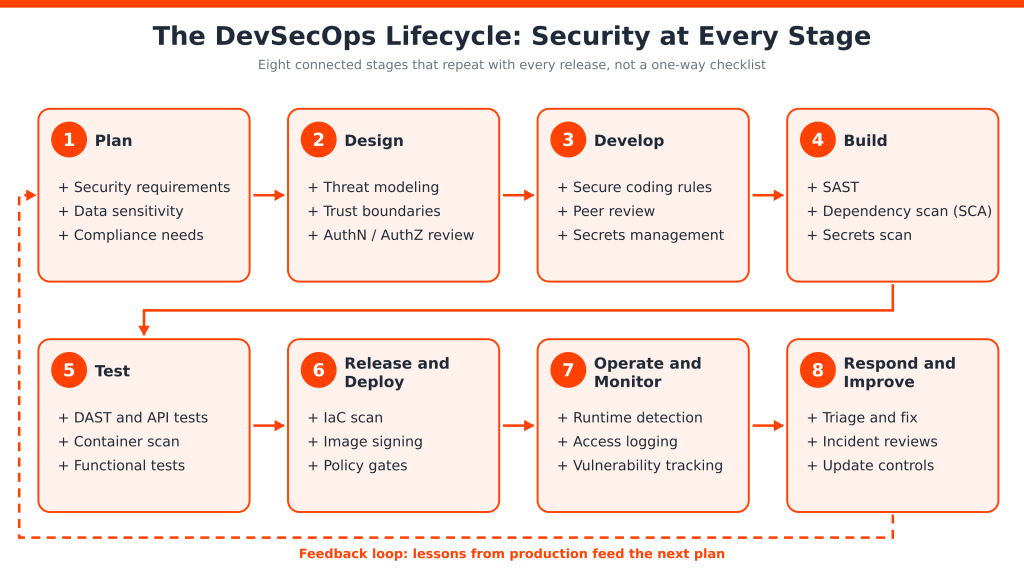
The lifecycle maps security activities onto each phase of software delivery. The stages are connected and often run in parallel, so treat it as a loop, not a one-way checklist.
-
Plan
Identify security requirements, business risks, data sensitivity, compliance needs, and likely threat scenarios. For example, a feature that stores payment details raises the bar for encryption and access control before anyone writes code.
-
Design
Review architecture, trust boundaries, authentication, authorization, and data flows. Threat modeling, a structured way of asking “what could go wrong here?”, belongs at this stage. A whiteboard session and a data-flow sketch often surface issues no scanner would.
-
Develop
Apply secure coding standards, peer review, secrets management, and lightweight developer-focused checks. Pre-commit hooks that block obvious secrets are a cheap, effective example.
-
Build
Run SAST, dependency scanning, secrets scanning, and other automated checks every time code is built, so results are consistent and traceable.
-
Test
Combine functional testing with DAST, API security testing, and container scanning in a realistic environment. Use test data and an isolated setup so scans cannot harm real systems.
-
Release and Deploy
Apply deployment policies, verify image integrity, validate configuration, and use controlled rollouts. Signed images and approval rules help ensure that what you built is what you ship.
-
Operate and Monitor
Watch runtime behavior, access patterns, infrastructure, and suspicious activity. Alerts should reach the people who can actually act on them.
-
Respond and Improve
Investigate findings, remediate vulnerabilities, review incidents, and update controls so the next cycle starts smarter. A blameless review of a missed vulnerability often reveals a missing check you can automate.
What Is a DevSecOps Pipeline?
A conventional CI/CD pipeline answers one question: does the code build and pass its tests? A DevSecOps pipeline adds a second: is it safe to ship? It does that by wiring security checks into the same automated flow, typically covering source control, build automation, unit and integration tests, SAST, secrets scanning, software composition analysis, container and artifact scanning, infrastructure as code scanning, DAST and API tests, policy gates, deployment, and runtime monitoring. Many teams express their gate rules as policy as code, so a rule such as “no critical vulnerabilities that have a known fix” is versioned, reviewed, and applied consistently.
Placement matters. Fast checks belong early, where developers still have context. Slower, deeper checks belong later, where they will not stall every commit. A common layout for a web application:
- On pull request: secrets scan, SAST, unit tests (minutes).
- On merge: dependency scan, build, container image scan, IaC scan.
- In staging: DAST and API security tests against a running copy.
- At deploy: policy checks and admission controls before production.
- After release: runtime monitoring and continuous vulnerability tracking.
DevSecOps Pipeline Diagram
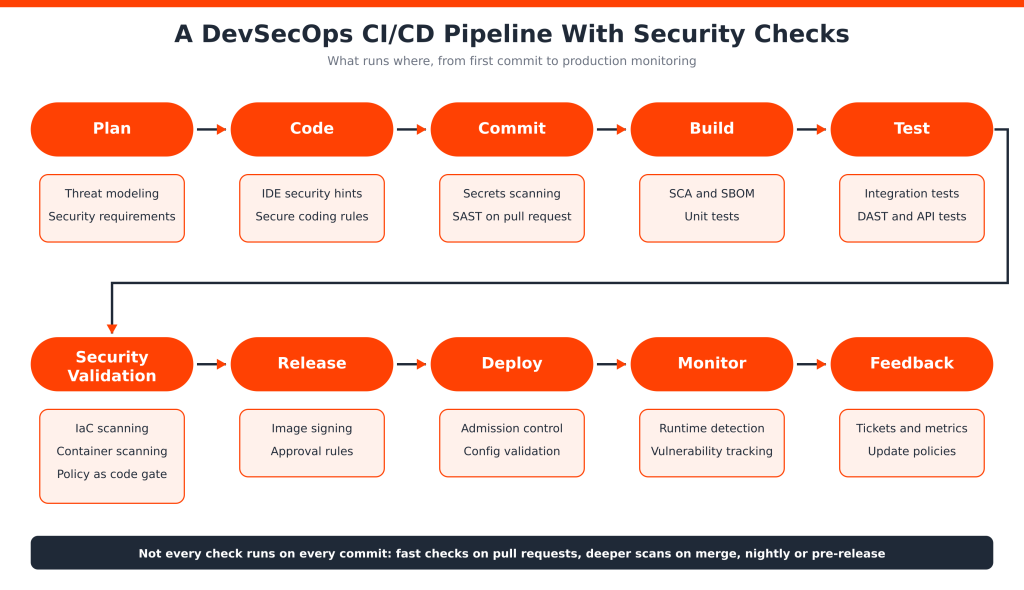
Read the diagram left to right, top to bottom. Threat modeling starts the flow at Plan. Secrets scanning and SAST guard the commit, SCA and tests run in the build, and DAST joins the test stage. The Security Validation stage is the decision point: IaC scanning, container scanning, and policy as code decide whether the artifact may continue. Release, deploy, and monitor follow, and findings loop back as feedback.
Your pipeline is also an attack surface. In March 2026, attackers compromised Aqua Security’s Trivy tooling. They repointed version tags of the trivy-action GitHub Action to malicious code that could harvest secrets from CI runners, and a backdoored Trivy release was published (Aqua advisory). Pipelines that referenced mutable tags instead of full commit SHAs were exposed. The lesson is not “avoid Trivy.” It is to pin actions to commit SHAs, limit pipeline permissions and secrets, and treat security tools like any other production dependency.
How to Automate DevSecOps Through CI/CD Pipelines
People often mix up four related terms, so let us separate them:
- Continuous integration (CI) merges and tests code frequently.
- Continuous delivery keeps every change in a releasable state, with a manual release decision.
- Continuous deployment releases every passing change automatically.
- DevSecOps automation is the layer of security checks and policies running inside any of those flows.
A simple automated workflow looks like this:
- A developer pushes code and a pull request opens.
- The CI pipeline starts.
- Unit tests and static analysis run.
- Dependencies and secrets are scanned.
- The build artifact is generated.
- Container and infrastructure checks run.
- DAST or other security tests run in a suitable environment.
- Policy checks decide whether the artifact can progress.
- The application is deployed.
- Monitoring continues after release.
Here is an illustrative GitHub Actions job for the pull request stage (tool installation steps omitted, and the commit SHA is a placeholder):
jobs:
pr-security-checks:
runs-on: ubuntu-latest
permissions:
contents: read
steps:
– uses: actions/checkout@<full-commit-sha>
– run: gitleaks dir .
– run: semgrep scan –config p/default –error
The devsecops automation tools you choose should plug into your existing CI system, and automation should be risk-based, not maximal. Running every scan on every commit slows developers and trains them to ignore results. Balance feedback speed, scan depth, and pipeline cost: quick checks on each pull request, deeper scans on merge or nightly, and full dynamic testing before release.
What Are the Main Types of DevSecOps Security Testing?
Each method finds a different class of problem. They complement each other and none replaces the rest.
| Method | What it examines | Typical stage | Typical findings |
| SAST | Source code, without running it | Commit, build | Insecure patterns, unsafe data handling, possible injection |
| DAST | A running application from outside | Test, staging | Misconfigurations, injection, authentication weaknesses |
| SCA | Third-party and open-source dependencies | Build | Known vulnerabilities, license and dependency risk |
| IAST | Application behavior during execution | Test | Vulnerabilities with code-level context |
| IaC scanning | Terraform, Kubernetes, CloudFormation files | Pull request, build | Public storage, open ports, excessive permissions |
| Secrets scanning | Repositories, history, artifacts | Pre-commit, pull request | Exposed API keys, tokens, passwords |
| Container scanning | Images and their packages | Build, registry | Outdated packages, risky image settings |
Static Application Security Testing (SAST)
SAST analyzes source code or related artifacts without running the application. It is fast and developer-friendly, but it can produce false positives and cannot see runtime behavior.
Dynamic Application Security Testing (DAST)
DAST tests a running application from the outside, the way an attacker would. It suits web applications and APIs, though findings can be harder to trace back to a line of code.
Software Composition Analysis (SCA)
SCA inventories your open-source and third-party dependencies and checks them for known vulnerabilities and license concerns. It is central to software supply chain security.
Interactive Application Security Testing (IAST)
IAST instruments the application and observes it while tests run, combining runtime visibility with code-level context. It needs agents and a decent test suite to be useful.
Infrastructure as Code Security Scanning
IaC scanners read Terraform, Kubernetes manifests, and CloudFormation templates and flag insecure settings before anything is provisioned.
Secrets Scanning
Secrets scanners look for credentials, tokens, and keys in code and Git history. A found secret should be revoked and rotated, not merely deleted.
Container and Image Security Scanning
Container scanners inspect image layers, operating system packages, application dependencies, and configuration for known risks.
Runtime Application and API Security
Runtime monitoring and API testing catch issues that code analysis misses, such as abuse of business logic or unexpected access patterns in production.
From Findings to Fixes: Managing Vulnerabilities
Finding issues is the easy part. Deciding what to fix first is harder. A workable triage routine asks four questions: How severe is it? Is it actually exploitable in our setup? Is the affected service exposed to the internet or to sensitive data? Is a fix or mitigation available? Scores such as CVSS give a starting point, but context should move a finding up or down the list. Then assign an owner, set a remediation target based on risk, and track the age of open items.
Hypothetical example. A scanner flags a critical remote code execution flaw in a library used by an internal reporting tool and a public API. The team confirms that only the public API loads the vulnerable code path, patches that service the same day, schedules the internal tool for the next sprint with a compensating control, and adds a pipeline rule so the vulnerable version cannot return.
Cloud-Native, API, and Infrastructure Security
Modern stacks need a few checks beyond application code. For containers, use minimal base images, scan them at build time and in the registry, and avoid running as root. For Kubernetes, validate manifests before deployment and use admission controls to reject workloads that break policy, such as privileged containers. For APIs, test authentication, authorization, and rate limiting, and keep an inventory of every endpoint, including old versions. For infrastructure, treat Terraform and cloud configuration as code that is reviewed and scanned, and watch for drift between what you declared and what is running.
DevSecOps Tools: Top Tools and Their Uses
The best way to understand devsecops tools is by function, not brand. Most teams assemble their devsecops software and pipeline tools from several categories rather than relying on one all-in-one devsecops platform. Here are representative options, with product names and licensing worth confirming before you buy.
| Category | Example tools | Where it fits | Main purpose |
| SAST | SonarQube, Semgrep, Checkmarx | Commit, pull request | Find insecure code patterns |
| DAST | OWASP ZAP, Burp Suite | Staging | Probe running apps and APIs |
| SCA | Snyk, Black Duck, Mend | Build | Flag risky dependencies |
| Secrets scanning | Gitleaks, TruffleHog | Pre-commit, pull request | Detect exposed credentials |
| IaC security | Checkov, KICS | Pull request, build | Catch insecure configurations |
| Container security | Trivy, Grype | Build, registry | Scan images and packages |
| CI/CD automation | Jenkins, GitHub Actions, GitLab CI/CD | Whole pipeline | Run builds, tests, and checks |
| Kubernetes security | Kubescape, admission controllers | Deploy, runtime | Assess configs and workloads |
| Cloud security | AWS Security Hub and equivalents | Operate | Posture and visibility |
A few selection notes by category:
- SAST: Semgrep is rule-based and quick to customize, while SonarQube blends code quality with security. Tune rules early or developers will tune you out.
- DAST: ZAP is open source and scriptable, and Burp Suite is a commercial favorite for deeper manual-assisted testing. Both need a realistic test environment.
- SCA: Compare vulnerability data quality, license checks, and fix suggestions. Black Duck and Snyk differ in depth and workflow.
- Secrets: Gitleaks is lightweight for repos and history, and TruffleHog can verify whether a detected secret is still live.
- IaC: Checkov offers a deep policy library. We left out Terrascan because Tenable archived it in November 2025.
- Containers: Trivy covers images, filesystems, and configuration, and Grype pairs well with Syft for SBOM-first workflows. Pin versions after the 2026 incident above.
- CI/CD, Kubernetes, and cloud: these platforms run and observe the checks. Prefer native integrations to reduce glue code.
No single tool delivers complete DevSecOps security. Choose by the risks you actually have, the languages and platforms you use, and how well results fit into developer workflows.
What Are DevSecOps Frameworks and Models?
These words get mixed up, so here is a working distinction. A framework is a structured set of recommended practices. A methodology is how a team chooses to work. A model describes stages or maturity. A tool is software that performs a task. Most of what follows are not DevSecOps frameworks in a narrow sense. They are standards and models that give your DevSecOps practice structure.
NIST Secure Software Development Framework (SSDF)
The SSDF (NIST SP 800-218) is a core set of high-level secure development practices that can be integrated into any software development lifecycle. Version 1.1 is the current final release, and NIST published an initial public draft of version 1.2 in December 2025.
OWASP SAMM
The Software Assurance Maturity Model is an open, prescriptive model. Version 2 defines five business functions and fifteen security practices, which you can use to assess where you stand and plan improvements.
BSIMM
The Building Security In Maturity Model is descriptive. It reports what real organizations actually do. The BSIMM16 report, published in January 2026, analyzed 111 organizations, which makes it useful for benchmarking.
CIS Benchmarks
CIS Benchmarks provide secure configuration guidance for operating systems, cloud platforms, containers, and other technologies. They complement your IaC and Kubernetes scanning.
Organization-Specific DevSecOps Frameworks
Most mature teams combine security policies, engineering processes, automation, governance, and tooling into their own approach, informed by the standards above. MITRE ATT&CK can sharpen threat modeling and detection, and ISO/IEC 27001 supports broader information security management, though neither is a development framework.
A simple way to choose: use the SSDF for a common language with customers and regulators, SAMM to assess and plan, BSIMM to benchmark against peers, and CIS Benchmarks for configuration baselines.
DevSecOps Maturity Model: How to Measure Progress
A maturity model helps you describe where you are and what to improve next. The five levels below are an illustrative model, not a universal industry standard. For formal assessment, look at OWASP SAMM or BSIMM.
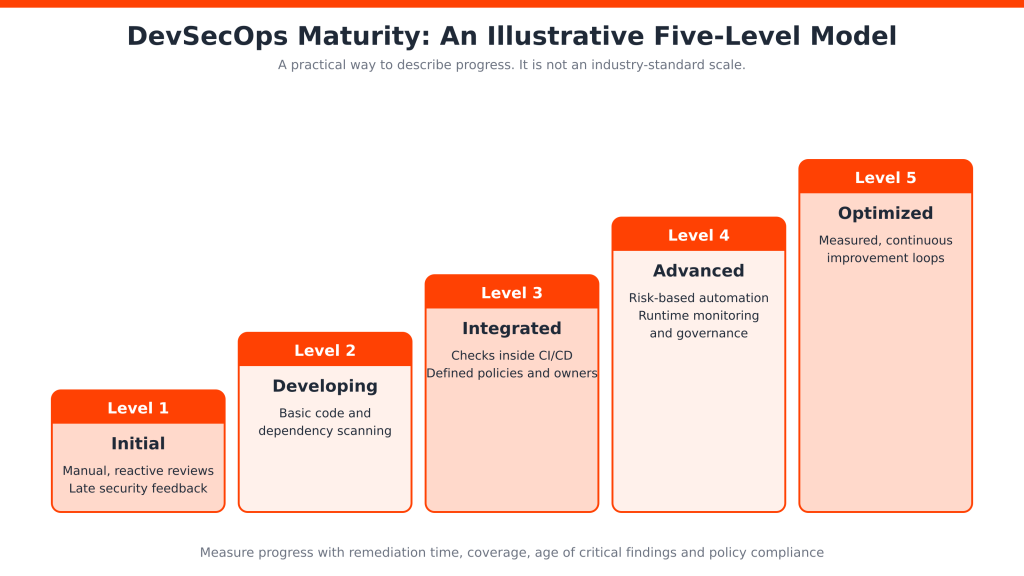
| Level | Description | Typical capabilities |
| Level 1: Initial | Security is mostly manual and reactive | Separate reviews, limited automation |
| Level 2: Developing | Basic checks are introduced | Code scanning and dependency checks |
| Level 3: Integrated | Checks run inside CI/CD | Automated testing and defined policies |
| Level 4: Advanced | Security spans teams and environments | Risk-based automation, monitoring, governance |
| Level 5: Optimized | Continuous measurement and improvement | Mature feedback loops, measurable practices |
Measure progress with signals you can actually observe:
- Security coverage across repositories and pipelines
- Time to remediate vulnerabilities
- Age of unresolved critical findings
- Security testing frequency
- Pipeline security failures
- Dependency risk management
- Incident response effectiveness
- Policy compliance
Avoid invented scores. A trend line on remediation time tells you more than a number you made up.
DevSecOps Culture, Roles, and Responsibilities
A successful devsecops culture needs more than tools, and DevOps and security teams need a shared language. Responsibilities usually split like this:
- Developers: write secure code, fix findings in their own services, and review each other’s changes.
- DevOps and platform engineers: build secure pipelines, base images, and defaults.
- Security engineers: set policy, tune tools, and advise on design and incidents.
- QA and testing: extend test suites to cover abuse cases and security regressions.
- Engineering leadership: protect time for remediation and back clear ownership.
Add training and knowledge sharing, and make sure every finding has an owner. Unowned vulnerabilities are the ones that age quietly.
What Does a DevSecOps Engineer Do?
A DevSecOps engineer integrates security tools into CI/CD, automates checks, supports secure cloud and infrastructure configuration, manages policies, monitors vulnerabilities, works with developers to resolve findings, and improves security visibility. Exact duties vary by organization and team structure. Some companies use the title for a platform-leaning role, others for an application security specialist who writes pipeline code.
Benefits of DevSecOps
- Earlier vulnerability detection and faster security feedback
- Better visibility into software supply chain risk
- Closer coordination between development, operations, and security
- More consistent testing and fewer manual bottlenecks
- Alignment between delivery speed and security requirements
- Stronger governance and traceability
- More informed release decisions
- Continuous security improvement over time
To be clear, DevSecOps improves your odds. It does not guarantee a vulnerability-free application, and any claim of exact percentage savings should be treated with suspicion unless the source is clear.
Common DevSecOps Challenges and How to Overcome Them
| Challenge | Realistic mitigation |
| Resistance to cultural change | Start with one team, show quick wins, and share the results. |
| Limited security knowledge among developers | Offer short, role-specific training and security champions. |
| Toolchain complexity | Consolidate where possible and add tools gradually. |
| False positives and alert fatigue | Tune rules, suppress known noise, and block only on high-confidence findings. |
| Slow scans | Scan changed code on pull requests and run full scans nightly. |
| Legacy applications | Begin with SCA, secrets scanning, and runtime monitoring. |
| Hard-to-integrate CI/CD systems | Use native plugins or a thin wrapper, and standardize outputs. |
| Unclear vulnerability ownership | Assign each service an owner and a remediation target. |
| Poorly defined policies | Write risk-based gates and review them quarterly. |
| Speed versus control | Measure outcomes such as remediation time, not tool counts. |
Pick the two or three challenges that hurt most and fix those first. Trying to solve all ten at once is itself a common failure mode.
DevSecOps Best Practices for 2026
These devsecops best practices focus on what teams should actually do:
- Plan for security early. Add a short security section to every design review.
- Shift left without ignoring runtime. Pair pre-release scanning with production monitoring.
- Automate the right checks. Fit each into the stage where it gives the fastest useful signal.
- Set secure coding standards. Reference the OWASP guidance your team already knows.
- Scan dependencies regularly. New vulnerabilities appear in old packages.
- Use a secrets manager. Never store credentials in code or CI variables you cannot rotate.
- Scan infrastructure as code. Review Terraform and manifests like application code.
- Harden containers and Kubernetes. Use minimal base images and apply CIS guidance.
- Prioritize by real risk. Weigh exploitability and exposure alongside severity scores.
- Define practical gates. Block on critical, exploitable issues and warn on the rest.
- Assign finding owners. Every issue needs a name and a date.
- Monitor production continuously. Alert on behavior, not just known signatures.
- Review controls regularly. Architectures and threats change.
- Train everyone. Include operations and QA, not just developers.
- Measure and improve. Track a handful of metrics and review them monthly.
How to Implement DevSecOps in an Organization: Step-by-Step Guide
Step 1: Assess the Existing Process
Review workflows, security reviews, infrastructure, known vulnerabilities, and CI/CD systems to find the biggest gaps.
Step 2: Define Security Objectives and Requirements
Identify sensitive data, application risks, compliance requirements, and business priorities.
Step 3: Select a Suitable DevSecOps Strategy
Choose a mix of frameworks, tools, automation, and practices that fits your stack and team size. A small team may start with two or three tools and one framework for guidance.
Step 4: Integrate Security Into CI/CD
Introduce code scanning, dependency checks, secrets detection, and policies in that order, starting in warning mode.
Step 5: Establish Team Responsibilities
Define who owns findings, fixes, approvals, monitoring, and improvements. If engineering capacity is the bottleneck, adding dedicated developers can free internal engineers to work on remediation and pipeline hardening.
Step 6: Monitor and Measure Performance
Track vulnerabilities, remediation time, pipeline reliability, and security coverage.
Step 7: Improve Continuously
Use feedback, audits, incidents, and changing risks to refine the program.
Hypothetical example. A team with an existing web app pipeline starts by adding secrets scanning and dependency scanning in warning mode for two weeks. After tuning out noise, they make critical dependency findings block merges, add image scanning next, and finish by introducing DAST in staging. Each addition was small, so developers did not experience a sudden slowdown.
DevSecOps Services, Consulting, and Managed Solutions
DevSecOps services generally help organizations design, build, or run secure delivery practices, and packaged devsecops solutions range from one-off audits to fully managed pipelines. DevSecOps consulting usually means assessment, roadmap, and tool selection. DevSecOps as a service and managed DevSecOps services hand part or all of the operation, such as pipeline monitoring and vulnerability triage, to an external team. Typical service areas include CI/CD security integration, application security assessment, cloud and container security, security automation, vulnerability management, infrastructure security, monitoring, and process improvement.
Internal implementation can be the better choice when you have experienced engineers and a manageable scope, since the knowledge stays in-house. External specialists help when you lack time or niche expertise. Some teams also need extra engineers to build the features while their core staff handles security work, which is where a staffing partner HireDeveloper.dev can fit.
When comparing devsecops companies or providers, check scope against your real requirements, their experience with your stack, how they hand over knowledge, and how they report outcomes. Provider offerings vary widely, so ask for specifics.
DevSecOps vs SecDevOps vs CI/CD
Three terms, three different things. DevSecOps integrates security into development and operations workflows. SecDevOps is sometimes used to emphasize security coming first, but usage varies and most teams treat it as a variant of the same idea, not a separate methodology. CI/CD describes automated integration and delivery workflows. DevSecOps often uses CI/CD pipelines to automate security practices, yet CI/CD alone is not a security methodology. A pipeline with no security checks is still just a pipeline.
Conclusion
DevSecOps is the practice of making security part of how software is planned, built, shipped, and run. CI/CD automation keeps checks consistent and fast, while culture, frameworks, and clear ownership make them stick. Tools alone will not get you there, and neither will good intentions. The teams that succeed adopt it progressively, start with the highest-risk gaps, and measure whether things improve. Remember, too, that the pipeline itself needs protecting.
Planning to strengthen your software team?
If your organization is planning to strengthen its software development capabilities, explore how HireDeveloper.dev can support your technology team with dedicated developers and engineering expertise, or talk to us about your requirements.
Related Sources