






Why Cloud Computing Services Matter in 2026-2027
A few years ago, moving to the cloud was a bold project for early adopters. Today most businesses already run something on cloud computing services, and the questions have changed. Which provider fits our workloads? What will the bill look like in year two? How do we keep security and spending under control once every team can launch resources on its own?
Cloud services now sit behind online stores, SaaS products, analytics dashboards and AI features. Amazon Web Services (AWS), Microsoft Azure and Google Cloud are the three largest platforms, and each has real strengths. None is the right answer for everyone.
$167.7B Estimated worldwide spending on cloud infrastructure services in Q3 2026, up 55% from a year earlier, according to Synergy Research Group’s October 2026 release. It covers IaaS, PaaS and hosted private cloud.
This guide moves in the order a decision actually happens: how cloud works, service and deployment models, what each provider offers, how they compare on features, price, security and AI, and then how to choose, migrate and govern. Product names are checked against current provider documentation as of November 2026, and several have changed this year.
What Are Cloud Computing Services and How Do They Work?
Cloud computing services are on-demand IT resources, such as computing power, storage, databases, networking and software, delivered over the internet by a provider and billed by usage. NIST’s definition adds that resources are pooled, scale quickly and are measured.
Instead of buying servers and housing them yourself, you use a provider’s data centers through a web console, command line or API. Capacity is provisioned in minutes, shared across many customers through virtualization, and measured so that you pay for what you consume. This is why cloud suits both a startup that needs one server today and an enterprise that needs thousands next quarter.
Every cloud infrastructure, the answer to “what is cloud infrastructure,” is built from the same parts:
- Compute: virtual machines, containers and functions that run code.
- Storage: object, block and file storage for data.
- Networking: virtual networks, load balancers and content delivery.
- Databases: managed relational and NoSQL services.
- Virtualization and containers: the layer that divides hardware into isolated resources.
- Identity and access management: who can do what.
- Monitoring and management tools: logs, metrics and alerts.
Here is a simple example. A web store runs its site on virtual machines, keeps product images in object storage, stores orders in a managed database, and serves visitors through a content delivery network. When a sale starts, more servers are added automatically. When it ends, they are removed.
Cloud computing vs traditional hosting: hosting usually means renting fixed servers on a contract. Cloud adds self-service provisioning, elastic scaling, a wide catalog of managed services and metered billing, so you change capacity without renegotiating.
Types of Cloud Computing Services: IaaS, PaaS, SaaS and Serverless
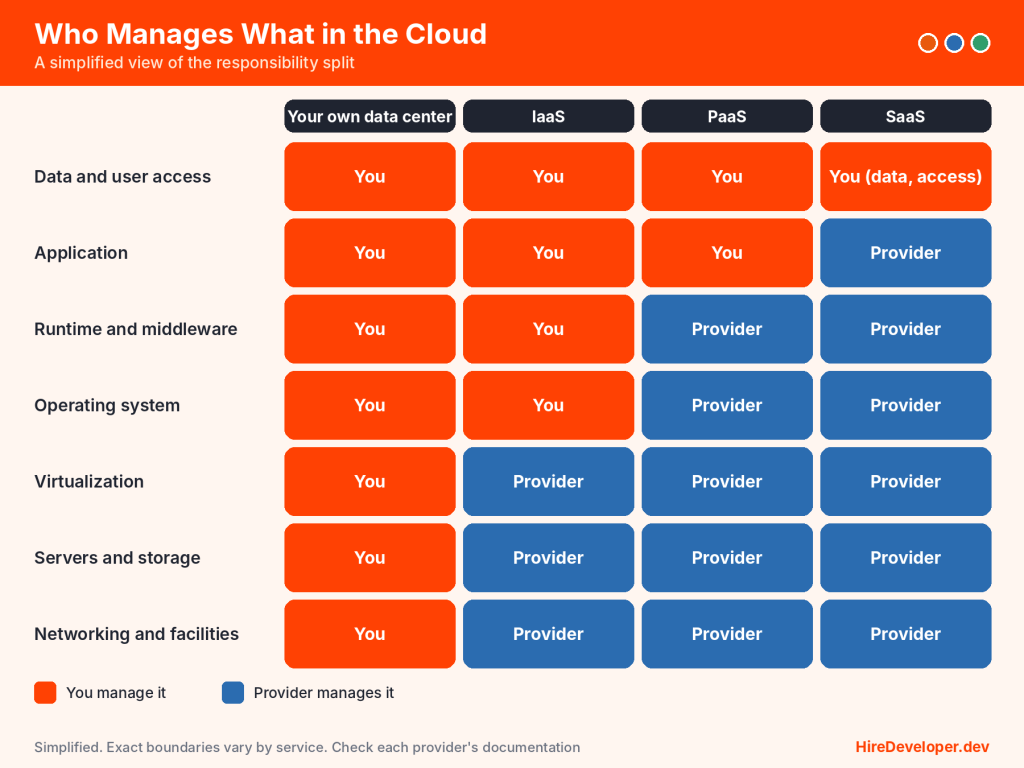
The three main cloud computing service models differ in how much of the stack you manage. Service models describe what is delivered. They are not the same as deployment models, which come next.
IaaS (infrastructure as a service) gives you virtual machines, storage and networks. You manage the operating system and everything above it. Examples include Amazon EC2, Azure Virtual Machines and Google Compute Engine. It suits lift-and-shift migrations and workloads that need control.
PaaS (platform as a service) provides a managed runtime so you deploy code without managing servers. Examples include AWS Elastic Beanstalk, Azure App Service and Google App Engine. Check lifecycle details: Elastic Beanstalk remains supported but retires platform branches on a published schedule, and many new Google Cloud projects choose Cloud Run instead of App Engine.
SaaS (software as a service) is a ready-to-use application, such as Microsoft 365 or Salesforce, managed by the vendor. It is a delivery model for finished software, not a label for any app that happens to be online.
FaaS and serverless run event-driven functions: AWS Lambda, Azure Functions and Cloud Run functions. Serverless does not mean there are no servers. It means you do not manage them. Watch for cold starts, execution limits and per-invocation billing.
Containers and Kubernetes package applications so they run consistently. Kubernetes orchestrates containers, and managed services include Amazon EKS, Azure Kubernetes Service (AKS) and Google Kubernetes Engine (GKE). Choose containers when you need portability and fine control, virtual machines for legacy software, and serverless for spiky, event-driven work.
| Responsibility | IaaS | PaaS | SaaS |
| Physical infrastructure | Provider | Provider | Provider |
| Networking infrastructure | Provider | Provider | Provider |
| Operating system | Usually customer | Provider | Provider |
| Runtime and middleware | Customer | Provider | Provider |
| Application | Customer | Customer | Provider |
| Application data and user access | Customer | Customer | Customer |
This table is a simplification. Exact boundaries vary by service, so check the provider’s own shared responsibility documentation.
Cloud Deployment Models: Public, Private, Hybrid and Multi-Cloud
Deployment models describe where infrastructure runs and who controls it. Public cloud uses provider-operated infrastructure shared by many customers, with logical isolation between them. Private cloud is a dedicated environment, on premises or hosted, with more control and more operational responsibility. Hybrid cloud connects on-premises systems with public or private cloud, often for gradual migration or data that must stay local. Multi-cloud uses more than one cloud provider.
Hybrid and multi-cloud are not the same. Hybrid is about connecting different kinds of environments. Multi-cloud is about using several providers, and it is often the result of acquisitions or team choices rather than a plan. In the 2026 Flexera State of the Cloud report, based on a survey of more than 750 cloud decision-makers, 73% of respondents used hybrid cloud.
| Deployment model | Main characteristics | Advantages | Considerations |
| Public cloud | Provider-operated shared infrastructure | Elasticity and managed services | Cost governance and configuration |
| Private cloud | Dedicated cloud environment | Greater control | Infrastructure and operational responsibility |
| Hybrid cloud | Connected on-premises and cloud systems | Flexibility and gradual migration | Integration and governance complexity |
| Multi-cloud | Multiple cloud providers | Workload flexibility and provider choice | More complex operations and skills |
AWS vs Microsoft Azure vs Google Cloud: Platform Overview
Synergy Research Group puts Q3 2026 worldwide cloud infrastructure share at 26% for Amazon, 19% for Microsoft and 16% for Google, compared with 29%, 20% and 13% a year earlier. Share shows scale and momentum. It does not tell you which platform fits your workload.
Amazon Web Services (AWS) has the broadest catalog and a mature ecosystem. Core services include EC2 for compute, S3 for object storage, RDS and DynamoDB for databases, Lambda for serverless, EKS for Kubernetes, CloudFront for content delivery and CloudWatch for monitoring. For AI, Amazon Bedrock offers hosted foundation models and agents, and Amazon SageMaker AI supports custom model work. AWS is often evaluated for varied workloads, cloud-native applications and teams that want a deep partner ecosystem.
Microsoft Azure is Microsoft’s cloud, and the main Microsoft cloud computing services option for organizations built around Windows Server, SQL Server, Microsoft 365 and Dynamics 365. Core services include Azure Virtual Machines, Blob Storage, Azure SQL Database, Azure Functions, AKS and Azure Monitor, with Microsoft Entra ID for identity. Its AI platform is now called Microsoft Foundry, formerly Azure AI Foundry. Azure is strong for hybrid scenarios and Microsoft integration, though not every Microsoft shop must choose it. If your team works with .NET, Microsoft developers can help build and integrate.
Google Cloud is known among Google cloud computing services for data analytics, Kubernetes and AI. Core services include Compute Engine, Cloud Storage, Cloud SQL, BigQuery, GKE, Cloud Run and Cloud Monitoring. Its AI platform, formerly Vertex AI, was renamed Gemini Enterprise Agent Platform in April 2026. It is often evaluated for data-heavy workloads, container-first teams and AI projects.
| Evaluation area | AWS | Microsoft Azure | Google Cloud |
| General positioning | Broad service ecosystem | Enterprise and Microsoft integration | Data, analytics, Kubernetes and AI |
| Compute | EC2 | Azure Virtual Machines | Compute Engine |
| Object storage | S3 | Blob Storage | Cloud Storage |
| Managed Kubernetes | EKS | AKS | GKE |
| Serverless | Lambda | Azure Functions | Cloud Run functions |
| Analytics | Redshift and others | Microsoft Fabric and Azure analytics | BigQuery |
| AI platform | Bedrock and SageMaker AI | Microsoft Foundry | Gemini Enterprise Agent Platform |
AWS vs Azure vs Google Cloud: Detailed Feature Comparison
Product lists look similar, so compare how each provider approaches the requirement. The notes below are starting points for evaluation, not rankings.
| Capability | AWS | Azure | Google Cloud |
| Compute | Very wide choice of instance types, including its own Arm-based Graviton chips | Licensing benefits for existing Windows Server and SQL Server | Flexible machine sizing and strong container focus |
| Storage | Mature S3 ecosystem and storage tiers | Blob tiers integrated with Microsoft data tools | Unified Cloud Storage classes |
| Databases | Many purpose-built engines, including Aurora and DynamoDB | Azure SQL Database and Cosmos DB | Spanner, AlloyDB and Bigtable alongside Cloud SQL |
| Networking and CDN | CloudFront, with deep VPC options | Front Door and strong hybrid networking | Global load balancing and Cloud CDN |
| AI and ML | Bedrock model access, SageMaker AI and custom Trainium chips | Microsoft Foundry, with Microsoft and OpenAI models | Gemini models, Model Garden and TPUs |
| Analytics | Redshift, Athena and a broad data toolset | Microsoft Fabric and wider Azure data services | BigQuery serverless warehouse |
| Kubernetes | EKS with AWS integrations | AKS with Entra and Azure integrations | GKE, from the team behind Kubernetes |
| Serverless | Lambda and Fargate | Functions and Container Apps | Cloud Run and Cloud Run functions |
| DevOps | CodePipeline and CodeBuild | Azure DevOps and GitHub integration | Cloud Build and Cloud Deploy |
| Security and identity | IAM, GuardDuty, Security Hub | Entra ID and Defender for Cloud | Cloud IAM and Security Command Center |
| Hybrid and multi-cloud | Outposts and hybrid networking | Azure Arc and Azure Local | Google Distributed Cloud |
| Global footprint | Publishes its region list | Publishes its region list | Publishes its region list |
Before choosing, test what matters to you: how a service behaves in your target regions, how your team operates it, and what it costs at your usage. Real performance depends on region, configuration, workload, network design and architecture, so no provider can be declared fastest, safest or most available for every case.
Two practical examples show how to read the table. If your product depends on a relational database, ask what failover, backup and scaling options each managed engine offers, and how your team will tune it. If you plan AI features, ask which models you can reach, whether your data stays in your chosen region, and how inference is billed. The answers matter more than the number of services on a product page.
Cloud Computing Services Pricing: AWS vs Azure vs Google Cloud
Cloud pricing is not one number. It is a set of meters, and the mix decides your bill. Compare providers only with the same workload, region, configuration and usage assumptions, and no provider is universally cheaper.
Pricing models include pay-as-you-go, reserved capacity and commitment discounts (AWS Savings Plans and Reserved Instances, Azure Reservations and savings plans, Google committed use discounts), spot or preemptible compute for interruptible work, subscriptions, and consumption-based managed services.
Major cost components include compute, storage, database usage, network transfer and data egress, load balancers, backups and snapshots, monitoring and logging, managed Kubernetes, premium support, and AI model and inference usage.
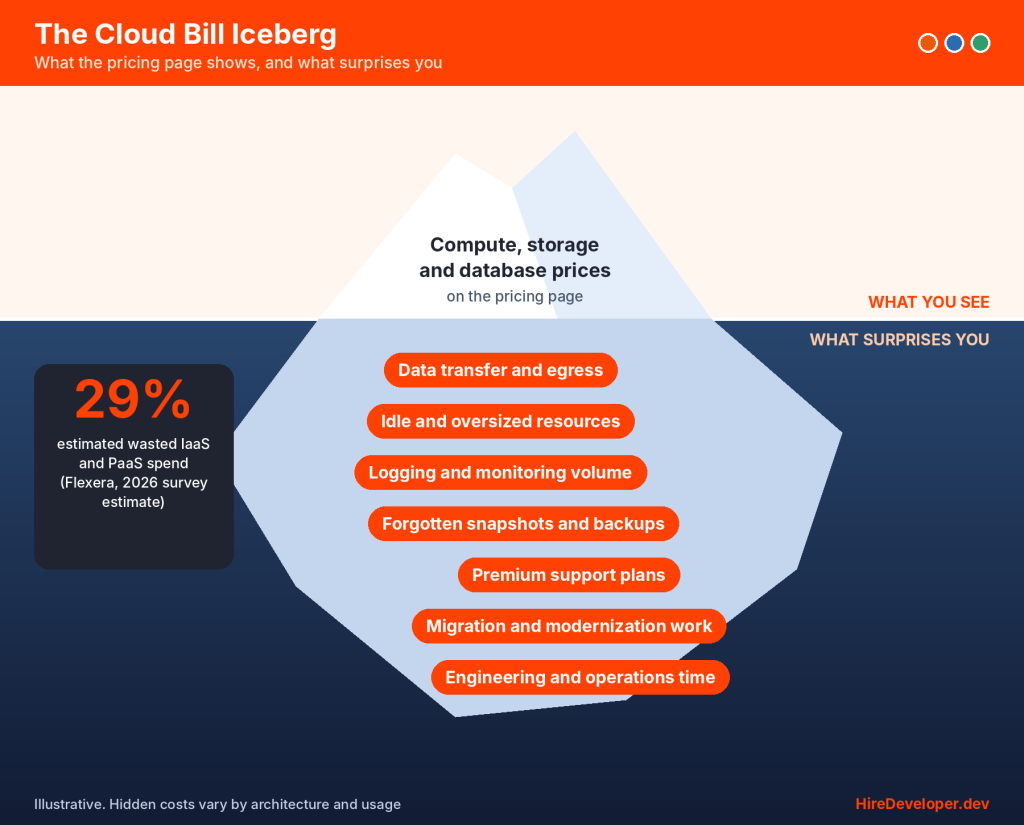
Hidden costs usually come from habits, not price lists: oversized or idle virtual machines, data moving between regions, excessive logging, long storage retention, over-provisioned databases, forgotten snapshots, always-on development environments and poorly tuned autoscaling. Egress deserves special attention. Moving data out of a cloud or between regions is metered, so architecture choices change cost. The three providers have also announced programs that waive transfer charges for customers leaving entirely, subject to conditions, so read the current terms.
29% Estimated wasted spend on IaaS and PaaS in Flexera’s 2026 State of the Cloud report, up from 27% the year before. It is a self-reported estimate from survey respondents, not a measured fact for every company.
CLOUD TCO FORMULA
Cloud TCO = Infrastructure + Storage + Networking + Managed Services + Migration + Security + Operations + Support + Maintenance
Calculate TCO over a defined period, such as three years, using realistic usage. Include monthly infrastructure charges, annual commitments, migration and modernization work, data transfer, staffing, backup and disaster recovery, support plans, and training. Commitments lower unit prices but create obligations, so commit only to steady usage you understand. Use the official calculators for AWS, Azure and Google Cloud, and record region, configuration, assumptions, currency and date for every estimate.
Cloud Security, Compliance and Data Protection
Cloud providers secure the infrastructure. You secure what you build and store on it. This is the shared responsibility model, documented by AWS, Azure and Google Cloud. The providers secure facilities, hardware and the core services. Customers remain responsible for identities, configuration, applications, data and workloads, and the split shifts with the service model. Google describes its approach as shared fate, offering more guidance and secure defaults, but the customer still owns its data and access decisions.
Whichever platform you choose, cloud computing security services start with the same essential controls:
- Identity and access management with least privilege and multi-factor authentication.
- Encryption at rest and in transit, with managed key services.
- Network segmentation and private connectivity.
- Secrets management and secure backups.
- Threat detection, logging and monitoring.
- Vulnerability management and data classification.
- A tested security incident response plan.
Misconfiguration, such as an open storage bucket or an over-permissive role, is a leading cause of cloud incidents, so review configurations continuously rather than once.
Compliance covers regulatory and industry requirements, data residency, auditability, governance policies, compliance evidence and regular access reviews. Standards such as ISO 27001, SOC 2 and GDPR are common reference points, alongside industry rules in healthcare and finance. Providers publish certifications for their infrastructure, but using a certified provider does not make your organization compliant. Compliance depends on how you configure services, handle data, write contracts and run internal controls. Data residency deserves an early decision: choose regions deliberately, understand where backups and logs are stored, and keep evidence that auditors can review. Add periodic access reviews so permissions do not drift as people change roles.
AI, Automation and Emerging Cloud Technologies in 2026-2027
AI workloads are changing how teams use the cloud. It helps to separate four activities: developing models, training them on GPU or custom accelerator infrastructure, hosting them, and running inference, which is the cost incurred each time a model answers. Retrieval-augmented generation (RAG) connects a model to your own data at query time.
The managed AI platforms are Amazon Bedrock (with AgentCore for agents) and SageMaker AI on AWS, Microsoft Foundry on Azure, and the Gemini Enterprise Agent Platform on Google Cloud. Two of the three names changed in 2026, so older articles may describe them as Azure AI Foundry and Vertex AI. All three offer models from several vendors, so compare model availability, GPU access, data controls and inference pricing for your use case. Inference cost can grow quickly with usage, so set budgets and rate limits before launch rather than after the first surprising invoice. If you plan AI features, you can hire AI developers to work with the platform of your choice.
Automation is already mainstream. Infrastructure as Code builds environments from version-controlled templates. CI/CD pipelines deploy changes safely, policy automation enforces rules, and autoscaling matches capacity to demand. These practices cut manual errors and make cloud environments reproducible.
Established and still emerging: serverless, containers and Kubernetes, and event-driven architecture are established. AI-assisted cloud operations, agent platforms and edge computing are growing but still maturing. Treat them as options to test, not as guarantees.
Cloud Computing Services for Different Business Needs
- Startups: low upfront investment, fast provisioning, managed databases and serverless options let small teams launch quickly. Cost visibility from day one prevents surprises.
- SaaS companies: need multi-tenant architecture, database scalability, API infrastructure, CI/CD, monitoring and disaster recovery.
- Large enterprises: need hybrid infrastructure, identity integration, governance, compliance, legacy modernization and multi-region requirements.
- E-commerce: variable traffic, inventory and order management, payment integration, content delivery and seasonal scaling.
- AI and data-driven businesses: need data pipelines, analytics, storage and compute for training and inference, and strong data governance.
- Remote and distributed teams: need secure application access, centralized identity, cloud-hosted development environments and distributed deployment.
In each case, start from the workload. A seasonal retailer cares about autoscaling and caching. A regulated enterprise cares about identity, audit trails and data residency. The provider decision follows from those needs. A media company moving large files cares about storage tiers and delivery costs, while a fintech startup cares about audit logging and encryption controls. Matching requirements to capabilities early prevents expensive redesigns later.
AWS vs Azure vs Google Cloud: Which Is Best for Your Business?
The honest answer is that it depends on the workload. Here are the platforms commonly evaluated first: AWS for broad needs, a mature ecosystem and organizations with existing AWS skills. Azure for Microsoft-oriented enterprises and hybrid infrastructure. Google Cloud for data analytics, Kubernetes-oriented platforms and AI projects. For application modernization, all three offer strong paths, so team expertise often decides.
| Business requirement | Platforms to evaluate | Important considerations |
| Startup launching a SaaS product | AWS, Azure, Google Cloud | Cost, development speed, scalability |
| Microsoft-oriented enterprise | Azure, AWS | Existing Microsoft investments and integrations |
| Data analytics-heavy workloads | Google Cloud, AWS, Azure | Data architecture, tools, integration |
| Kubernetes-oriented platform | AWS, Azure, Google Cloud | Team expertise and cluster operations |
| AI application development | All three | Model availability, GPU access, inference cost |
| Hybrid infrastructure | AWS, Azure, Google Cloud | Existing infrastructure and connectivity |
| Global application deployment | All three | Region availability, latency, resilience |
Why might a provider suit a workload? Usually because of what already exists around it: identity systems, data platforms, licenses, team skills or a partner ecosystem you trust. Before committing, verify service availability in your regions, run a small proof of concept, and compare the cost of your actual workload. Treat the table as a starting point, not a ranking. The three scenarios below are hypothetical examples, not customer case studies.
| Startup SaaS | Microsoft-based enterprise | AI and analytics platform | |
| Needs | Fast launch, managed database, scalable API, cost control, CI/CD | Microsoft systems, enterprise identity, hybrid infrastructure, governance | Data ingestion, storage, analytics, model training, inference, governance |
| AWS could offer | ECS or Lambda, RDS, CodePipeline | Directory integration and hybrid networking for parts of the estate | S3, Glue, Redshift, SageMaker AI, Bedrock |
| Azure could offer | App Service, Azure SQL Database, Azure DevOps | Entra ID, Azure Arc, Windows and SQL Server workloads | Fabric, Azure ML, Microsoft Foundry |
| Google Cloud could offer | Cloud Run, Cloud SQL, Cloud Build | Selected workloads and analytics alongside Microsoft systems | BigQuery, Dataflow, Gemini Enterprise Agent Platform |
Cloud Architecture: How to Design Infrastructure for Business Applications
Good architecture follows the application, not the other way around. A typical business application has these layers:
Users → DNS / CDN → Load balancer → Application services → Database / Cache / Object storage → Monitoring and security
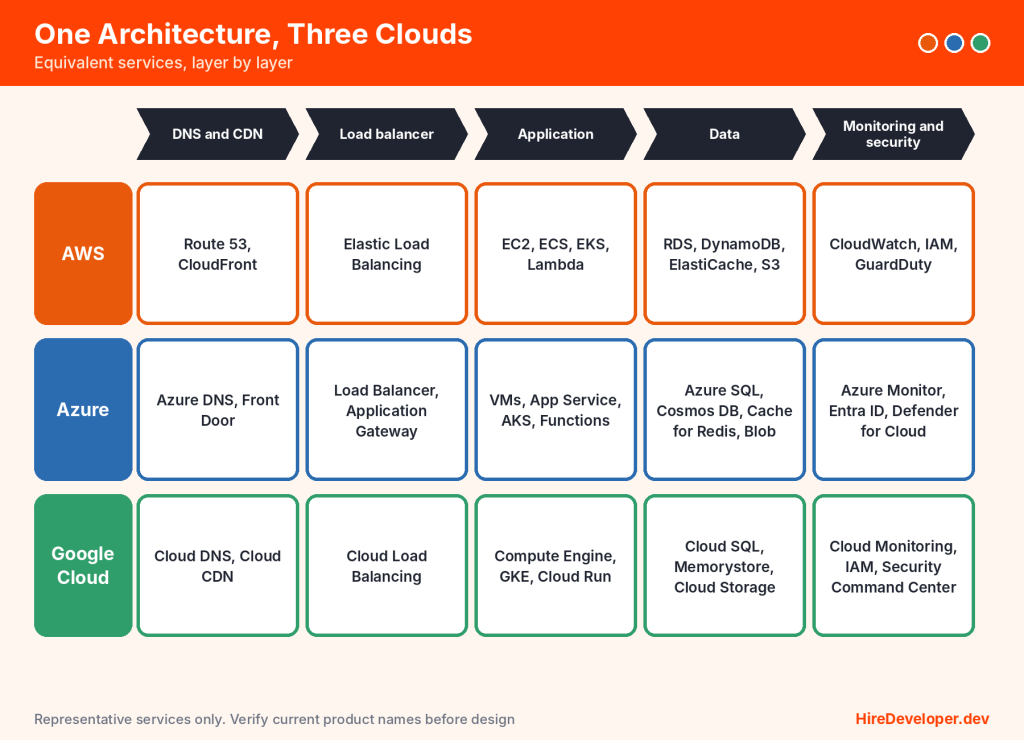
The CDN speeds delivery and absorbs traffic. The load balancer spreads requests across healthy instances. Application services run your code. The data layer stores records, caches hot data and keeps files. Monitoring and security watch everything and control access.
Pattern 1, a startup SaaS app: one region, two availability zones, a managed database with automated backups, a container or serverless app tier, and a pipeline that deploys from code. Pattern 2, a growing enterprise app: separate services for busy components, read replicas and caching, queues between services, a tested disaster recovery plan and, if justified, a second region.
Multi-zone deployment gives high availability inside a region. Fault isolation keeps one failing component from taking down everything. No design guarantees zero downtime, and most businesses do not need microservices, Kubernetes or multi-region on day one. Add complexity when a requirement demands it. Start with the simplest architecture that meets your availability and recovery targets, document why each component exists, and review the design as traffic and requirements grow. If your backend is JavaScript, you can hire Node.js developers to build the application layer.
Cloud Migration and Implementation Strategy
54% Share of respondents in Flexera’s 2026 report who named understanding application dependencies as a top cloud migration challenge, the most common answer in that survey question.
- Assess infrastructure. Inventory applications, databases, dependencies, performance needs, compliance duties and current costs.
- Select the provider. Weigh requirements, technical fit, pricing, existing skills, security and compliance.
- Choose a migration strategy for each workload (see below).
- Set up the environment. Networking, identity and access, compute, storage, database provisioning and security controls.
- Migrate and test. Move applications and databases, validate data, run performance and security tests, and plan the cutover with a rollback path.
- Optimize after migration. Monitoring, cost, performance, backup and recovery, and governance.
The classic framework has six Rs. AWS’s current migration guidance lists seven by adding Relocate, so you may see both.
| Strategy | Use it when |
| Retire | An application is unused or duplicated |
| Retain | Compliance, cost or recent investment makes moving premature |
| Rehost | You need to move quickly with minimal change (lift and shift) |
| Replatform | Small changes, such as a managed database, remove operations work |
| Repurchase | A SaaS product replaces a commodity application |
| Refactor | An application needs cloud-native scale and agility, and the budget allows |
| Relocate | You move virtualized platforms as they are, with little application change |
Do not refactor everything during migration. Common challenges are hidden dependencies, data volume, downtime windows and skills gaps. Reduce risk with pilot migrations, rehearsed cutovers and clear owners. For AWS-specific planning, see our guide to AWS cloud consulting services.
■ Cloud adoption readiness checklist
- Current applications are assessed for cloud compatibility.
- Data dependencies are understood.
- Security and compliance requirements are documented.
- The migration budget is defined.
- The business has cloud engineering expertise.
- A disaster recovery plan exists.
- Monitoring and cost governance are defined.
- Application owners are involved in planning.
Managed Cloud Computing Services and Cloud Operations
Managed cloud computing services mean a provider or partner runs part of your cloud environment for you. That can include infrastructure management, monitoring and alerting, backup and recovery, security configuration, patching, performance tuning, cost management, incident response, governance and maintenance.
Know the difference between the options. Self-managed means your team runs everything. Managed services hand over daily operations. Cloud consulting and advisory helps you plan and decide. Implementation services build or migrate the environment. Ongoing operations keep it healthy afterward. Many companies combine several of these. A common pattern is to bring in advisory help for strategy, an implementation team for the migration, and a smaller managed service afterward for monitoring and patching while internal engineers focus on the product.
Consider managed support when internal expertise or on-call capacity is limited. Remember that the cloud provider does not manage your whole application environment automatically. It runs the platform, and someone must still run what you build on it. If the gap is engineering capacity, HireDeveloper.dev (Talent Wing of Rightbyte Technologies Pvt Ltd) can help with cloud computing development services, adding dedicated developers to your team.
Common Cloud Computing Challenges and How to Address Them
| Challenge | Practical mitigation |
| Unexpected costs | Budgets, alerts, tagging and monthly reviews |
| Vendor lock-in | Document exit paths, use open standards where it pays off |
| Security misconfiguration | Policy as code, posture scanning, least privilege |
| Data migration complexity | Staged transfers, validation and rehearsals |
| Performance and downtime | Multi-zone design, load testing, monitoring |
| Skills shortages | Training, shared platform teams, trusted partners |
| Compliance and governance | Documented controls, access reviews, audit evidence |
| Multi-cloud complexity | Adopt it for a reason, standardize tooling |
| Resource sprawl | Ownership tags and automatic cleanup |
| Backup and recovery gaps | Tested restores and defined recovery targets |
About vendor lock-in: provider-specific managed services and proprietary APIs make leaving harder. Portability comes from data export options, containers, Infrastructure as Code and clear exit planning. Avoiding every native service is rarely practical or cheap, because native services often save time. The goal is to understand the trade-offs and decide deliberately. Multi-cloud is not automatically more resilient or cheaper, and it adds skills and governance overhead.
Cloud Cost Optimization, FinOps and Governance
FinOps is a collaborative practice in which engineering, finance and business teams manage cloud spending together. The shift is from “who runs the servers” to “who owns the value of this spend.” That means cost visibility, allocation through tags, budget alerts, rightsizing, commitment discounts, autoscaling, storage lifecycle policies, idle resource detection, forecasting and project-level accountability, reviewed continuously.
Reducing cost and optimizing value are different goals. Cutting a database to its smallest size saves money until the application slows down and customers leave. Unit economics, such as cost per order or per active user, show whether spend is producing value.
■ Cloud cost governance checklist
- Assign ownership to cloud resources.
- Apply consistent resource tags.
- Set budgets and alerts.
- Review idle resources.
- Right-size compute and databases.
- Monitor data transfer charges.
- Review storage lifecycle policies.
- Evaluate commitment-based discounts.
- Track project-level cloud costs.
- Review cost and usage trends regularly.
How to Choose the Right Cloud Computing Services Provider
Choosing a platform and choosing a company to implement or manage it are separate decisions. The cloud provider (AWS, Azure or Google Cloud) is not the same as your implementation partner.
Evaluating the platform: application compatibility, infrastructure needs, performance and latency in your regions, pricing transparency, security and compliance capabilities, database and analytics needs, AI and automation, integration with existing technology, technical support and long-term flexibility.
Evaluating cloud computing service providers and partners (cloud computing consulting services, advisory and implementation): experience on your chosen platform, architecture skill, migration and modernization record, DevOps and automation expertise, security and compliance knowledge, cost optimization, managed support, and documentation and knowledge transfer. Enterprise cloud computing services buyers should also ask how knowledge transfers to their own team. Useful questions include: Have you run workloads like ours? Who will do the work? How do you document architecture decisions? How will we see and control spending? What happens after go-live?
| Evaluation criterion | Suggested weight | Score (1 to 5) |
| Workload and technical compatibility | 20% | Your score |
| Total cost of ownership | 20% | Your score |
| Security and compliance | 15% | Your score |
| Scalability and reliability | 15% | Your score |
| Existing technology integration | 10% | Your score |
| Team expertise and support | 10% | Your score |
| Portability and long-term flexibility | 10% | Your score |
These weights are suggestions, not an industry standard. Adjust them to your priorities, score each provider against your real workloads, and multiply scores by weights.
Future Trends in Cloud Computing Services: 2027 and Beyond
Several trends are well established: serverless and event-driven systems, cloud-native development, hybrid and multi-cloud adoption and platform engineering, where internal teams offer self-service infrastructure. Others are clearer as direction than as proven practice: AI-native cloud infrastructure, AI-assisted cloud operations, edge computing, sustainability reporting and automated governance and security.
The practical effect is that infrastructure decisions are increasingly tied to AI cost, data governance and skills. The following is a prediction, not a fact: managing AI spend will become as routine as managing compute spend. Plan for flexibility instead of betting on one forecast.
Conclusion: Choosing the Right Cloud Computing Platform
Cloud computing services support modern infrastructure, and AWS, Azure and Google Cloud each offer broad but different ecosystems. The right choice depends on workload, cost, security, integration and team expertise, and success after migration depends on governance and optimization, not just the first invoice.
If you need cloud-connected application development or extra engineering capacity, HireDeveloper.dev (Talent Wing of Rightbyte Technologies Pvt Ltd) can be a technology partner for your team.
Planning a cloud-based application or modernizing existing systems?
Expanding your engineering team? Explore how we can support your software development requirements with dedicated developers or start from our homepage.