







Introduction to Node.js Backend Development
Every app people actually use has a backend working quietly behind it: checking logins, saving orders, sending notifications and answering thousands of API calls at once. When that layer is slow or fragile, the best interface in the world cannot rescue the product. Choosing and structuring a Node.js backend is therefore a business decision as much as a technical one.
Backend development is the work behind the interface: business logic, data storage, security and integrations. Node.js lets teams write that work in JavaScript, which is why companies use it for APIs, real-time features and scalable services.
This guide moves from fundamentals to decisions: how Node.js works, how to architect and pick a framework, how to build, secure and scale an API, how Node.js compares with other options, what it costs and when to bring in help. Version details are checked against the official Node.js release schedule as of November 2026.
| BY THE NUMBERS | ||
| 46% of respondents to the 2026 Stack Overflow Developer Survey web technologies question reported using Node.js, still the top answer, down from 48.7% in 2025. | 58% reported using PostgreSQL, the most-used database in the same 2026 survey. | April 30, 2029 is the planned end of support for Node.js 26, the Active LTS line since October 28, 2026. |
What Is Node.js and Is It Frontend or Backend?
Node.js is an open-source JavaScript runtime that lets JavaScript run outside a browser. That makes server-side development possible. So, is Node.js frontend or backend? It is a runtime most often used for the backend. It draws nothing on screen. It receives requests, runs logic, talks to databases and returns responses.
Three terms get tangled. JavaScript is the language. Node.js is the environment that runs it on servers. A framework such as Express.js or NestJS is a library built on Node.js that organizes routing and structure. Node.js is neither a language nor a framework.
The same split explains backend vs frontend developer roles. A frontend developer builds what users see and touch. A backend developer builds the services behind it. Because both can use JavaScript, one team can work across the stack, but the responsibilities stay different.
| Technology | Main role |
| JavaScript | Programming language |
| Node.js | JavaScript runtime |
| React | Frontend UI library that consumes APIs |
| Express.js | Node.js backend framework |
| NestJS | Structured Node.js backend framework |
How Node.js Works: Runtime, V8 and Event Loop
Node.js runs JavaScript on Google’s V8 engine, which compiles it to machine code. Around V8, Node.js adds APIs for files, networking and timers, plus libuv, a C library that provides the event loop and handles asynchronous I/O.
The core idea is non-blocking I/O. When your code asks a database for a record, Node.js hands off the request and keeps serving other users. When the result arrives, a callback or promise continuation is queued, and the event loop runs it. This event-driven design is why one Node.js process can juggle many open connections.
Concurrency and parallelism are different things. Concurrency means making progress on many tasks by interleaving them. Parallelism means running tasks at the same instant on several CPU cores. Node.js is excellent at concurrency for I/O-heavy work, while your JavaScript on the main thread runs one piece at a time.
|
MYTH |
“Node.js is single-threaded, so it can only do one thing at a time.” |
|
FACT |
Your JavaScript runs on one main thread by default, but not everything happens there. The operating system handles network I/O, libuv’s thread pool handles tasks such as file system calls, DNS lookups and crypto work, and worker threads run JavaScript in parallel. |
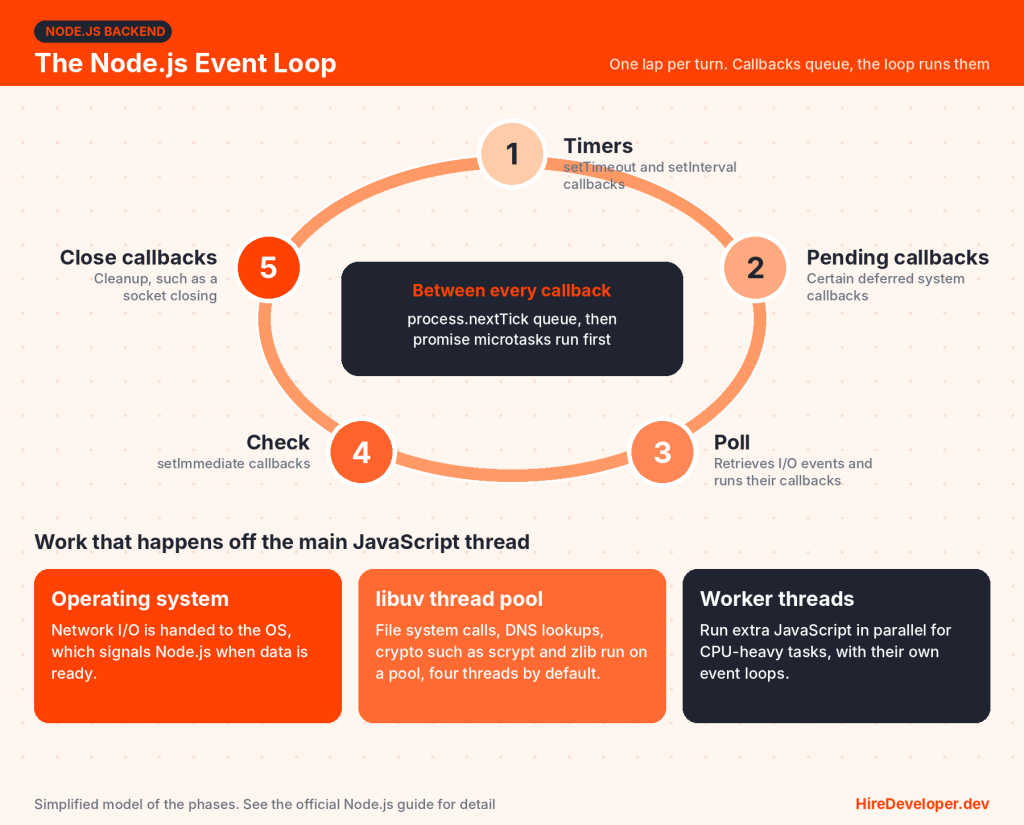
A simple example: 1,000 users request their order history, and each request triggers a database query. Node.js sends the queries, keeps waiting without blocking, and responds as results return. If one request instead runs a heavy calculation for two seconds, every other request waits, because that code blocks the event loop.
Key Features of Node.js Backend Development
- Asynchronous, event-driven processing: handles many simultaneous connections efficiently, which suits API traffic.
- Non-blocking I/O: a slow database or third-party call does not freeze other users.
- JavaScript across the stack: shared language and validation logic reduce handoffs between frontend and backend.
- npm ecosystem: ready-made packages shorten delivery, though they need dependency hygiene.
- Cross-platform support: the same code runs on Linux, Windows and macOS, so development matches production.
- API development: native JSON handling suits REST and GraphQL services.
- Real-time communication: WebSockets power chat, live dashboards and notifications.
- Microservices support: small services start quickly and deploy independently.
- TypeScript compatibility: types catch mistakes early in large codebases.
- Cloud and serverless integration: major cloud platforms offer Node.js runtimes.
Node.js Backend Architecture Explained
A typical Node.js backend follows the client-server model: a client such as a browser, mobile app or partner system sends a request, and the server returns a response. Between those two points, the request passes through layers.
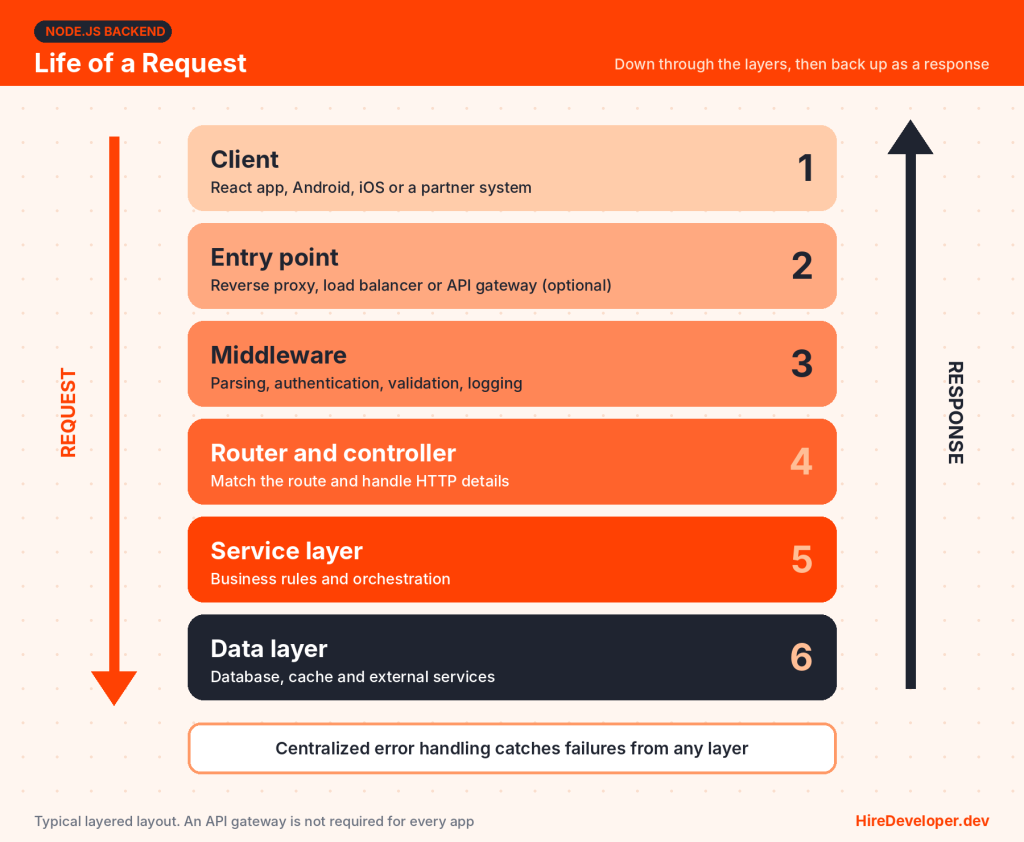
The request lifecycle in eight steps:
- The client sends an HTTP request.
- The Node.js server receives it.
- Middleware handles validation, authentication and logging.
- The router matches the URL and method.
- The controller handles the HTTP details.
- The service layer runs business logic.
- The data layer reads or writes the database, cache or external service.
- The response returns to the client, with centralized error handling for failures.
For example, POST /orders first passes a token check and body validation, reaches the createOrder controller, and calls a service that confirms stock and prices. A repository saves the order, and the controller returns 201 Created. An API gateway is optional, not mandatory. In short, middleware guards the door, controllers translate HTTP into function calls, services hold the business rules, and the data layer is the only place that talks to storage. Keeping those jobs separate makes each one easier to test and change.
Common patterns include layered and MVC structures for organized codebases, modular design for clear internal boundaries, microservices for independent deployment, and serverless for event-driven workloads.
| Architecture | Advantages | Considerations | Suitable for |
| Monolithic | Simpler initial development and deployment | Can become difficult to scale independently | Small and medium applications |
| Modular monolith | Clear internal boundaries | Requires disciplined module design | Growing applications |
| Microservices | Independent service deployment and scaling | More operational complexity | Complex distributed systems |
| Serverless | Managed infrastructure, event-driven execution | Runtime, cold-start and platform considerations | Event-driven and variable workloads |
WATCH OUT
Microservices are not automatically better. Match the architecture to application complexity, team capability and business needs.
Best Node.js Backend Frameworks in 2026-2027
Node.js is the runtime. The framework is the structure you build on it. In the Stack Overflow 2026 survey, Express was used by 15.6% of respondents answering the web frameworks question and NestJS by about 6%. That shows how common each is, not which one is right for you. Here is how the main node js backend frameworks differ.
▌ Express.js
Minimal, flexible and everywhere. Express 5 is now the default on npm, and Express 4 moved to maintenance in 2025, so start new js express projects on version 5. It suits small to mid-size REST APIs, but you must organise the project yourself.
▌ NestJS
TypeScript-first, with modules, controllers, providers and dependency injection. It gives large teams structure, at the cost of a steeper learning curve. It can run on Express or Fastify underneath.
▌ Fastify
Built for low overhead, with schema-based validation and serialization and a plugin architecture. A strong candidate for high-throughput, performance-sensitive APIs.
▌ Koa.js, Hapi.js and AdonisJS
Koa has a tiny core and composable middleware, ideal if you want full control. Hapi is configuration-driven, with built-in validation and plugins. AdonisJS is opinionated and full-featured, bundling an ORM, auth and validation in the spirit of Laravel. Check each project’s recent release activity before committing.
| Framework | Architecture style | Main strength | Ideal use case |
| Express.js | Minimal and flexible | Ecosystem and simplicity | REST APIs and custom backends |
| NestJS | Modular and structured | Enterprise application organization | Large applications |
| Fastify | Plugin-based | Performance-focused APIs | High-throughput services |
| Koa.js | Minimal, middleware-based | Flexibility | Lightweight custom backends |
| Hapi.js | Configuration-driven | Built-in server capabilities | Structured API applications |
| AdonisJS | Opinionated, full-featured | Integrated development experience | Full-featured backend projects |
▸ Framework selection matrix
| Project requirement | Evaluate | Why |
| Small REST API | Express.js | Lightweight and flexible |
| Structured enterprise backend | NestJS | Modular architecture and dependency injection |
| Performance-sensitive API | Fastify | Performance-focused design |
| Lightweight custom backend | Koa.js | Minimal, middleware-based approach |
| Integrated application framework | AdonisJS | Built-in conventions and features |
Treat these as starting points. Team expertise, maintenance activity, integrations and workload should drive the final choice, and each project’s repository shows its current release activity.
Essential Technologies Used in Node.js Backend Development
A framework is only one piece. A modern stack combines several categories:
- JavaScript and TypeScript: the languages. TypeScript adds static types.
- npm and package managers: install and lock dependencies.
- REST and GraphQL: the API styles that clients call.
- WebSockets: persistent connections for live updates.
- ORMs and query builders: map code to database tables or documents.
- Authentication libraries and identity providers: handle sign-in and tokens.
- Redis and caching: keep hot data in memory.
- Message queues and event streaming: move slow work out of the request path.
- Docker: packages the app consistently.
- CI/CD: tests and deploys every change automatically.
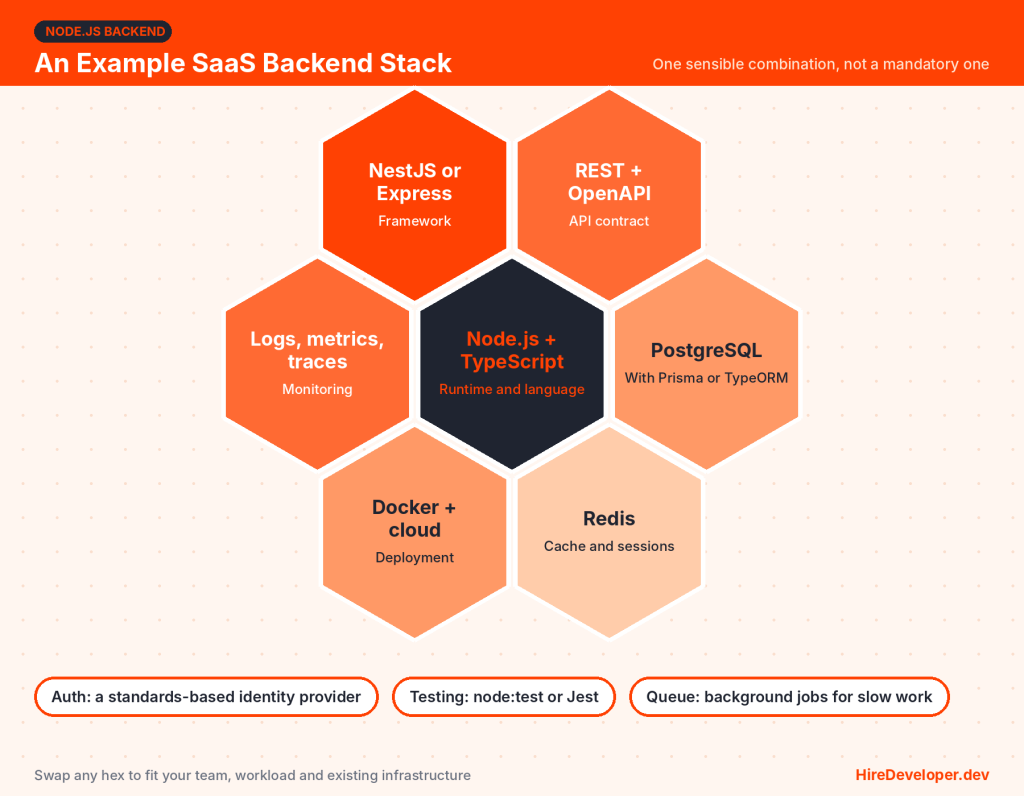
An example SaaS stack: Node.js and TypeScript, NestJS or Express, PostgreSQL with Prisma or TypeORM, Redis, REST with OpenAPI, a standards-based identity provider, Docker on a cloud platform, and logs, metrics and traces for monitoring. It is an example, not a required combination.
Best Databases for Node.js Backend Development
The best database depends on data structure, consistency needs, workload and existing infrastructure, not on the backend language. Relational databases store data in tables with defined relationships and support transactions that keep related changes consistent. Transactions group several changes so they succeed or fail together, which matters for payments and inventory. Document databases store flexible, JSON-like records. Redis keeps data in memory for very fast access. PostgreSQL leads the 2026 Stack Overflow survey for database usage, which reflects how often teams choose it, not that it fits every project.
Whatever you choose, three habits matter. Add indexes for fields you filter and sort on, and check slow queries with the database’s query plan. Use connection pooling, because opening a new connection per request is expensive. Pick access tools deliberately: Prisma, TypeORM and Sequelize work with relational databases, while Mongoose models MongoDB documents.
| Database | Type | Common use cases |
| PostgreSQL | Relational | Transactional and complex data |
| MySQL | Relational | Web applications and structured data |
| MongoDB | Document database | Flexible document-based data |
| Redis | In-memory data store | Caching, sessions and fast data access |
| Microsoft SQL Server | Relational | Microsoft-oriented enterprise environments |
Node.js Backend for React and Mobile Applications
A Node.js backend for React is a clean split: React runs in the browser and renders the interface, while the Node.js API handles data and rules. The two communicate through REST or GraphQL, with requests going out and JSON coming back. If you are building the interface side, you can hire React developers to work in parallel with the API team.
React / Android / iOS → Node.js API → Business logic → Database → API response
Authentication works through sessions or tokens issued by the backend. Teams using TypeScript on both sides can share request and response types. For live updates, WebSockets push changes to clients without constant polling.
Node.js does not replace an Android or iOS frontend. It commonly powers the server-side APIs that those mobile apps call.
How to Build a Node.js Backend Application: Step-by-Step
Treat these steps as a backend Node.js roadmap for a new service:
- Define business and application requirements.
- Choose the Node.js version and framework.
- Set up the development environment.
- Design the backend architecture.
- Configure database connectivity.
- Develop API routes and controllers.
- Implement business logic.
- Add authentication and authorization.
- Add validation and error handling.
- Write automated tests.
- Configure deployment and monitoring.
Choosing a version: use a supported line. Node.js 26 became Active LTS on October 28, 2026, and Node.js 24 is in Maintenance LTS until April 2028. Node.js 18 reached end of life in April 2025 and Node.js 20 in April 2026, so neither should start a new project. Check the official release schedule before pinning a version.
server.js
import express from ‘express’;
const app = express();
app.use(express.json());
const products = new Map([[1, { id: 1, name: ‘Notebook’, price: 9.5 }]]);
app.get(‘/api/products/:id’, async (req, res) => {
const product = products.get(Number(req.params.id));
if (!product) return res.status(404).json({ error: ‘Product not found’ });
res.json(product);
});
// Express 5 forwards errors from async handlers to this middleware
app.use((err, req, res, next) => {
console.error(err);
res.status(500).json({ error: ‘Internal server error’ });
});
app.listen(3000, () => console.log(‘API running on port 3000’));
This example uses ES modules (“type”: “module” in package.json). It creates a server, parses JSON, exposes one endpoint that returns a JSON response, and uses a central error handler. A real service would replace the in-memory map with a database call.
Node.js API Development: REST vs GraphQL
APIs connect your backend with web, mobile and third-party applications. Good APIs get the fundamentals right: correct HTTP methods and status codes, clear routing, request validation, authentication and authorization, versioning, documentation and testing. Prefix routes with a version such as /v1 so you can change contracts without breaking clients, and return honest status codes, for example 401 when credentials are missing and 403 when the caller is not allowed. Our guide to API design principles covers these in depth.
| Evaluation | REST | GraphQL |
| Data access | Multiple resource endpoints | Flexible queries through a schema |
| Response structure | Defined by the endpoint | Selected by the client query |
| Caching | Established HTTP caching patterns | Requires a deliberate caching strategy |
| Complexity | Familiar and straightforward for many APIs | Requires schema and query management |
| Suitable for | Resource-oriented APIs | Flexible data requirements |
Document REST APIs with OpenAPI and Swagger. GraphQL schemas document themselves through introspection and tooling. Neither approach is universally better, and some products use both.
Node.js Backend Security Best Practices
Start with a distinction. Authentication confirms who the caller is. Authorization decides what that caller may do. Most serious API flaws are authorization failures, which the OWASP API Security Top 10 highlights.
- JWT is a token format, not a complete authentication system. Handle expiry, revocation and storage carefully.
- OAuth 2.0 and OpenID Connect handle delegated access and identity, and usually come from an identity provider rather than custom code.
- Passwords need a modern hashing algorithm such as Argon2id, scrypt or bcrypt, never plain text or a fast hash.
- Input validation and parameterized queries stop SQL and NoSQL injection. Escape output to reduce cross-site scripting risk.
- CSRF protection matters when you use cookie-based sessions.
- Rate limiting and secure HTTP headers reduce abuse and common browser attacks.
- CORS controls which browser origins may call your API. It is not authentication or authorization.
- Dependencies and secrets: audit packages, commit lockfiles, and keep secrets in environment variables or a secrets manager.
- HTTPS and logging: encrypt traffic and monitor for suspicious activity.
No single library makes an application secure. The Node.js security guidance is a good baseline to review with your team.
Node.js Backend Performance Optimization and Scalability
Four terms get blurred, so define them first. Performance optimization makes each request cheaper. Concurrency is handling many requests in progress. Parallelism is using several cores at once. Scaling adds capacity: vertical scaling gives one machine more resources, and horizontal scaling adds more instances behind a load balancer.
Practical levers include:
- Keep the event loop free: avoid long synchronous work and prefer asynchronous APIs.
- Optimize queries, add indexes and pool database connections.
- Cache hot data in Redis and paginate large responses.
- Use clustering or multiple instances to use all CPU cores, and move CPU-heavy tasks to worker threads or separate services.
- Push slow work such as emails or report generation into background jobs and queues.
- Watch memory use, profile slow endpoints and monitor latency and error rates.
Example: an orders endpoint slows down as traffic grows. Profiling shows three unindexed queries and a PDF generated inside the request. The team adds indexes, caches the common list in Redis, paginates results, moves PDF creation to a queue, and runs several instances behind a load balancer. Each change is measured before the next. No fixed requests-per-second figure applies to every system, so test with your own workload.
Node.js Backend Testing, Debugging and Development Best Practices
Testing happens at several levels: unit tests for logic, integration tests for modules working together, API tests for endpoints, end-to-end tests for full flows, and load tests for capacity. The tools do different jobs:
- The Node.js built-in test runner, Jest and Mocha (often with Chai) run tests.
- Supertest sends HTTP requests to your app inside tests.
- Postman organizes API collections and checks.
- Playwright automates browsers for end-to-end flows.
- Load tools such as k6 or autocannon measure capacity under traffic.
Good habits keep a codebase healthy: modular structure, TypeScript where it helps, consistent code standards, centralized error handling, input validation, current API documentation, updated dependencies, CI/CD pipelines and health monitoring. Together they improve maintainability, reliability and teamwork.
▸ Node.js backend development checklist
- Business and technical requirements are written down.
- Architecture and framework are selected.
- Database and data model are designed.
- API design and documentation are ready.
- Authentication and authorization are implemented.
- Input validation and security controls are in place.
- Unit and integration tests pass.
- Performance and load tests are done.
- Deployment and monitoring are configured.
- Maintenance and dependency updates are scheduled.
Node.js Backend Deployment and Hosting
Node.js apps run on virtual machines, managed container services, Kubernetes or serverless platforms across AWS, Microsoft Azure and Google Cloud. For help planning the AWS side, see our guide to AWS cloud deployment.
Docker containers keep environments consistent. A CI/CD pipeline tests and ships each change. An Nginx reverse proxy often sits in front to handle TLS and routing. Production also needs environment configuration, centralized logging, monitoring and health check endpoints so the platform can restart unhealthy instances.
WATCH OUT
Kubernetes is not mandatory. Choose the deployment model that fits your traffic, reliability needs, team capacity and application complexity, and add orchestration only when you need it.
Real-World Node.js Backend Applications and Business Use Cases
Node.js fits SaaS platforms, e-commerce, real-time chat and collaboration, fintech, enterprise applications, streaming and notification systems, IoT and AI-powered applications. Each has its own pressure points: fintech needs audit trails and strict consistency, streaming and notification systems need queues to absorb bursts, IoT needs lightweight protocols, and AI features need streaming responses and sensible timeouts. These three scenarios are hypothetical examples, not client projects.
| SaaS startup | E-commerce company | Enterprise modernization | |
| Requirement | First backend and customer-facing APIs | Real-time inventory and order updates | Move a legacy backend into modular services |
| Why Node.js | Fast iteration with one language across the product | Strong at many concurrent I/O connections | Services can be extracted gradually |
| Technologies | TypeScript, NestJS, PostgreSQL, Redis | WebSockets, Redis, a message queue, PostgreSQL | Modular monolith, REST, queues, containers |
| Considerations | Keep it simple, avoid early microservices | Consistency of stock counts and event ordering | Clear boundaries, testing and rollback plans |
Benefits, Limitations and When Node.js Is Not the Right Choice
| Benefits | Limitations |
| JavaScript across frontend and backend | CPU-intensive work needs careful design |
| Fast development cycles | Event-loop blocking can stall all requests |
| Strong fit for I/O-intensive workloads | Asynchronous error handling takes discipline |
| Large package ecosystem | Dependencies need active management |
| Real-time communication capabilities | Memory and resource use need monitoring |
| Flexible architecture and cloud integration | Distributed systems add operational complexity |
Alternatives may suit workloads dominated by heavy numerical computation, specialized data processing, or companies whose existing enterprise ecosystem strongly favors another technology. A large, available pool of JavaScript developers helps hiring, but it never makes Node.js the right answer for every project.
Node.js vs Other Backend Technologies
| Technology | Strengths | Common use cases | Key consideration |
| Node.js | Asynchronous I/O and JavaScript ecosystem | APIs, SaaS, real-time systems | CPU-heavy tasks need careful architecture |
| Python | Broad libraries and data ecosystem | AI, automation, APIs | Performance depends on workload and framework |
| Java | Mature enterprise ecosystem | Enterprise and distributed systems | Often more structured and resource-intensive |
| PHP | Established web ecosystem | CMS and web applications | Existing platform and framework choices matter |
| .NET | Strong enterprise and Microsoft integration | Business applications and APIs | Ecosystem and hosting requirements |
| Go | Concurrency and efficient compiled services | Infrastructure and backend services | Different language and ecosystem requirements |
Backend Python vs Node.js is the comparison buyers ask about most, and it is not a speed contest. Be skeptical of benchmarks that do not share hardware, versions, workloads and methodology. Decide on these factors instead:
- Workload: I/O-heavy APIs and real-time features favor Node.js. Data science, machine learning and heavy numerical work favor Python.
- Team expertise and hiring: the skills you already have usually matter most.
- Libraries and integrations: check that the packages you need are mature on each side.
- Scaling and operations: both scale horizontally, so compare how your team deploys and monitors them.
- Long-term maintenance: pick the stack your team can keep healthy for years.
Many companies run both: Node.js for the API layer and Python for AI or data services.
Node.js Backend Development Cost in 2026-2027
There is no single price. Cost depends on application complexity, the number of APIs and integrations, framework and database choices, authentication and security requirements, third-party services, developer experience and location, cloud infrastructure, testing depth, and maintenance. A simple internal API and a multi-tenant SaaS platform with payments are very different projects. Developer location also shifts rates, so compare total delivery value, including communication overlap, rather than hourly price alone.
Common engagement models include fixed-price projects for well-defined scope, hourly development for flexible work, dedicated Node.js developers who join your team, a dedicated backend development team for larger programs, and monthly engagements for continuous delivery.
Keep development cost separate from other spending: hosting, database services, third-party software licenses and ongoing maintenance all come on top. Ask any provider to state its assumptions, and be cautious about quotes that skip testing, security or support.
How to Choose a Node.js Backend Development Company
Evaluate providers on ten criteria: Node.js and JavaScript expertise, experience with Express.js, NestJS or Fastify, backend architecture capability, database and API experience, security and testing practices, scalability and cloud deployment experience, relevant case studies, communication and project management, maintenance support and pricing transparency.
A backend development company should answer plain questions:
- Have you built backends like ours, and can we speak with those clients?
- How will you structure the architecture and why?
- How do you handle security, testing and code review?
- Who will actually work on our project?
- What happens after launch?
Delivery experience matters more than the lowest hourly rate. A cheap team that skips testing and security often costs more once the product is live.
When Should You Hire Node.js Backend Developers?
Consider it when you are building a new SaaS product, developing REST APIs or microservices, adding real-time features, modernizing a legacy application, integrating third-party platforms, scaling an existing backend, improving security and performance, or extending an in-house team.
An individual developer suits a focused task. A dedicated backend team suits larger programs that need architecture, testing and continuity. If you decide to hire Node.js developers, define the outcomes first, then choose the model. A hire dedicated Node.js developer arrangement works well for long-running products, and Node.js backend development services fit projects with a clear scope. For wider capacity, dedicated development teams and IT staff augmentation services cover other needs.
Future of Node.js Backend Development in 2027 and Beyond
Some developments are established. TypeScript is widely used, and the 2026 Stack Overflow survey places it among the most-used languages. Node.js ships regularly, and recent versions can run TypeScript files that use erasable syntax through type stripping, so check the docs for your version. Serverless and cloud-native deployment are mainstream.
Others are still emerging. AI agent and large language model integrations are driving more streaming and API-orchestration work in Node.js backends, and edge runtimes are growing for latency-sensitive tasks. Treat these as directions to watch, not guarantees. A sensible approach is to build on established practice today, run small experiments with emerging tools, and revisit decisions as official documentation matures.
Conclusion
Node.js is a practical foundation for modern web, SaaS, mobile and enterprise backends. Success depends on the choices around it: architecture, framework, database, security controls and deployment. HireDeveloper.dev (Talent Wing of Rightbyte Technologies Pvt Ltd) can be a technology development partner for businesses that need backend engineering expertise.
Planning a new Node.js backend?
Looking to scale an existing development team? Hire Node.js developers or discuss your software development requirements with our team.