Introduction
Picture a growing distribution company in its busiest week. Sales promises a delivery date from a spreadsheet. The warehouse counts stock in another tool. Finance retypes invoices into accounting software, and purchasing learns about a shortage when a customer calls to complain. Nobody is careless. The systems simply do not talk to each other.
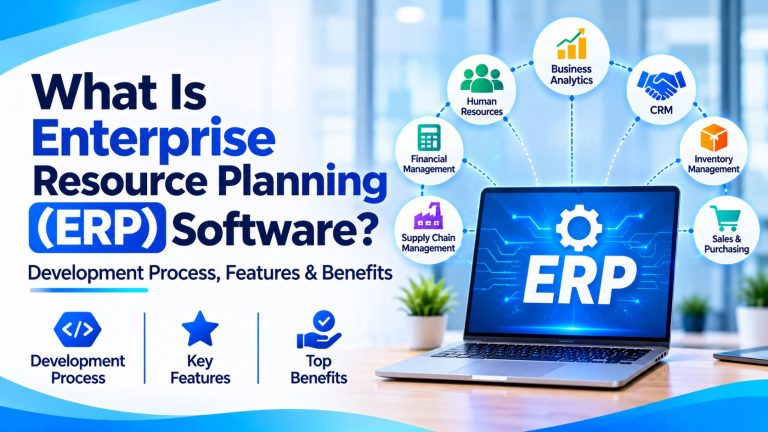
Enterprise resource planning exists to fix that. ERP software connects finance, inventory, procurement, sales, HR, manufacturing, and operations through shared data and integrated workflows, so every team works from the same facts.
In 2026 that matters even more. Businesses want real-time visibility, more automation, and AI that is only as good as the data behind it. This guide explains what ERP is, how it works, which modules and features to look for, how ERP software is developed, how to choose between ready-made and custom options, and what to check before you invest.
What Is Enterprise Resource Planning (ERP)?
THE SHORT VERSION
Enterprise Resource Planning (ERP) is a business management approach supported by integrated software that connects core organizational processes, data, and workflows in a centralized system.
Put simply, ERP software is a set of connected business applications built around shared information. Instead of each department keeping its own records, an ERP system gives everyone access to the same customers, products, orders, and financial data, according to their permissions. You will hear it called an ERP system, ERP platform, or ERP programs. They all point to the same idea.
EXAMPLE
A manufacturer receives an order. The ERP system links sales (the order), inventory (is there stock?), procurement (order materials if not), production planning (schedule the work), the warehouse (pick and ship), invoicing, and financial reporting. One order, one trail of connected records.
That is why ERP is not simply accounting software or an inventory tool. Those handle one function. ERP spans many, and it supports planning, execution, reporting, and management across them. Its planning capabilities, sometimes searched as ERP planning software, cover things like demand, materials, production, workforce, and financial planning. You may also see the term enterprise resource management used for the same space.
How Does ERP Software Work?
An ERP system works by keeping business data connected and letting workflows pass information from one team to the next. The main pieces are:
- Shared data: a central database or connected data services act as one source of truth, so a customer or product is defined once and reused everywhere.
- Functional modules: finance, inventory, sales, and other areas, each with its own screens and logic on a common data foundation.
- Business workflows: rules that route work between people and modules, such as purchase approvals or order processing.
- Role-based access: each person sees and changes only what their role allows, which protects sensitive data.
- Data entry and validation: checks that catch errors, such as a missing tax code or unknown product, when information is first recorded.
- Reporting and analytics: dashboards and reports built from live operational data instead of manually merged spreadsheets.
- Integrations and automation: connections to outside applications and automated processes, such as sending shipment details to a carrier.
Architecture varies. Some platforms use one logical database, others connect separate services through APIs, and deployment models differ. What stays constant is the idea that changes made in one module are visible to the others.
Information moves between departments through those shared records and workflows. When sales confirms an order, inventory sees the demand, purchasing sees what to buy if stock is short, and finance sees revenue that will soon be billed. The system does not make teams agree, but it removes the guesswork about what the others know.
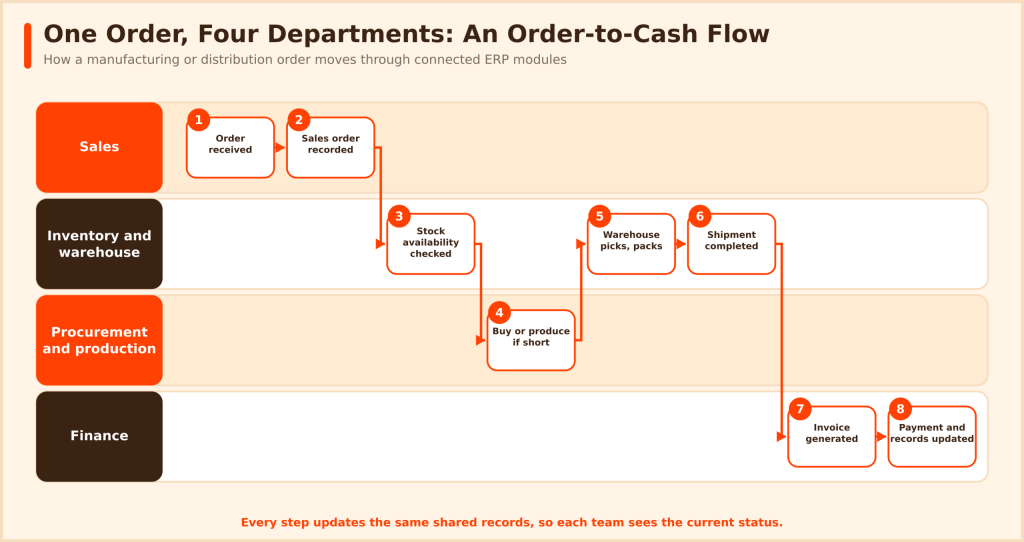
Here is that idea in an order-to-cash flow for a manufacturing or distribution business:
- A customer order is received.
- The sales order is recorded.
- Inventory availability is checked.
- Procurement or production is triggered if stock is short.
- The warehouse picks and packs the order.
- The shipment is completed.
- An invoice is generated.
- Payment and financial records are updated.
No one re-enters the order. Each step uses and updates the same record, so sales sees shipping status and finance sees what is ready to invoice.
Key Modules of ERP Software
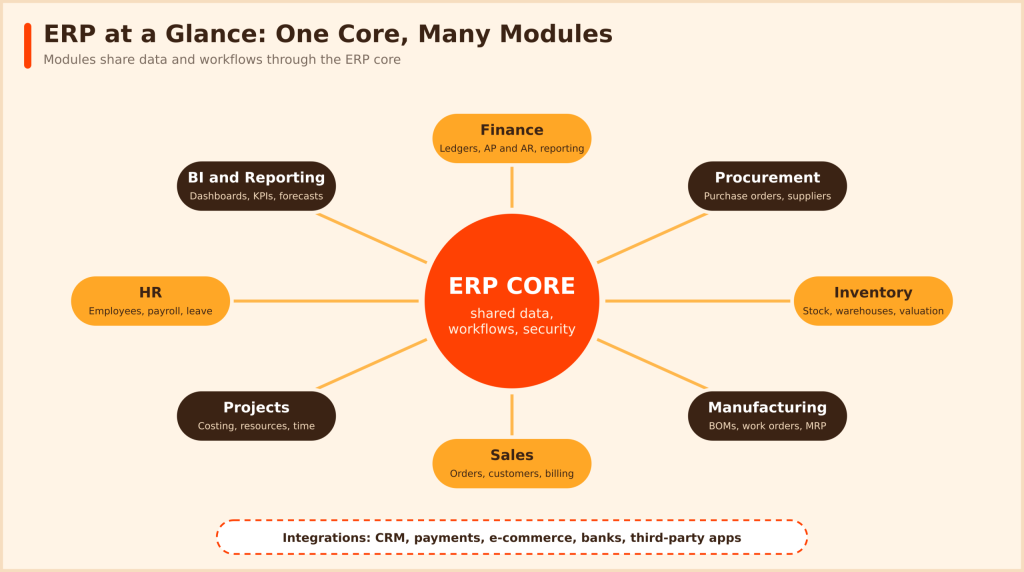
ERP modules are the building blocks of an ERP system. They work together on shared data, and you do not have to switch on every one at once.
Finance and Accounting
The financial backbone: general ledger, accounts payable and receivable, budgeting, financial reporting, cash flow visibility, and tax and compliance support. Because transactions from sales, purchasing, and payroll post automatically, month-end close usually involves less manual reconciliation. This is where ERP accounting software capabilities live.
Human Resource Management
Employee records, payroll integration, recruitment workflows, attendance and leave, performance management, and workforce planning. Linking HR to finance and projects also helps with labor costing and headcount planning.
Inventory and Warehouse Management
Stock tracking and valuation, warehouse operations, reorder levels, stock movements, and demand planning, so you hold what you need and not much more. Accurate inventory lets sales promise real delivery dates and helps purchasing avoid both stockouts and excess stock.
Procurement and Supply Chain Management
Purchase orders, supplier management, approval workflows, supply chain visibility, and vendor performance tracking. Approvals and three-way matching of orders, receipts, and invoices keep purchasing organized and auditable.
Sales and Customer Management
Sales orders, customer records, order processing, and billing coordination. CRM functionality may be built into an ERP suite or provided by an integrated CRM product. Order history and pricing live in one place, so billing and fulfillment start from the same record.
Manufacturing and Production Planning
Production scheduling, bills of materials, material requirements planning, work orders, quality management, and production tracking. A bill of materials lists every component of a product, and material requirements planning uses it to work out what to buy and when.
Project and Resource Management
Project budgets, costing, time tracking, and resource allocation, including multi-resource scheduling of people, machines, and equipment across jobs. Project-based businesses use this to see profitability while a job is running, not after it ends.
Business Intelligence and Reporting
Dashboards, financial reports, operational KPIs, forecasting, and performance analysis. The value comes from trusted data: dashboards are only as reliable as the records underneath them.
| ERP module | Main function | Business value |
| Finance | Accounting and financial control | Better financial visibility |
| HR | Workforce administration | Centralized employee information |
| Inventory | Stock and warehouse management | Improved inventory control |
| Procurement | Purchasing and supplier workflows | More organized purchasing |
| Sales | Order and customer processes | Better order visibility |
| Manufacturing | Production planning | Improved production coordination |
| Project management | Cost and resource tracking | Better project control |
| BI and analytics | Reporting and analysis | Data-driven decisions |
Most businesses start with the modules that solve their biggest pain, such as finance, inventory, and sales, then add others as they grow.
Read – https://hiredeveloper.dev/insights/erp-software-development/
Essential Features of Modern ERP Software in 2026
When you compare ERP software for business use, these are the capabilities worth checking:
- Centralized data management: one record per customer, product, or supplier, shared across departments.
- Real-time or near-real-time visibility: stock levels, order status, and cash position without waiting for a report run.
- Customizable dashboards and reporting: views tailored to each role, from warehouse supervisor to CFO.
- Workflow automation: approvals, routing, and notifications that follow your business rules.
- Role-based access and permissions: least-privilege access, with separation of duties for sensitive tasks.
- Multi-location and multi-entity support: several sites, currencies, and legal entities in one system.
- Financial management and accounting.
- Inventory and supply chain management.
- API-based integrations: documented interfaces for connecting e-commerce, CRM, banks, and other tools.
- Mobile and remote access: approvals and lookups from outside the office.
- Document management: contracts, invoices, and certificates linked to the records they support.
- Audit trails and compliance support: a record of who changed what, and when.
- AI-assisted analytics and forecasting: pattern detection and predictions, which vary by product and depend on good data.
- Scalability and configurable workflows: room to add users, entities, and processes without a rebuild.
Separate core capabilities from advanced ones. Finance, inventory, order management, and reporting are typically core. Advanced manufacturing planning, AI agents, or industry-specific functions may need additional modules, higher editions, or integrations. Never assume every ERP product includes every feature by default. Ask for a demo of your own workflows.
Types of ERP Software and Deployment Models
On-Premises ERP
Hosted on your own infrastructure. You get direct control, and you also take on IT operations, security, and maintenance. You also decide when to upgrade. It suits organizations with specific infrastructure or control requirements.
Cloud-Based ERP
Hosted by the vendor or a cloud provider and reached through supported interfaces, often on a subscription. In many SaaS arrangements the vendor manages the infrastructure. Cloud ERP software does not remove your responsibilities, though: you still manage users, access, data quality, and integrations. Two terms come up often: in a multi-tenant setup, many customers share one application instance, which standardizes updates, while a single-tenant setup gives each customer a dedicated instance, which often allows more customization and control over upgrade timing.
Hybrid ERP
A mix of cloud and on-premises components, useful when legacy systems or deployment constraints prevent a full move.
Industry-Specific ERP
Preconfigured for sectors such as manufacturing, construction, retail, distribution, healthcare, professional services, and food processing.
Custom ERP Software
Built, or substantially tailored, around your own workflows, integrations, and reporting needs.
| ERP type | Deployment or design | Best suited for |
| On-premises ERP | Organization-managed infrastructure | Businesses needing infrastructure control |
| Cloud ERP | Vendor or cloud-hosted | Distributed and growing organizations |
| Hybrid ERP | Combination of cloud and local systems | Businesses with mixed environments |
| Industry-specific ERP | Preconfigured industry workflows | Specialized business operations |
| Custom ERP | Designed around business requirements | Organizations with unique workflows |
Examples of ERP Software and Leading ERP Platforms
These ERP systems examples show the range of the market. Product names and packaging change often, so confirm current details with each vendor before shortlisting.
SAP ERP and SAP S/4HANA
SAP ERP today mainly means SAP S/4HANA, covering finance, procurement, manufacturing, and supply chain for large, complex organizations. It is offered as a multi-tenant public cloud edition, a single-tenant private edition, and on-premises. Many customers on the older SAP ECC are planning migrations, because SAP has communicated that mainstream maintenance ends in 2027, with paid extended maintenance through 2030. It is typically chosen where scale, process depth, and global operations justify the investment, and smaller firms may find it heavy. See the SAP documentation.
Microsoft Dynamics 365 ERP
Dynamics 365 is a family of separate applications, not one ERP product. The ERP side includes Dynamics 365 Finance and Supply Chain Management for larger operations, and Business Central for small and mid-sized businesses, which suits smaller operations better than the larger apps. Microsoft’s 2026 plans emphasize Copilot and AI agents, with availability varying by app. It fits organizations that already use Microsoft technologies, and teams building around it can look at Microsoft developers. See the Dynamics 365 documentation.
Oracle ERP
Oracle Fusion Cloud ERP covers financial management, procurement, project management, and risk and compliance on a cloud platform for enterprise finance and operations. It is commonly considered by large organizations that want finance, procurement, and project management on one platform. Oracle has been adding AI agents across Fusion applications. See Oracle’s documentation.
Sage ERP Solutions
Sage Intacct is cloud financial management for multi-entity and growing businesses, and Sage X3 targets manufacturing, distribution, and services with cloud or on-premises options. Sage 50 serves smaller businesses in some markets. Fit depends on the product and region, so confirm which edition matches your size. Check Sage for current positioning.
Other ERP Platforms
Odoo offers modular, configurable business applications. Infor builds industry-oriented enterprise software. Many industry-specific ERP products also exist, for example for construction contractors or process manufacturers.
| ERP platform | Main focus | Typical use case |
| SAP | Enterprise-wide operations | Large and complex organizations |
| Microsoft Dynamics 365 | Finance and operations applications | Businesses using Microsoft technologies |
| Oracle ERP | Cloud enterprise management | Enterprise finance and operations |
| Sage | Finance and business management | Small and mid-sized businesses, by product |
| Odoo | Modular business applications | Businesses seeking configurable apps |
| Infor | Industry-oriented enterprise apps | Specialized industry operations |
No platform here is “best” in general. The right ERP depends on company size, industry, complexity, integrations, budget, and internal capability.
Benefits of ERP Software for Businesses
Done well, ERP delivers practical gains across the organization:
- Centralized information and less duplicate data entry.
- Better operational visibility and faster access to business data.
- More consistent processes across teams and locations.
- Improved inventory and resource planning.
- Stronger financial reporting and auditability.
- Workflow automation and better planning and forecasting.
- Support for growth, including multiple locations and entities.
Departments feel it differently. Finance closes books from the same data operations uses. Warehouse teams see incoming orders and stock in one place. Purchasing sees demand before it becomes a shortage. Sales can promise realistic delivery dates. For a multi-location retailer, shared inventory data can show which store has stock before a purchase order is raised. For a services firm, linked time tracking and billing can shorten the gap between work done and invoice sent.
Outcomes are not guaranteed, though. Results depend on implementation quality, data quality, process adoption, and organizational readiness.
Challenges and Limitations of ERP Implementation
ERP projects fail less from bad software than from unrealistic planning. Common challenges include high initial investment or subscription costs, complex implementation, data migration problems, integration with legacy applications, customization complexity, staff training and resistance to change, security and access management, vendor dependency, scope expansion, and ongoing upgrades.
Proper planning, stakeholder involvement, a realistic scope, phased rollout, and thorough testing reduce these risks. Use this implementation risk checklist early:
□ Requirements were gathered from every affected department.
□ Legacy data has been cleaned and its accuracy checked.
□ Customization is limited to what the business truly needs.
□ Each process and data set has a named owner.
□ Testing covers workflows, integrations, and data migration.
□ There is a training and adoption plan for employees.
□ Integrations have been designed and tested, not assumed.
□ Access controls and permissions follow least privilege.
ERP Software Development Process: How to Build a Custom ERP System
ERP development and ERP implementation are related but different. Implementation configures an existing product, while development builds software around your requirements. Here is how custom ERP software is typically planned and built.
-
Business Requirement Analysis
Identify business problems, map current workflows, interview department stakeholders, and define objectives. Capture functional and non-functional requirements, and document integration needs. Ask what people do today, where they re-enter data, and which reports they trust. Workshops with real users uncover requirements that executives forget.
-
ERP Planning and Module Selection
Choose the modules you need, prioritize core workflows, define the MVP scope, and set milestones and success criteria. Plan phased development rather than one giant release, which also gives earlier feedback and limits the impact of mistakes.
-
System Architecture and Technology Selection
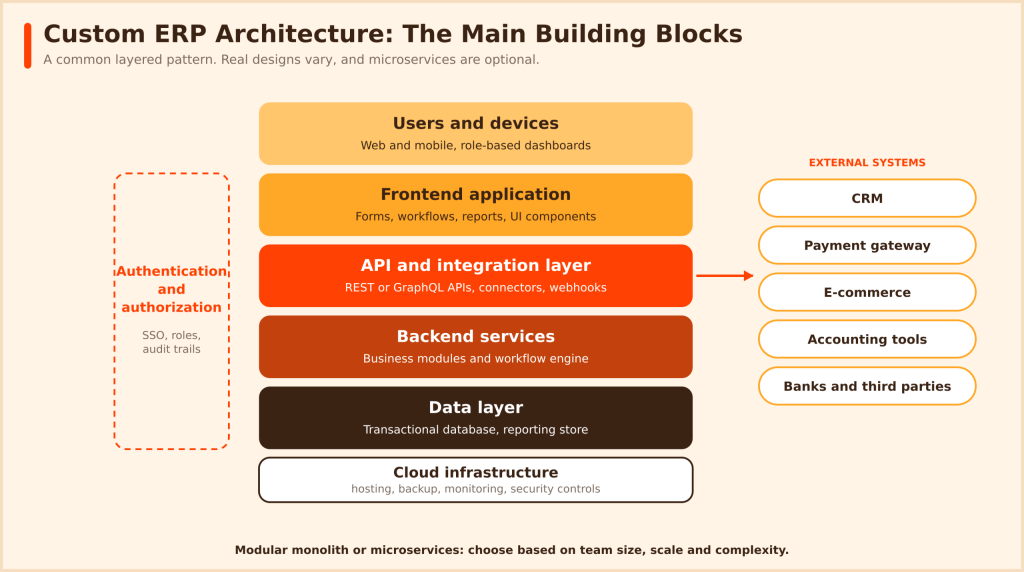
Decide on frontend and backend architecture, database design, API strategy, authentication and authorization, cloud and infrastructure, and how the system will scale and integrate. Record key decisions, such as why you chose a database or integration pattern, so future teams understand the trade-offs. A modular monolith is often a sensible start. Microservices can help at larger scale but are not mandatory. Typical stacks use .NET, Java, Node.js, or Python on the backend with a framework such as React or Angular on the front end. If your stack is Microsoft-based, .NET developers are a natural fit, and Node.js developers suit JavaScript-based services.
-
UI/UX Design
Design role-specific dashboards, department interfaces, data entry screens, and reports. Aim for usable workflows, accessibility, and responsive layouts, since poor usability drives workarounds. Test prototypes with real users before building every screen.
-
ERP Module Development
Build modules such as finance, inventory, procurement, HR, sales, manufacturing, and reporting. They must share data cleanly and coordinate workflows through the business workflow engine. Reusing shared components for customers, products, and approvals keeps modules consistent.
-
ERP Integration and Data Migration
Connect CRM, payment systems, accounting applications, e-commerce platforms, and other third-party tools through APIs. Migration is more than copying records: extract, clean, map, load, and then validate and reconcile the data before go-live. Common integration patterns include synchronous APIs, scheduled batch jobs, and event-driven messaging, chosen by how fresh the data must be. For migration, run trial loads, reconcile totals against the legacy system, and agree who signs off on data accuracy.
-
Testing and Quality Assurance
Run unit, integration, system, performance, and security tests, plus user acceptance testing and data migration validation. Include role-based access checks and realistic data volumes, since permission mistakes are among the most serious ERP defects. Align security work with guidance such as OWASP.
-
Deployment and Employee Training
Deploy to cloud or on-premises infrastructure, configure production, train users, write documentation, plan the rollout, and monitor closely after launch. Consider a pilot with one department or location before a company-wide rollout, and prepare a rollback plan.
-
Maintenance and Continuous Improvement
Fix bugs, apply security updates, tune performance, build new modules, maintain integrations, and improve features based on user feedback. Plan a release cadence and clear ownership, because an ERP system is never finished while the business keeps changing.
SECURITY THROUGHOUT
Treat security as part of every step, not a final check. Define access and compliance requirements early, design authentication and least-privilege roles, follow secure coding practices, scan dependencies, protect data in transit and at rest, and patch regularly.
A Phased MVP Approach
You do not need every module on day one. A common sequence, depending on business priorities, is:
- Phase 1: core business workflows.
- Phase 2: finance, inventory, and procurement integrations.
- Phase 3: advanced reporting and automation.
- Phase 4: additional modules and AI-enabled capabilities.
If you are exploring custom ERP development, HireDeveloper.dev (Talent Wing of Rightbyte Technologies Pvt Ltd) offers dedicated developers and custom software development support for businesses planning enterprise applications. Whichever partner you consider, check their experience with integrations, data migration, and security.
Custom ERP Software vs Ready-Made ERP Software
| Factor | Ready-made ERP | Custom ERP |
| Initial setup | Product configuration and implementation | Requirements and development |
| Customization | Limited by product architecture and licensing | Tailored to defined requirements |
| Deployment time | Depends on complexity and configuration | Depends on development scope |
| Integrations | Supported connectors and APIs | Designed around required integrations |
| Ownership | Governed by vendor licensing and contract | Depends on IP and development agreement |
| Maintenance | Vendor updates plus customer responsibilities | Ongoing development and maintenance |
| Best for | Common, supported business processes | Unique or highly specialized workflows |
Ready-made ERP is sensible when your processes are fairly standard and a vendor product covers them with configuration. Custom development is justified when your workflows are genuinely unusual, your integrations are complex, or you want full control over ownership and roadmap. Hybrid approaches also work: a standard core for finance, with custom modules or integrations for what is unique. Neither option is always cheaper or better.
Configuration vs Customization
These are different activities. Configuration uses the product’s own settings, such as setting up approval rules, and is usually safe through upgrades. Customization changes or extends the product with code, which can add upgrade and support costs. Many ERP regrets come from excessive customization, so configure first and customize only where the benefit is clear.
Total Cost of Ownership
Compare total cost of ownership, not just the first invoice. Costs include software licenses or subscriptions, implementation and configuration, customization, data migration, integrations, infrastructure, training, support, upgrades, and ongoing maintenance. A cheap start can become expensive if upgrades and integrations were ignored.
How to Choose the Right ERP Software for Your Business
Work through these factors in order:
- Business size and operational complexity.
- Industry-specific requirements.
- Required modules.
- Cloud, on-premises, or hybrid preference.
- Integration requirements.
- Customization flexibility.
- Security and compliance.
- Reporting and analytics.
- Scalability.
- Vendor support and product roadmap.
- Licensing and total cost of ownership.
- Implementation partner expertise.
Priorities differ by size. ERP software for small business should favor fast setup, affordability, and core finance and inventory. Growing companies need scalability and integrations. Large enterprises weigh governance, multi-entity support, and deep customization.
| Your situation | Likely path |
| Standard processes, limited IT capacity | Buy an existing ERP product |
| Mostly standard, with a few special workflows | Customize an existing platform |
| Unique workflows that no product fits well | Build a custom ERP solution |
| Standard core plus unique needs | Hybrid: product core with custom modules |
Does it cover our top five workflows without heavy customization?
□ Can it integrate with the systems we must keep?
□ Is total cost clear for years one through five?
□ Do reference customers in our industry exist?
□ Are security, access, and audit controls adequate?
□ Can it scale with our growth?
Industry-Specific ERP Scenarios
Module priorities shift by industry. These are typical, not universal, examples:
| Industry | Typical module priorities |
| Manufacturing | Production planning, bills of materials, inventory, quality, procurement |
| Construction | Project costing, job budgets, subcontractor and equipment tracking, progress billing. Look for construction ERP software built for this |
| Retail | Inventory across channels, point-of-sale and e-commerce integration, purchasing |
| Distribution | Warehouse management, order fulfillment, supplier management, demand planning |
| Professional services | Project accounting, time tracking, resource scheduling, billing |
The Role of AI and Automation in ERP Software in 2026
Major vendors are adding AI to their ERP products. Microsoft’s Dynamics 365 plans emphasize Copilot and agents, and Oracle has announced agentic applications for finance and supply chain. Typical uses include forecasting, demand and inventory prediction, intelligent reporting, automated invoice processing, anomaly detection, predictive maintenance in relevant industries, and natural-language access to business data.
These terms are not interchangeable:
- Rule-based automation follows fixed instructions, such as routing invoices over a set amount for approval.
- Predictive analytics uses historical data to estimate what is likely, such as demand.
- Generative AI produces text or summaries from prompts, such as drafting a report.
- AI agents and orchestration pursue a goal across several steps and systems, usually within defined limits.
AI also depends on data readiness. If product records are duplicated or inventory counts are unreliable, forecasts will be unreliable too. Start with a contained use case, measure the results, and set rules for what an AI feature may do without approval, especially when it can post transactions or contact suppliers.
WATCH OUT
AI does not automatically improve ERP outcomes, and capabilities differ by vendor, product, and edition. Verify product-specific features, keep humans in review loops, and protect data quality, access controls, governance, and privacy. For teams building their own intelligent features, AI developers can help with design and integration.
Conclusion
Enterprise resource planning software connects the parts of a business so teams share one version of the truth. Its modules, automation, and analytics make planning and execution more consistent, while the choice between cloud, on-premises, hybrid, ready-made, and custom deserves careful thought. Before you invest, be clear about requirements, integrations, security, and scalability, and plan for the full cost of ownership. Start small, prove the value, and expand in phases. If you are considering custom enterprise software, HireDeveloper.dev (Talent Wing of Rightbyte Technologies Pvt Ltd) can be a development partner.
Planning a custom ERP or enterprise application?
Talk to the team at HireDeveloper.dev about your enterprise software development requirements, and explore how dedicated developers can support your project.