Introduction
A founder briefs a team on a “simple” booking app. Three months later the budget is gone, the requirements have changed twice, testers are finding bugs nobody planned for, and no one agrees on what “done” means. Nothing here is about bad developers. It is about missing structure.
The software development life cycle (SDLC) is that structure: a process for planning, designing, building, testing, deploying, and maintaining software. In 2026, with AI assistants writing code and releases shipping weekly, it matters more, not less. And no single version fits every project.
This guide explains the phases, compares the main models, and shows where Agile, security, tools, and AI fit in. By the end you will know how to pick an approach that suits your own project.
What Is the Software Development Life Cycle (SDLC)?
THE SHORT VERSION
The software development life cycle (SDLC) is a structured process that teams use to plan, design, build, test, deploy, and maintainsoftware. It splits the work into phases with clear goals and outputs, so projects stay organized, risks surface early, and quality can be checked at every step.
You will also see it written as the software development lifecycle, the SDLC process, or the life cycle of software development. They all mean the same thing.
It helps to separate three ideas that are often mixed up. The SDLC is the overall framework: the phases every project passes through in some form. A model (Waterfall, Agile, Spiral) describes how those phases are organized and executed. A methodology or framework (Scrum, Kanban, Extreme Programming) describes how a team works day to day. International standards such as ISO/IEC/IEEE 12207 also define software life cycle processes, though most teams adapt their own version.
EXAMPLE (HYPOTHETICAL)
A clinic wants an online booking system. The full software development lifecycle runs from the business need (“patients keep phoning to book”) through requirements, design, code, testing, and launch, and then continues with updates for years afterwards. That clinic app will be our running example.
Why Is the Software Development Life Cycle Important?
A defined lifecycle gives everyone the same map. In practice that means:
- Better planning: realistic scope, budget, and timelines.
- Clear stages and responsibilities: people know what is expected and when.
- Stronger requirements management: fewer surprises halfway through.
- Higher quality: testing and review are built in, not bolted on.
- Earlier risk detection: technical and security issues surface sooner.
- Better collaboration: developers, testers, and stakeholders share one picture.
- Easier maintenance: documented decisions make future changes cheaper to make.
Done well, this reduces rework and uncertainty. But SDLC does not guarantee success. A heavy process applied to the wrong project can slow a team down as easily as no process at all. The goal is enough structure to see problems early, and no more.
What Are the Seven Phases of the Software Development Life Cycle?
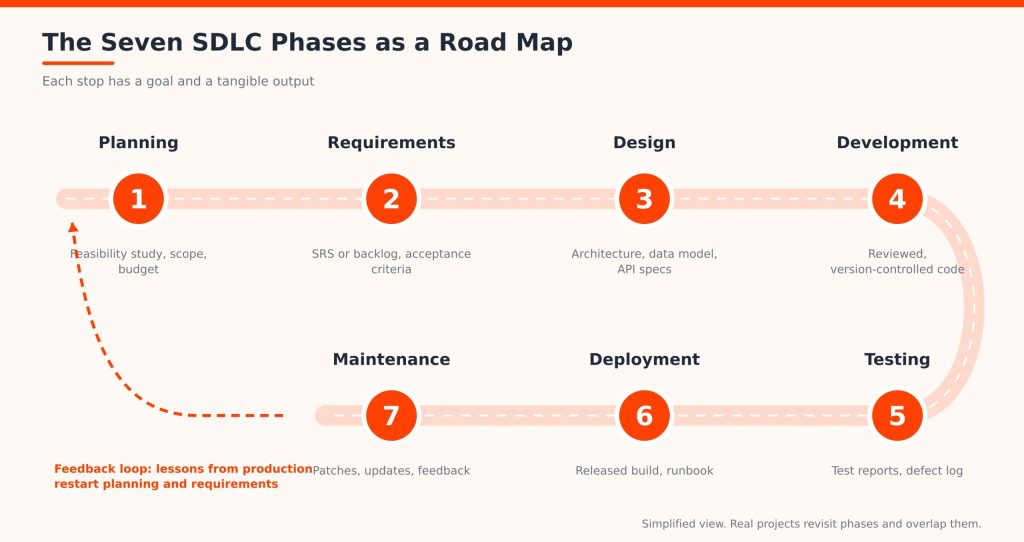
Sources split the lifecycle into five, six, or seven phases, and organizations adapt them freely. The seven-phase view below is the most common. Each phase has a purpose, a set of activities, and outputs that feed the next one.
-
Planning and Feasibility Analysis
Planning decides whether to build and how. The team defines goals and scope, estimates time, budget, and people, and lists risks and constraints. Estimates at this stage are informed guesses, so good teams record their assumptions and revisit them as requirements firm up. A feasibility study tests the idea from three angles: technical (can we build it?), operational (will people use it?), and financial (is it worth the cost?). Typical outputs: a project plan, scope statement, and risk register. Clinic app: confirm the system can connect to the existing patient records and fits the budget.
-
Requirements Gathering and Analysis
Here the team captures what the software must do. Functional requirements describe behavior (book, cancel, send reminders). Non-functional requirements describe qualities such as speed, accessibility, and security. Teams use stakeholder interviews, user stories, and use cases, then write acceptance criteria such as “a patient can cancel up to 24 hours ahead without phoning.” Unclear requirements here cause rework, delays, and scope changes later, because every phase builds on them. Outputs: a requirements specification or prioritized backlog. Many teams also agree a shared “definition of done” here, so testers, developers, and stakeholders judge completion the same way.
-
System Design and Architecture
Design turns requirements into a blueprint. High-level design covers the architecture: components, services, and hosting. Low-level design covers modules and classes. The team also designs the database, defines API contracts, chooses the technology stack, and sketches the user interface, while weighing security and scalability. Recording key architecture decisions gives developers a reference when questions arise. Outputs: architecture diagrams, data model, API specifications, wireframes.
-
Software Development and Coding
Developers turn approved designs into working software. They follow coding standards, work in branches under version control such as Git, write unit tests alongside the code, and submit changes for peer review before merging. Components are integrated early and often so problems appear while they are small. Outputs: reviewed, tested, version-controlled code and build artifacts.
-
Software Testing and Quality Assurance
Testing checks that the software works and meets the requirements. It spans unit, integration, system, functional, regression, performance, and security testing, and ends with user acceptance testing (UAT). Defects are logged, triaged, fixed, and retested, and the team decides whether release criteria are met. Quality assurance is broader than testing: it improves the process to prevent defects in the first place. Outputs: test plans, test reports, a defect log, and release sign-off. A common guideline is the test pyramid: many fast unit tests, fewer integration tests, and the fewest slow end-to-end tests, so feedback stays quick without leaving gaps.
-
Deployment and Release
Deployment puts the software in front of users. Teams prepare production environments, package the build, plan the release, run database migrations, and validate the result with smoke tests. A rollback plan means a bad release can be undone quickly. CI/CD pipelines automate much of this, but they are one part of the lifecycle, not the whole of it. Outputs: a released build, release notes, and a runbook.
-
Maintenance and Continuous Improvement
Release is not the finish line. Maintenance covers bug fixes, security patches, performance work, compatibility updates, and new features, guided by monitoring and user feedback. It also includes paying down technical debt, the accumulated shortcuts that make future changes harder. Over a product’s life this is often the longest phase, which is why maintenance planning belongs in the very first one. Clinic app: a time zone bug, a library patch, and a request for waitlists all arrive after launch.
Software Development Life Cycle Diagram: How the Phases Connect
The road map above shows the path from planning to maintenance and a feedback loop back to the start. In a hypothetical clinic project, work moves forward from requirements to design to code. If testers find that the reminder feature contradicts a requirement, the team goes back and fixes the requirement, not just the code.
Real SDLC processes are rarely a strict straight line. Phases overlap, and findings in later phases change earlier decisions. Agile and iterative approaches build that feedback in by running small versions of the whole cycle repeatedly. Treat the diagram as a simplified picture, not a universal process.
Hypothetical Example: A Clinic Booking App, End to End
Here is how the full software development lifecycle might play out for our imaginary clinic app. This is an illustration, not a real case study.
| Phase | What happens | Example deliverable |
| Planning | Owner and team confirm budget, scope, and records integration is feasible | Feasibility report |
| Requirements | Staff and patients are interviewed; cancellation rules are agreed | Prioritized backlog with acceptance criteria |
| Design | Team picks a web stack, designs the schedule database and booking API | Architecture diagram, API spec |
| Development | Developers build booking and reminders in reviewed pull requests | Tested, versioned code |
| Testing | Testers check double-booking, load, and access control; patients try it in UAT | Test report, defect log |
| Deployment | Release goes live on a quiet weekend with a rollback plan | Release notes, runbook |
| Maintenance | Team patches a library, fixes a time zone bug, adds waitlists | Patch releases, roadmap |
What Are the Different Software Development Life Cycle Models?
The types of software development life cycle models differ mainly in how they sequence the phases and how they handle change. Project management practices and the SDLC overlap here: the model shapes how you plan, track, and report.
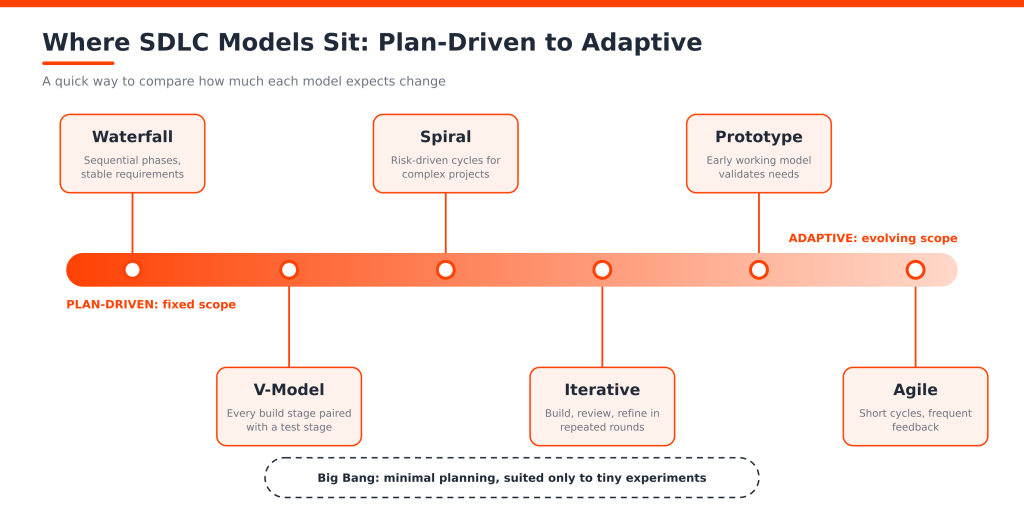
- Waterfall: phases run in sequence with formal sign-off and heavy documentation. Predictable, but changes late in the project are costly.
- Agile: short iterations deliver working software and gather feedback often. It embraces changing requirements.
- Iterative: build a basic version, then refine it through repeated cycles of development and review.
- Spiral: each loop plans, assesses risk, builds, and evaluates. Suited to complex or high-risk projects.
- V-Model: each development stage is paired with a testing stage, for example requirements with acceptance testing.
- Prototype: an early working model helps validate unclear requirements before full development.
- Big Bang: little formal planning, with coding starting straight away. Generally unsuitable for complex or high-risk work.
| Model | Main approach | Suitable for | Main limitation |
| Waterfall | Sequential phases | Stable, well-defined requirements | Hard to accommodate late changes |
| Agile | Iterative and incremental | Evolving requirements | Needs frequent collaboration |
| Iterative | Repeated refinement | Progressive improvement | Scope needs careful management |
| Spiral | Risk-driven cycles | Complex, high-risk projects | Can be costly and complex |
| V-Model | Development mapped to testing | Strict verification needs | Less flexible to change |
| Prototype | Early working model | Unclear user requirements | Prototype expectations can mislead |
| Big Bang | Minimal formal planning | Small experiments | High uncertainty and risk |
How to Choose a Model
No model is universally best. Ask five questions: How stable are the requirements? How risky is the project? Do regulations demand formal documentation and traceability? Can stakeholders give regular feedback? How often must you release? Stable, regulated work leans toward Waterfall or the V-Model. Uncertain, fast-moving products lean Agile. Many organizations blend them, for example planning a release roadmap up front and delivering in sprints.
Agile Software Development Life Cycle: How It Works
Agile is an iterative way of organizing and delivering software. Instead of finishing each phase for the whole product, the team runs all the phases in small slices. A typical Scrum rhythm looks like this:
- Product backlog: a prioritized list of everything the product might need.
- Sprint planning: the team picks the items it can finish in the next sprint, usually one to four weeks.
- Development and daily collaboration: build, test, and sync often.
- Testing and feedback: each item is tested inside the sprint.
- Sprint review: stakeholders see working software and react.
- Retrospective: the team improves how it works. Working increments ship regularly.
In the clinic example, sprint one might deliver basic booking, sprint two cancellations, and sprint three reminders, with real patient feedback shaping each step. Inside every sprint the team does a miniature version of the lifecycle: it plans the work, clarifies the requirement, designs the change, codes, tests, and often releases.
Agile is not one fixed SDLC model. It is a family of principles, set out in the Agile Manifesto, and Scrum is one common framework for applying them. Compared with Waterfall, Agile revisits requirements and design continuously instead of fixing them up front. That makes it flexible, but it needs engaged stakeholders and disciplined engineering.
Secure Software Development Life Cycle (Secure SDLC)
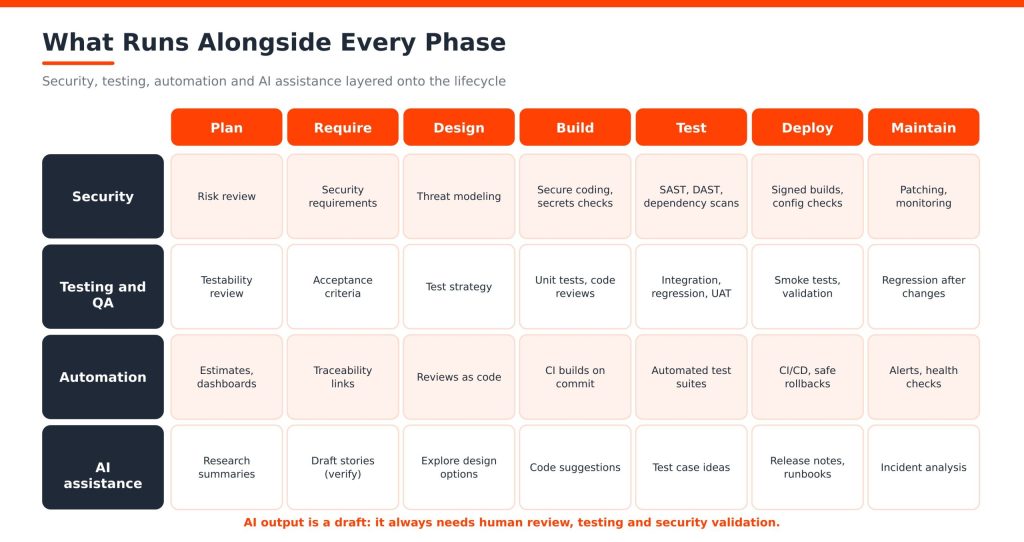
A secure software development life cycle builds security into every phase instead of checking it just before release. Moving security checks earlier is often called shifting left. Late discovery is expensive: a flaw found in production can touch design, code, tests, and deployment. Modern projects also depend heavily on open-source packages, so supply chain risk, meaning vulnerable or tampered dependencies, belongs in the process too. Practical steps by phase:
- Requirements: define security and privacy needs.
- Design: use threat modeling and secure architecture patterns.
- Development: follow secure coding standards and manage secrets properly.
- Testing: run static (SAST) and dynamic (DAST) testing, dependency and vulnerability scanning, and security tests.
- Release: check configuration and verify what you ship.
- Maintenance: patch quickly and monitor for threats.
DevSecOps supports this by automating security checks inside the delivery pipeline. For frameworks, the NIST Secure Software Development Framework (SP 800-218) describes secure development practices that fit into any lifecycle, and the OWASP SAMM model helps organizations assess and improve software security maturity.
EXAMPLE (HYPOTHETICAL)
In the clinic app, threat modeling during design reveals that appointment links could be guessed, so the team adds signed, expiring links. Static analysis then runs on every pull request, and a dependency scan flags a vulnerable library before release, not after.
SDLC Tools Used Across the Software Development Process
Software development life cycle tools support specific stages. No single product manages the whole lifecycle, so most teams combine several. Check current capabilities and licensing before you commit.
| Stage | Example tools | What they help with |
| Project and requirements | Jira, Azure Boards, Trello | Backlogs, tasks, and progress tracking |
| Design and collaboration | Figma, Lucidchart, Miro | Wireframes, diagrams, and workshops |
| Development and version control | Git, GitHub, GitLab, Visual Studio Code | Writing, storing, and reviewing code |
| Testing and QA | Selenium, JUnit, Postman, SonarQube | Browser, unit, and API tests; code quality and security analysis |
| CI/CD and deployment | Jenkins, GitHub Actions, GitLab CI/CD, Azure Pipelines | Automated builds, tests, and releases |
| Monitoring and maintenance | Prometheus, Grafana, Datadog | Metrics, dashboards, and alerts |
Pick tools for the problems you actually have, and make sure they integrate, since handoffs between tools are where information gets lost.
A quick note on related terms. DevOps is a culture and set of practices that joins development and operations. CI/CD automates building, testing, and delivering code. Both plug into the SDLC rather than replacing it: the lifecycle is the whole journey, and CI/CD automates parts of the middle and end of it.
AI in the Software Development Life Cycle in 2026
An AI software development life cycle is not a new lifecycle. It is the same phases with AI assistance added at many points:
- Requirements: summarizing interviews and drafting documentation or user stories.
- Coding: code generation, completion, and automated review suggestions.
- Testing: generating test cases and helping debug failures.
- Documentation and release: drafting docs and release notes.
- Operations: monitoring support and incident analysis.
The limits matter just as much. AI can produce incorrect or insecure code, invent technical recommendations, and raise data privacy and intellectual property questions. Its output needs human review, testing, and security validation like any other contribution.
The 2025 DORA research, based on responses from nearly 5,000 technology professionals, found that AI acts mainly as an amplifier: it magnifies the strengths of well-run teams and the weaknesses of struggling ones. In other words, AI supports SDLC activities, but it does not replace engineering judgment or quality assurance.
A practical rule: treat AI like a fast but unproven junior contributor. Review its changes, run the tests, scan the code, keep confidential code out of unapproved tools, and note where AI was used so reviewers know where to look harder.
Software Development Life Cycle Best Practices
- Define clear requirements and agree on what “done” means.
- Choose a model based on project needs, not habit.
- Involve stakeholders throughout, not just at kickoff.
- Set measurable quality criteria, such as test coverage or performance targets.
- Keep documentation clear and current.
- Use version control and code reviews for every change.
- Test early and often.
- Apply secure coding practices from day one.
- Automate repetitive builds and deployments.
- Monitor after release and act on what you learn.
- Keep feedback loops short and retrospectives honest.
- Review technical debt regularly before it compounds.
Each of these improves collaboration, quality, predictability, or maintainability. Short feedback loops matter most: the sooner a misunderstanding, defect, or vulnerability is found, the less it costs to correct. If a phase is short on skilled people, some teams add dedicated developers through HireDeveloper.dev so internal staff can focus on architecture and review.
Common SDLC Challenges and How to Overcome Them
COMMON MISTAKE
Treating the lifecycle as paperwork. If a phase produces documents nobody reads, shorten it. If a phase is skipped, such as maintenance planning, expect to pay for it later.
| Challenge | Practical way to reduce it |
| Unclear or changing requirements | Write acceptance criteria, validate with stakeholders, and use a change process. |
| Poor estimation | Break work into small items and re-estimate from real velocity. |
| Communication gaps | Share one backlog and hold regular, short syncs. |
| Scope creep | Prioritize ruthlessly and trade new work against existing work. |
| Inadequate testing | Plan tests with requirements and automate regression checks. |
| Security found late | Add threat modeling and automated scans from the start. |
| Technical debt | Reserve capacity in every cycle to refactor. |
| Integration and deployment problems | Integrate continuously and rehearse releases and rollbacks. |
| No maintenance plan | Budget for support and ownership before launch. |
Conclusion: Choosing the Right Software Development Life Cycle
The software development life cycle gives software projects a shape: seven phases that move an idea from planning to maintenance. Models such as Waterfall, Agile, and the V-Model differ in how they organize that work, and testing, security, and continuous improvement matter in every one of them. Choose an approach based on your project’s complexity, risk, requirements, and delivery needs, and adjust it as you learn. Your next step: map your current process to the seven phases and find the one where problems keep appearing.
Need more engineering capacity for your next build?
If your organization is planning a software project and needs extra development capacity, explore how HireDeveloper.dev can support your team with dedicated developers.