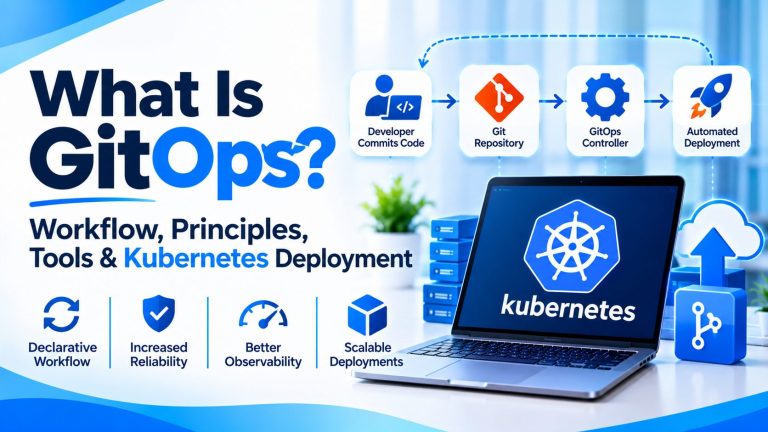
Introduction
It is 4:47 p.m. A developer bumps a replica count in a config file, merges it, and heads home. The next morning the cluster still runs the old number, and nobody can say whether the change was applied, reverted, or overwritten by someone’s late-night command. The repository says one thing. Production says another.
That gap is the problem GitOps exists to solve. It treats Git as the source of truth for application and infrastructure configuration, then uses automation to make the live environment match what Git says. Every change is reviewed, recorded, and reversible.
This guide covers what GitOps is, how the workflow runs, the four core principles, how it works with Kubernetes, the tools worth knowing in 2026, and how to adopt it without breaking things.
What Is GitOps?
THE SHORT VERSION
GitOps is an operating model for delivering software and infrastructure. The desired state of a system is stored declaratively in Git, and automated agents continuously pull that state and reconcile the live environment to match it.
You will see it written as GitOps or “Git Ops.” Either way, five ideas hold it together:
- Desired state: what the system should look like, as written in Git.
- Actual state: what is really running right now.
- Declarative configuration: files that describe the outcome, such as “three replicas,” not the steps to get there.
- Reconciliation: the process of comparing the two states and closing the gap.
- Configuration drift: any difference between desired and actual state, usually caused by manual changes.
IN PLAIN ENGLISH
Think of a thermostat. You set 21 degrees. The thermostat keeps measuring the room and adjusts the heating until the room matches. Git holds the setting, and the GitOps controller is the thermostat.
Here is a small example (illustrative). A team wants five replicas instead of three. An engineer edits one line, opens a pull request, and a teammate approves it. After the merge, the controller notices the new desired state and scales the application. If someone later runs a manual command to scale it to eight, the controller sees the drift and, with self-healing enabled, puts it back to five.
How Does GitOps Work? Understanding the GitOps Workflow
A GitOps workflow is a loop with a human-approved front half and an automated back half. In order:
- An engineer changes application or infrastructure configuration.
- The change is committed to a Git repository.
- A pull request (or merge request) is opened.
- Automated checks and reviewers validate it.
- The approved change is merged into the designated branch.
- A GitOps controller detects the updated desired state.
- It compares the repository with the live environment.
- It applies whatever changes are needed.
- It keeps reconciling to hold the desired state.
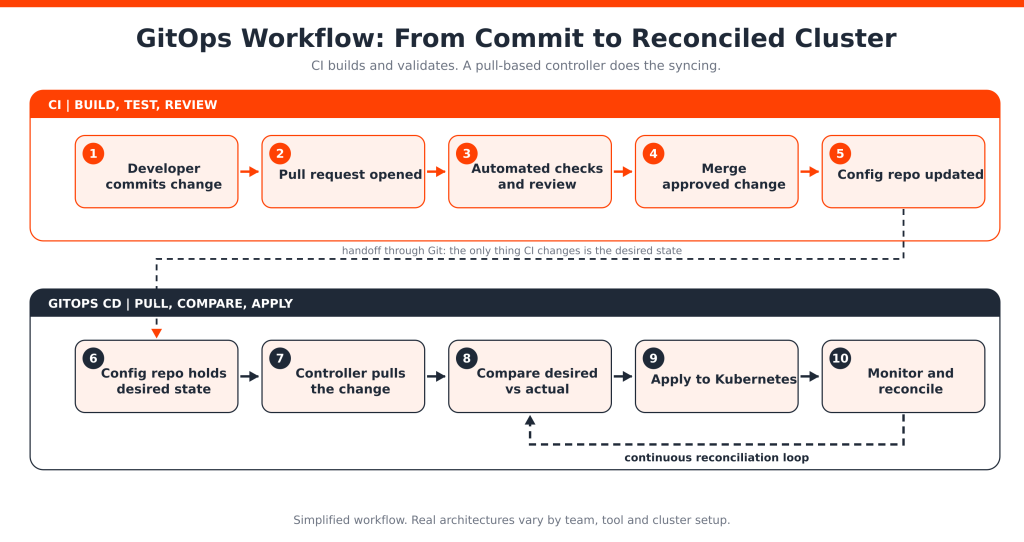
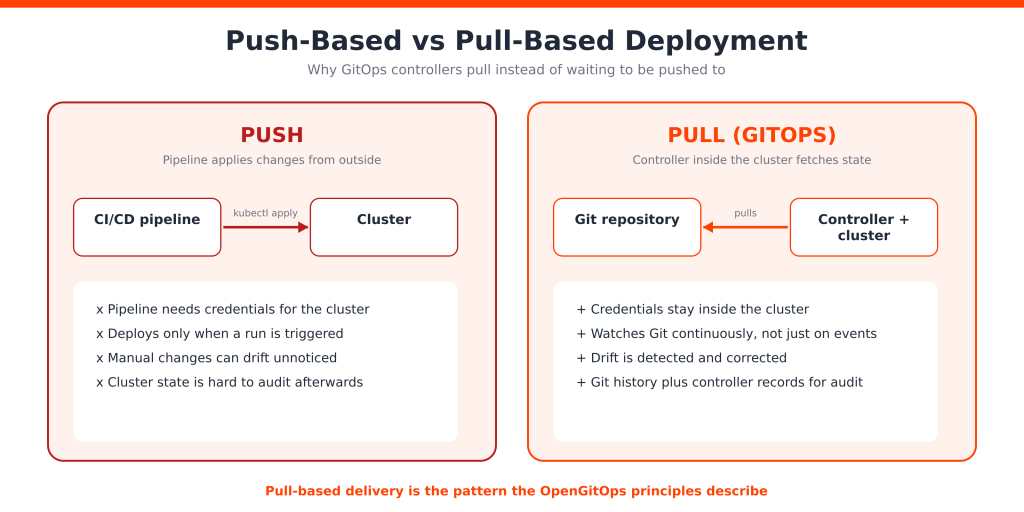
Several parts cooperate here. Git repositories hold configuration manifests. CI pipelines build and test code and may update image versions. A GitOps controller runs in or near the cluster, and the Kubernetes API is how it reads and changes live resources.
That split matters. CI commonly builds and tests application code. The GitOps controller continuously synchronizes declared configuration with the target environment. Some people call the whole thing a GitOps pipeline, but it is really two cooperating loops. The diagram is simplified, and real architectures vary.
Things still go wrong. Webhooks get dropped, repository credentials expire, and manifests fail to render. That is why teams watch for sync errors and stale revisions instead of assuming a merged change is a deployed change.
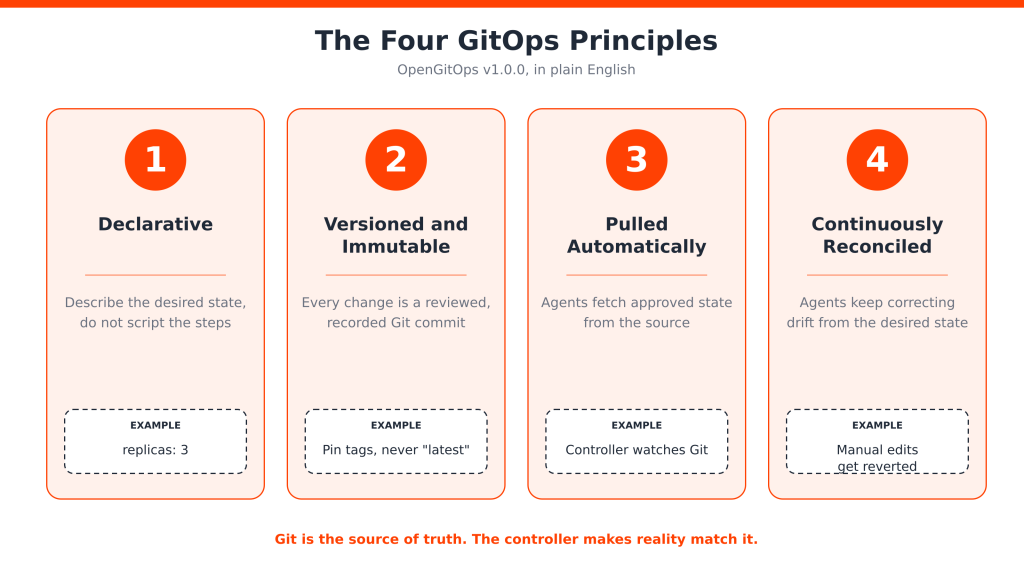
What Are the Four Core Principles of GitOps?
The most widely cited GitOps model is the OpenGitOps v1.0.0 set of principles, developed under the CNCF. Each one builds on the last.
Declarative Configuration
The desired state is expressed as facts about the system, not as a script of commands. Declarative files separate what you want from how it gets done, which makes the result predictable and easy to review.
Versioned and Immutable Desired State
Git stores history, supports review, and gives you traceability and rollback options. But “we use Git” is not enough. A manifest that references a “latest” image tag is not truly versioned, because you cannot reliably roll it back. Git history and branch protection also do not make every deployment immutable on their own.
Automatically Pulled and Applied Changes
A software agent fetches approved changes and applies them. In a push-based model, an external pipeline runs commands against the cluster and needs credentials to do it. In a pull-based model, the agent inside the environment reaches out to Git. Webhooks can speed up detection, but the agent should not rely on them alone.
Continuous Reconciliation
The agent keeps observing actual state and attempts to match the desired state, correcting drift as it appears. Exactly how this works, including how aggressively it self-heals, depends on the tool and its settings.
Together these principles make deployments more predictable and auditable: you can answer “what changed, who approved it, and what is running now?” from records, not memory.
GitOps vs DevOps vs CI/CD: What Is the Difference?
These ideas overlap, but they are not interchangeable. DevOps is a culture and set of practices that joins development and operations. CI/CD automates building, testing, and delivering software. GitOps adds a specific way of managing the desired state of systems using Git and reconciliation.
Git in DevOps is everywhere already. It holds source code, pipeline definitions, and review history. GitOps goes further by making Git the authority for what should be running. The same logic reaches beyond applications: DataOps, for example, applies similar practices to data pipelines, and teams often version those definitions in Git too.
| Aspect | DevOps | CI/CD | GitOps |
| Main focus | Collaboration and delivery practices | Automating build, test, and delivery | Git-based management of desired system state |
| Role of Git | Common version control tool | Stores code and pipeline configuration | Source of truth for declared configuration |
| Automation | Broad development and operations automation | Build, test, and release automation | Synchronization and reconciliation |
| Deployment approach | Varies by team | Push-based or other models | Commonly pull-based with a controller |
| Auditability | Depends on implementation | Pipeline and release logs | Git history plus controller records |
GitOps usually sits inside a DevOps and CI/CD ecosystem. It does not replace the rest of those practices.
How GitOps Works with Kubernetes Deployment
Kubernetes is a natural fit because it is already declarative. You describe objects such as Deployments, Services, ConfigMaps, and Secrets in YAML manifests, usually organized by namespace or environment, and Kubernetes works to make the cluster match them. See the Kubernetes documentation for the object model.
A simplified Kubernetes GitOps deployment looks like this:
- Store Kubernetes manifests in Git.
- Review configuration changes through pull requests.
- Merge approved changes.
- Let the GitOps controller detect the repository change.
- Synchronize the declared state with the cluster.
- Monitor reconciliation and application health.
Here is a short, illustrative Deployment manifest. It is not a production-ready setup:
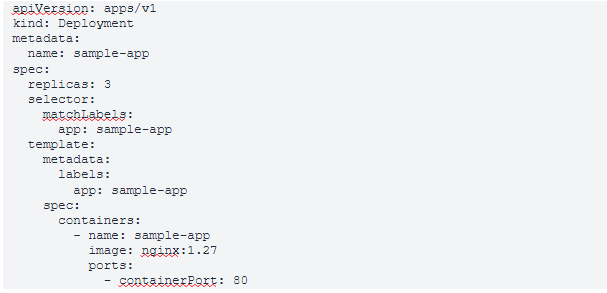
The manifest declares the desired state. Two controllers then play different roles. Kubernetes’ own Deployment controller keeps the running Pods in line with the object inside the cluster. The GitOps controller keeps that object in line with Git.
COMMON MISTAKE
Kubernetes does not read your Git repository. The GitOps controller does the repository synchronization. Without one, a merged manifest just sits in Git.
A Git Change, Start to Finish (Illustrative)
Imagine a team ships version 1.4.2 of an API. CI builds and tests the code, pushes an image tagged 1.4.2, and opens a pull request against the configuration repository that changes the image line. A reviewer approves it, and the merge lands on the main branch. Within the controller’s polling interval, or sooner if a webhook fires, the controller sees the new commit, renders the manifests, and applies the difference. Kubernetes then performs a rolling update. If health checks fail, the team reverts the commit in Git, and the controller rolls the cluster back to the previous version. The audit trail is the pull request, the merge commit, and the controller’s sync history.
Configuration Drift and Reconciliation
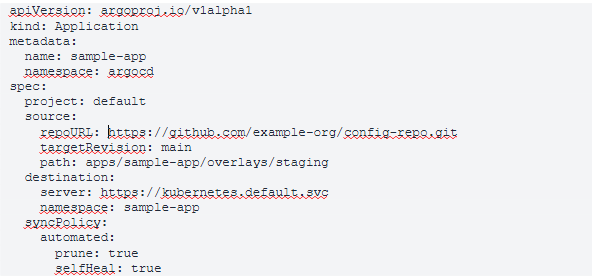
Drift happens when live state stops matching Git: an engineer edits a resource during an incident, an autoscaler changes replicas, or a script patches a ConfigMap. A GitOps controller finds it by comparing the rendered desired state with what the Kubernetes API reports. Depending on settings, it can simply flag the difference (Argo CD shows an OutOfSync status, for example) or correct it automatically. Automatic correction is powerful, but it surprises people who patch production by hand, so agree on a policy first. Exclude fields owned by other controllers, such as autoscaled replica counts, so the two do not fight.
Most Popular GitOps Tools in 2026
Which are the best GitOps tools? It depends on the job, because only some tools are GitOps controllers. The rest are supporting automation or infrastructure tools, and they are not interchangeable.
Argo CD
Argo CD is a Kubernetes-focused GitOps continuous delivery controller with a strong UI. It compares live state with Git, reports sync and health status, and supports manual or automated sync, multiple clusters, and Helm or Kustomize sources. A minimal Application with automated sync and self-heal (illustrative):
Flux CD
Flux is a set of Kubernetes controllers (a toolkit) that pull from Git and other sources and reconcile cluster configuration, including Kustomize and Helm. Its source, kustomize, and helm controllers are separate, so you can adopt only the pieces you need, and optional image automation can update tags in Git. Argo CD and Flux are both CNCF graduated projects, and both are common choices.
Weave GitOps
Weave GitOps was a dashboard and management layer built on Flux. Its parent company, Weaveworks, shut down in February 2024, and recent checks suggest the open source UI still ships an older binary. Treat it as legacy and evaluate Flux or Argo CD directly instead.
Jenkins, GitHub Actions, and GitLab CI/CD
Jenkins is an automation server, and it can run CI steps or update config repos, but it is not a native reconciliation controller. GitHub Actions can build images and open pull requests that trigger a deployment, yet on its own it does not continuously reconcile. GitLab CI/CD covers builds, tests, and security scanning, and GitLab documents integration with Flux for pull-based workflows. In short, they feed the GitOps flow from the CI side.
Terraform
Terraform is an Infrastructure as Code tool, not a Kubernetes GitOps controller. Terraform GitOps usually means keeping configuration in Git, running a plan on pull requests, and applying after approval. Protect the state file, use remote state with locking, and review plans carefully.
| Tool | Main role | Common use case |
| Argo CD | Kubernetes GitOps CD | Application synchronization and deployment |
| Flux CD | Kubernetes GitOps toolkit | Automated reconciliation of cluster configuration |
| Weave GitOps | Flux-based UI (legacy) | Viewing GitOps workflows; avoid for new projects |
| Jenkins | Automation and CI/CD | Build, test, and release automation |
| GitHub Actions | Repository-based CI automation | Building and validating changes |
| GitLab CI/CD | Integrated CI/CD platform | Testing, scanning, and deployment workflows |
| Terraform | Infrastructure as Code | Declarative infrastructure provisioning |
GitOps Branching Strategy and Repository Structure
Most teams separate the application repository (source code) from the configuration repository (manifests and environment settings). CI builds from the first and updates the second, which keeps deployment history clean.
For environments such as development, staging, and production, you can use directories (one folder or overlay per environment) or branches (one per environment). Directories are simpler to compare and review. Branches can suit strict promotion flows, but long-lived environment branches tend to drift apart, so promote by merging rather than copying files. Tools such as GitOps Promoter, an Argo Project Labs tool, automate promotion through pull requests, so check its maturity before relying on it.
A monorepo gives one place to search and review, while multiple repositories give finer access control and clearer ownership. Neither is right for every team. Whichever you choose, use protected branches, mandatory reviews, and versioned references to releases.
GitOps Security: Risks and Best Practices
GitOps concentrates power in a repository, so GitOps security starts with protecting it. Key risks include broad repository permissions, exposed credentials, misconfigured Kubernetes RBAC, untrusted configuration changes, supply-chain attacks, vulnerable container images, and unauthorized deployments. The OWASP CI/CD security risks list is a useful companion.
NEVER DO THIS
Do not commit plain-text Kubernetes Secrets to Git. Base64 is encoding, not encryption.
- Grant least-privilege access to repositories and clusters.
- Require protected branches and reviews, with separation of duties for production changes.
- Keep secrets out of plain text using encrypted workflows or external secret managers (Sealed Secrets, SOPS, and External Secrets Operator are common examples).
- Scan images and dependencies, and sign commits or artifacts where appropriate.
- Enforce policy and keep audit logs of both Git and controller activity.
Scope the controller’s own RBAC too. A controller with cluster-admin everywhere turns a repository compromise into a cluster compromise. Use separate paths or repositories and credentials per environment where you can, and pin image digests so you deploy exactly what you verified.
Benefits and Challenges of GitOps
Benefits. The GitOps benefits are practical:
- More consistent deployments and better change traceability.
- Version-controlled application and infrastructure configuration.
- Easier audits and reviews.
- Less manual deployment work and better drift management.
- More predictable Kubernetes operations, and recovery from known Git revisions, subject to safe rollback procedures.
Challenges. It is not magic:
- A real learning curve and initial setup effort.
- Repository sprawl and complex multi-cluster or multi-environment management.
- Secrets and credential handling.
- Stateful applications and database migrations, which do not roll back as neatly as stateless ones.
- Reconciliation conflicts and the risk of incorrect desired state, which GitOps will faithfully apply.
- A need for monitoring and operational expertise.
It is also fair to ask whether it is worth it. A single small application on one server may not need a controller, a config repository, and a review flow. The payoff grows with the number of environments, clusters, and people changing them.
KEY TAKEAWAY
GitOps makes changes safer and more visible. It does not make a bad change good, so review quality still matters.
GitOps Implementation: A Practical Adoption Roadmap
- Assess your current CI/CD and infrastructure workflows.
- Choose a suitable GitOps controller.
- Decide which application and infrastructure configuration belongs in Git.
- Organize repositories and environment configuration
- Set up secure repository and cluster access.
- Deploy and configure the controller.
- Start in a non-production cluster.
- Configure sync and reconciliation policies.
- Add monitoring, alerts, and security controls.
- Expand gradually to production and more environments.
Adopt incrementally and avoid migrating every workload at once. A good first candidate is a stateless, low-risk service with clear health checks. Write down how you will roll back, and rehearse it once in staging before anything reaches production. If your team lacks platform capacity for the rollout, adding dedicated developers with Kubernetes experience through HireDeveloper.dev is one way some teams keep delivery moving. Others use GitOps consulting or services for the initial design.
GitOps Best Practices for 2026
- Keep Git as the trusted source of desired state, and avoid manual cluster edits.
- Make pull requests the deployment gate, so review is governance, not ceremony.
- Separate app code from deployment config where it helps ownership and history.
- Handle environment differences carefully, with overlays rather than copy and paste.
- Protect production branches and secure secrets outside plain-text repositories.
- Pin and verify image versions, so every state is reproducible.
- Monitor reconciliation and sync errors, because a silent failure is drift in disguise.
- Assign clear ownership for each repository and environment.
- Test before production sync, and keep rollback procedures ready.
- Review controller permissions regularly, since the controller is a privileged actor.
Nearly every practice here protects one of two things: the integrity of the desired state, or the visibility of what happened. If a habit does neither, question it.
Conclusion: Is GitOps the Right Approach for Modern Software Delivery?
GitOps means managing declared desired state in Git and letting automation keep reality in line with it. Its four principles make Kubernetes and cloud-native delivery more predictable and auditable, and tools like Argo CD and Flux do the reconciling. Security, monitoring, and repository governance are what keep it trustworthy. Your best next step is small: pick one non-production cluster, move one application into Git, and see how it feels before committing the rest.
Need more engineering capacity for your platform work?
If your organization is planning to strengthen its cloud-native delivery, explore how HireDeveloper.dev can support your technology team with dedicated developers.