






Introduction
Ask five different SaaS founders why their team’s AI features took longer to ship than expected, and four of them will describe some version of the same problem: every new tool the AI needed to talk to, whether that was a CRM, a support inbox, or an internal database, meant another custom integration, another set of API quirks to handle, and another thing that quietly broke the next time an upstream service changed something. Model Context Protocol, or MCP, exists specifically to end that cycle, and heading into the second half of 2026 it is going through the biggest change since it launched.
MCP is an open standard that lets AI applications connect to external tools, data, and services through one consistent interface instead of a custom integration for every connection. Anthropic introduced MCP in November 2024, and it is now stewarded as an open governance project under the Linux Foundation, with development driven by public Working Groups and a formal Spec Enhancement Proposal process. It has been adopted by Claude, ChatGPT, Microsoft Copilot Studio, Visual Studio Code, Cursor, Databricks, AWS, and thousands of independent MCP servers. This guide breaks down what MCP is, walks through what happens under the hood when an AI assistant uses it, covers exactly what is changing in the 2026 specification update, and explains why engineering teams keep adopting it.
2026 UPDATE: A new MCP specification, dated 2026-07-28, is locked as a release candidate andfinalizeson July 28, 2026. It is the largest revision of the protocol sincelaunch. See the dedicated section below for what changes.
This guide combines information from the official MCP documentation, the MCP specification blog, the MCP GitHub organization, IBM Think, Databricks, Zapier, and AWS, along with our own perspective from working with backend engineering teams across the US, UK, and Europe. Sources are listed at the end of this article.
What Is the Model Context Protocol (MCP)?
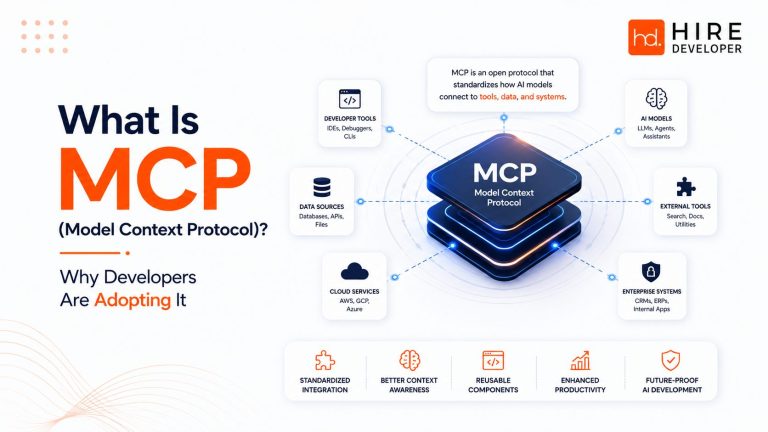
MCP is an open source protocol that standardizes how AI applications, such as Claude or ChatGPT, connect to external systems including local files, databases, search engines, calculators, and specialized workflows. The official MCP documentation describes it as a way to give AI applications access to key information and the ability to perform real tasks, rather than being limited to whatever was in their training data.
The comparison used across nearly every source on this topic, including Anthropic, IBM, Databricks, and Zapier, is that MCP works like a USB-C port for AI applications. Before USB-C, every device needed its own cable and adapter. USB-C gave hardware makers one standard connector that works across devices, and MCP does the same for AI systems: one protocol instead of a custom integration for every tool, database, or API an AI application needs to reach.
What has changed since MCP’s first year is governance, not just features. The project now runs under a formal open source structure, a Series of LF Projects, LLC under the Linux Foundation, with technical direction set through public Working Groups, Interest Groups, and Spec Enhancement Proposals, or SEPs, rather than a single vendor’s roadmap. For engineering leaders evaluating whether to build on MCP long term, that governance shift matters as much as any single feature: it is a stronger signal that the standard will keep evolving with broad industry input instead of one company’s priorities.
The Problem MCP Solves: Why Integrations Used to Multiply
Before MCP, connecting an AI model to multiple external tools created what Databricks and AWS both describe as the N times M integration problem. With N different AI applications and M different tools or data sources, connecting every application to every tool directly means building and maintaining N multiplied by M separate integrations.
Put actual numbers on it. A company running five AI-powered products, each needing access to twenty internal tools, faces one hundred separate integrations under the old model. Add one new tool, and all five products need their own custom connector rebuilt for it. MCP collapses that math: each AI application implements the client side once, and each tool implements the server side once, bringing the total down from one hundred integrations to twenty five. That is not a marginal efficiency gain, it is the difference between an integration backlog that grows every quarter and one that stays flat.
Businesses trying to reduce integration overhead often work with HireDeveloper.dev to bring in backend developers who already understand protocol-based integrations like MCP.
What Actually Happens When an AI Assistant Uses MCP
It helps to walk through a concrete example rather than stay purely conceptual. Say a developer asks Claude, inside an IDE with an MCP-connected GitHub server, to summarize open issues labeled bug.
- 1. The host receives the request. The AI application, in this case the IDE, captures the natural language request and passes it to the model.
- 2. The model decides a tool is needed. Claude recognizes it cannot answer from memory alone and identifies that a connected GitHub tool can list issues matching a label.
- 3. The client formats the call. The MCP client inside the host converts that intent into a structured JSON-RPC request matching the tool’s defined schema.
- 4. The server executes the action. The GitHub MCP server receives the request, calls the GitHub API with proper authentication, and retrieves the matching issues.
- 5. The response returns as structured data. The server sends the results back through the client in JSON-RPC format, which the model then reads as context, not as a command.
- 6. The model composes the answer. Claude turns the raw issue data into a readable summary for the developer, all within the same conversation.
The entire round trip typically takes a second or two. What matters for engineering teams is that none of those six steps required custom code specific to Claude or specific to GitHub. The same GitHub MCP server works identically if the host were Cursor, ChatGPT, or an internal enterprise chatbot instead. This basic flow holds true across both the current 2025-11-25 specification and the incoming 2026-07-28 version, the difference described in the next two sections is in how the connection underneath that flow is set up and kept alive.
Tools, Resources, and Prompts: The Three Building Blocks
Every mcp server exposes its capabilities through three primitives defined in the model context protocol specification.
- Tools: functions the AI model can call to take action, such as sending an email, running a calculation, or writing a file. The model decides when to call them, which is what gives an agent the ability to actually do something rather than just talk about it.
- Resources: structured data the server makes available for context, such as a document, a database record, or a commit history. Resources inform the model but do not perform actions on their own.
- Prompts: reusable templates that standardize how a user or model triggers a workflow, often surfaced as slash commands inside an mcp app or client interface.
Together, these three primitives are why MCP feels less like a plumbing spec and more like a shared vocabulary between models and software.
How MCP Works: Hosts, Clients, and Servers
MCP architecture has three core pieces. The MCP host is the AI application itself, such as Claude Desktop or an IDE like VS Code, managing one or more clients. The MCP client lives inside the host, keeps a connection to a single server, and handles requests and errors. The MCP server is the external program that exposes data or functionality, such as a GitHub connector, and most are open source, published on GitHub in languages including Python, TypeScript, Java, C#, and Go.
Servers expose capabilities through three primitives:
- Tools: functions the model calls to perform an action, such as sending a message or fetching live data.
- Resources: structured data the server returns, such as a file or database record, without taking an action
- Prompts: reusable templates that standardize how the model requests something from the server.
All of this runs on JSON-RPC 2.0, a lightweight remote procedure call format for requests, responses, and notifications.
MCP Transports: stdio and Streamable HTTP
MCP supports two main transport methods. Standard input and output, or stdio, works best for local integrations such as a file system, handling simple, synchronous message passing with little overhead. Streamable HTTP is built for remote servers and handles asynchronous calls over the web.
Here is where the 2026 update matters in practice. Under the specification that has been live since November 2025, a client calling a tool over Streamable HTTP first opens a session: the server hands back an Mcp-Session-Id that every following request must carry, which pins that client to whichever server instance issued it. That works, but it means a remote MCP server needs sticky routing and a shared session store to run behind a load balancer at scale. The 2026-07-28 specification removes that handshake and session ID entirely. Every request becomes self-contained, carrying its own context in the message body, so any server instance behind a plain round-robin load balancer can handle it, no sticky sessions, no shared session store, and Streamable HTTP responses can now declare a ttlMs value so clients know exactly how long a cached result stays valid.
What's New in MCP for 2026: The 2026-07-28 Specification
The MCP specification that has been in production since November 25, 2025 is still what most live integrations run today. But as of this writing, the next version, dated 2026-07-28, is locked as a release candidate and is scheduled to become the final specification on July 28, 2026, giving SDK maintainers and client builders a ten week validation window. It is described by the protocol’s own maintainers as the largest revision since MCP launched. Here is what changes:
| Change | What It Means | Replaces |
| Stateless protocol core | Requests are self-contained; any server instance can handle any call, no sticky sessions or shared session store needed | The 2025-11-25 handshake and Mcp-Session-Id header |
| Extensions framework | New capabilities ship as opt-in, independently versioned extensions before ever entering the core spec | Ad hoc, undocumented extension patterns |
| MCP Apps (official extension) | Servers ship interactive HTML interfaces hosts render in a sandboxed iframe | Text-only tool responses for UI-heavy use cases |
| Tasks (extension) | Long-running work gets a task handle the client polls with tasks/get and tasks/update | The experimental core Tasks API from 2025-11-25 |
| Authorization hardening | Closer alignment with OAuth 2.0 and OpenID Connect, including mandatory iss validation | Looser, spec-optional authorization guidance |
| Roots, Sampling, Logging deprecated | Still functional for at least 12 months, but new builds should use the listed replacements | N/A, annotation-only deprecation |
A few of these are worth expanding on for anyone actively building against MCP right now:
- Stateful applications still work. Removing the protocol-level session does not remove application state. Servers that need to track something across calls, a shopping basket, a multi-step workflow, mint an explicit handle such as a basket_id from a tool call, and the model passes that handle back as a normal argument on the next call. In practice this has turned out to be more flexible than hidden session state, since the model can reason about the handle and hand it between tools.
- Deprecated does not mean broken. Roots, Sampling, and Logging are marked deprecated under a new formal feature lifecycle policy, but they keep working for at least twelve months after deprecation, giving teams a real migration window rather than a hard cutoff.
- Tool schemas get more expressive. Tool input and output schemas move to full JSON Schema 2020-12 support, meaning conditional logic, composition keywords like oneOf and anyOf, and references are now valid, which matters for teams exposing complex internal APIs as MCP tools.
For a team building or maintaining an MCP server today, the practical takeaway is to track the migration timeline rather than rush it. Tier 1 SDKs are expected to ship support for 2026-07-28 within the ten week validation window following the May 21, 2026 release candidate lock, and the formal deprecation policy means nothing in active production breaks overnight.
What Is an MCP Server? What Is an MCP App?
An MCP server for AI is simply a program that exposes a defined set of tools, resources, or prompts through the MCP standard so any compatible AI client can use them without custom code. Examples include a server for GitHub that lets an AI assistant read and create issues, or Zapier’s MCP server, which alone connects AI assistants to thousands of apps and tens of thousands of actions through one endpoint.
MCP apps have moved from an experimental idea to an official, first-class extension of the protocol, built on the open mcp-ui project. Rather than just returning data or triggering an action, an MCP app lets a server ship an interactive HTML interface, a dashboard, a form, a data visualization, that the host renders inside a sandboxed iframe. Tools declare their UI templates ahead of time so a host can prefetch, cache, and security-review the interface before anything runs, and every action a user takes inside that rendered UI still flows back through the same JSON-RPC protocol and consent path as a direct tool call. This is a meaningful step beyond simple tool calling toward MCP functioning as a lightweight application layer for AI clients.
The MCP Ecosystem: Who Supports It Today
MCP adoption moved unusually fast for a new protocol. Claude supported it from day one, since Anthropic created the standard, and ChatGPT added MCP support through OpenAI’s developer platform, including third-party access inside ChatGPT apps. Visual Studio Code now ships with a built in Model Context Protocol VS Code extension, letting developers connect MCP servers directly inside their editor, and Microsoft has built MCP support into Copilot Studio, often what people mean by Microsoft MCP integration.
Cloud platforms adopted it just as fast. Databricks governs MCP servers through its AI Gateway and Unity Catalog permissions, AWS supports MCP through Amazon Bedrock, and Zapier built a server that exposes its entire app ecosystem to any compatible client. Cursor, Windsurf, and Postman round out a fast-growing list of MCP clients, and the protocol’s own governance now runs through public Working and Interest Groups rather than a single vendor.
MCP Libraries, SDKs, and the MCP Inspector
Anthropic and the community maintain official MCP libraries, sometimes called MCP SDKs, published under the Model Context Protocol GitHub organization, covering Python, TypeScript, Java, C#, Kotlin, and Go. Each SDK handles JSON-RPC formatting, transport setup, and primitive definitions, so a developer building a new server does not implement the protocol from scratch. As of the 2026 governance updates, official SDKs are now scored against a conformance test suite and grouped into SDK tiers, giving teams a clear, public signal of which library tracks the current specification most closely before they build on it.
For debugging, the Model Context Protocol Inspector is a browser based tool that connects to any MCP server, lists its tools and resources, and lets a developer manually test calls before wiring it into a real client, saving real time over debugging purely through a chat interface.
Model Context Protocol Security
Security is an active area of discussion in the MCP community, and it deserves attention since some sources gloss over it. Because a server can grant an AI model real access to data and real actions, a poorly secured one introduces genuine risk.
- Over-permissioned servers: a server should expose only the specific tools and data a use case needs, not blanket access to an entire system.
- Prompt injection through tool output: data returned from a resource or tool can contain hidden instructions, so output should be treated as untrusted content, not a trusted command.
- Tool poisoning: a malicious or compromised server can register a tool that looks legitimate but performs a harmful action, which is why installing servers from unverified sources carries real risk.
- Credential handling: API keys and tokens used by a server need the same rotation and least-privilege discipline as any production secret.
The 2026-07-28 specification directly targets one long-standing weakness here: authorization. Six SEPs harden the authorization spec to align more closely with how OAuth 2.0 and OpenID Connect actually get deployed, including a requirement that clients validate the iss parameter on authorization responses per RFC 9207, which mitigates a class of mix-up attack that is more common in MCP’s pattern of one client talking to many servers. Security researchers covering the update have also noted that some of these changes shift more of the safeguarding responsibility onto developers implementing clients and servers correctly, so tightening the specification is not a substitute for a team’s own review process. Databricks governs servers through Unity Catalog and managed OAuth, and AWS emphasizes centralized governance at scale. Any team adopting MCP internally should review a new server the way it reviews any third-party API, and should track the authorization changes in 2026-07-28 closely if it runs MCP in production.
MCP vs API vs Function Calling
A common point of confusion is how MCP relates to a regular API or to function calling. Here is how they differ:
| Approach | What It Standardizes | Integration Effort | Reusable Across AI Clients |
| Traditional REST API | Data exchange between two specific systems | Custom code per integration | No, built for one consumer at a time |
| Function calling | How a single model calls a predefined function | Custom per model provider | Limited, tied to one model’s function schema |
| Model Context Protocol | How any AI client discovers and calls any tool or resource | Build once per server, reuse everywhere | Yes, works across any MCP-compatible client |
MCP is not a replacement for REST APIs. Most MCP servers call existing REST APIs behind the scenes. What it replaces is the need for a separate custom connector for every AI application that wants to use that API.
Why Developers Are Adopting MCP
Developers are adopting MCP for reasons that go beyond hype. The practical benefits show up in day to day engineering work:
- Faster integration cycles: build one MCP server and every compatible AI client, present and future, can use it without extra work.
- Lower maintenance burden: one protocol instead of a patchwork of provider-specific plugins that each break differently when an upstream API changes.
- Portability across AI vendors: switching providers, or supporting several at once, does not require rebuilding integrations from scratch.
- Faster agent development: MCP handles the tool connection layer, freeing engineers to focus on agent logic instead of plumbing
- Neutral governance: with the protocol now under Linux Foundation stewardship and support from Anthropic, OpenAI, Microsoft, AWS, and Databricks, building on it carries less risk of betting on a standard controlled by one vendor’s roadmap.
Companies building agentic products often bring in HireDeveloper.dev to access developers experienced with MCP servers, agent orchestration, and backend integration work.
Getting Started With MCP in an Afternoon
Teams evaluating MCP for the first time do not need a large project to see the value. A useful first step is connecting Claude Desktop or VS Code to a filesystem MCP server, one of the simplest official servers available, which lets the AI read and search files in a chosen local folder.
- 1. Install a host that supports MCP, such as Claude Desktop or a recent version of Visual Studio Code with the MCP extension enabled.
- 2. Add a server entry, pointing the host’s MCP configuration file to an official server package, such as the filesystem or GitHub server, using stdio for a local test.
- 3. Restart the host and ask a real question, such as summarizing a folder’s contents, to see the tool call happen in real time.
- 4. Open the MCP Inspector, to see exactly which tool was called and what data came back, which builds real intuition for how the protocol behaves before writing a custom server.
- 5. Check the protocol version, your host and server report, since 2025-11-25 and 2026-07-28 will both be in circulation during the migration window, and mismatched expectations about sessions are the most common early integration bug.
This kind of low-risk pilot is usually enough for a team to decide whether a deeper MCP investment, such as building a custom internal server, is worth prioritizing on the roadmap.
How to Choose MCP Servers and Tools for Your Team
Start by checking whether an official MCP server already exists for the tool you need. Anthropic, AWS, Microsoft, and most major SaaS platforms now publish official servers, which are almost always safer and better maintained than a third-party alternative. If you must use a community server, check its GitHub activity, its SDK tier if one is listed, review its permission scope, and test it through the MCP Inspector before connecting real data. For internal tools without an existing server, weigh the build effort against how many AI clients will actually use it, since MCP earns its keep once more than one team or product needs the same connection.
Conclusion
Model Context Protocol solves a real, practical problem engineering teams were already feeling: the exploding cost of connecting every AI application to every tool and data source individually. By standardizing that connection into a client-server model with clear primitives for tools, resources, and prompts, MCP turned a growing maintenance headache into a build once, reuse everywhere pattern. Heading into the second half of 2026, that foundation is getting a major refresh: a stateless core built for horizontal scale, official extensions for interactive apps and long-running tasks, and authorization that finally matches how OAuth is deployed in the real world, all under open, multi-vendor governance rather than one company’s roadmap.
If your team is evaluating whether to build an MCP server, migrate to the 2026-07-28 specification, or bring in engineers who understand agent and protocol level work, HireDeveloper.dev can connect you with pre-vetted developers experienced in exactly this kind of integration.
Sources and References
- Model Context Protocol, official documentation, ‘Getting Started’ introductionModel Context Protocol, official GitHub organizationIBM Think, ‘What is Model Context Protocol (MCP)?’ by Anna Gutowska
Databricks, ‘What is the Model Context Protocol (MCP)?’
Zapier, ‘What is MCP (Model Context Protocol)?’
AWS Machine Learning Blog, ‘Unlocking the power of Model Context Protocol (MCP) on AWS’