






Introduction
AI Automation has moved from an experimental IT project to a boardroom priority. For project managers, operations leaders, and founders, the question is no longer whether to adopt it, but how to do it in a way that actually improves delivery speed, quality, and cost.
Every business runs on repeatable work: approvals, data entry, reporting, customer conversations, scheduling, and status updates. Traditional automation handled the predictable parts of this work. AI Automation goes further. It reads unstructured information, makes judgment based decisions, and adapts when a process does not follow the script exactly.
For a PMO leader, this changes how programs are staffed and tracked. For an operations manager, it changes how exceptions get handled. For a CTO, it changes how much custom engineering effort a workflow actually needs. This guide breaks down what AI Automation is, how it works, where it delivers real value, and how to plan an implementation that will hold up under enterprise scrutiny.
What Is AI Automation?
Quick Answer
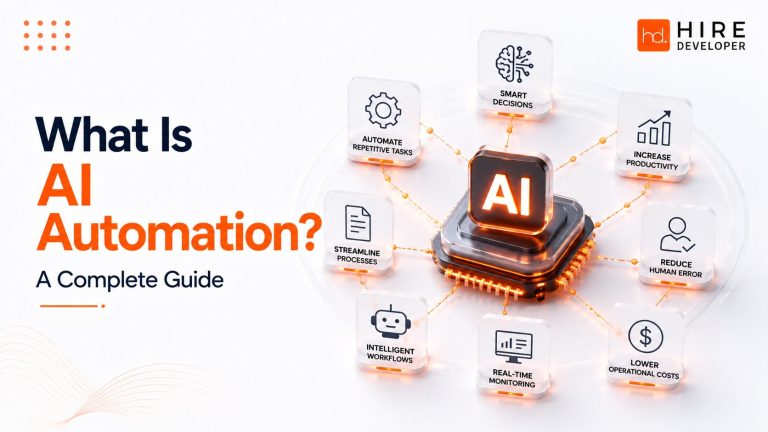
AI Automation is the use of artificial intelligence, including machine learning, natural language processing, and generative AI, to automate tasks and decisions that traditional rule based automation cannot handle on its own. It combines the reliability of workflow automation with the reasoning and adaptability of AI models.
Traditional automation follows fixed rules. If a condition is met, a defined action happens. AI Automation adds a reasoning layer on top of that structure. It can interpret an email, classify a support ticket by intent, extract data from a scanned invoice, summarize a contract, or decide which of several next steps makes sense given the context.
In practice, most enterprise AI Automation is not a single tool. It is a combination of workflow engines, robotic process automation (RPA), large language models (LLMs), predictive analytics, and business rules working together inside a governed process.
How Does AI Automation Work?
At a high level, AI Automation follows a consistent pattern regardless of the department or use case:
- Trigger. A process starts, such as a new email, a form submission, a support ticket, or a scheduled data pull.
- Data capture. The system pulls structured data (from a CRM or ERP) and unstructured data (documents, chat, images) relevant to the task.
- AI interpretation. An AI model classifies, extracts, summarizes, or reasons about the data to determine intent or next steps.
- Decision logic. Business rules and, increasingly, decision intelligence layers combine AI output with policy constraints to decide the action.
- Action or handoff. The system executes the action directly, or routes it to a human for review when confidence is low or stakes are high.
- Feedback loop. Outcomes and corrections are logged and, where appropriate, used to improve future model performance.
AI vs Traditional Automation
Business leaders often ask whether AI Automation replaces RPA or traditional workflow tools. In most enterprise environments it does not replace them, it extends them. The table below breaks down the practical differences.
| Dimension | Traditional Automation | AI Automation |
| Input type | Structured, predictable data | Structured and unstructured data (text, images, speech) |
| Logic | Fixed rules and conditions | Reasoning, pattern recognition, and probability based decisions |
| Handles exceptions | No, exceptions go to a human | Often yes, within defined confidence thresholds |
| Adaptability | Requires manual reprogramming | Learns and adjusts from new data over time |
| Best fit | High volume, repetitive, rule based tasks | Judgment based tasks, unstructured data, natural language |
| Examples | Data entry, file transfers, scheduled reports | Ticket triage, document understanding, AI agents, forecasting |
Key Components of AI Automation
A production grade AI Automation system is built from several layers working together. Understanding this stack helps project managers scope work accurately and helps CTOs evaluate vendors.
Core Technology Components
- Machine Learning: models that recognize patterns and make predictions from historical data.
- Natural Language Processing (NLP): enables systems to read, interpret, and generate human language.
- Large Language Models (LLMs): power tools like ChatGPT, Claude, Gemini, and Microsoft Copilot for reasoning, summarization, and content generation.
- Computer Vision: reads images and documents, useful for invoice processing, quality inspection, and identity verification.
- Robotic Process Automation (RPA): executes rule based digital tasks such as clicking, copying, and data transfer between systems.
- Workflow Engines: orchestrate the sequence of steps, approvals, and handoffs across a process.
- Decision Intelligence: combines AI output, business rules, and historical outcomes to recommend or execute a decision.
A Simple AI Automation Architecture
Most enterprise implementations follow a layered architecture: a data and integration layer (CRM, ERP, databases, document stores), an AI and model layer (LLMs, ML models, NLP, computer vision), an orchestration layer (workflow engine, business rules, low-code or no-code tools), and a governance layer (access controls, audit logs, human review checkpoints). Cloud computing infrastructure typically underpins all four layers, providing the scalability needed for enterprise data volumes.
Types of AI Automation
AI Automation is not one thing. It shows up differently depending on the department and the nature of the work.
| Type | What It Automates | Typical Owner |
| Workflow Automation | Multi step processes across systems and teams | Operations, PMO |
| Marketing Automation | Campaign personalization, lead scoring, content generation | Marketing |
| Customer Service Automation | Ticket triage, chatbots, sentiment routing | Customer Support |
| Finance Automation | Invoice processing, reconciliation, fraud detection | Finance |
| HR Automation | Resume screening, onboarding, policy Q&A | HR |
| IT Automation | Incident triage, monitoring, access provisioning | IT / DevOps |
| Project Management Automation | Status reporting, risk flagging, resource scheduling | PMO |
| Document Automation | Extraction, classification, contract review | Legal, Operations |
Top AI Automation Use Cases
The strongest AI Automation programs start with a specific, high friction business process rather than a broad platform rollout. Here is how that looks across industries.
- Healthcare: automated clinical documentation, appointment triage, and insurance claims processing.
- Finance: fraud detection, automated reconciliation, credit risk scoring, and regulatory reporting.
- Retail: demand forecasting, dynamic pricing, personalized recommendations, and inventory automation.
- Manufacturing: predictive maintenance, computer vision based quality inspection, and supply chain planning.
- Education: automated grading support, personalized learning paths, and administrative workflow automation.
- Logistics: route optimization, shipment tracking automation, and demand sensing.
- Marketing: content generation, audience segmentation, and campaign performance automation.
- Software Development: AI assisted code review, automated testing, and CI/CD pipeline automation.
- Project Management: automated status reporting, risk detection, resource allocation, and meeting summarization.
AI Workflow Automation Explained
AI workflow automation connects individual AI capabilities into an end to end process. Consider a common enterprise example: vendor invoice processing.
Example Workflow: Invoice to Payment
1. An invoice arrives by email as a PDF attachment.
2. Computer vision and NLP extract vendor name, amount, line items, and due date.
3. The system matches the invoice against the purchase order in the ERP.
4. If the match confidence is high and the amount is within policy, the system routes it for automatic approval.
5. If the match is uncertain or the amount exceeds a threshold, it routes to a human approver with the discrepancy highlighted.
6. Once approved, payment is scheduled automatically and the ERP is updated.
This same pattern (capture, interpret, decide, act or escalate) applies to onboarding a new employee, triaging a support ticket, or generating a weekly project status report from scattered updates across tools.
AI Automation Tools
AI Automation tools generally fall into a few categories rather than one universal product. Understanding the category helps you evaluate fit rather than chasing feature lists.
| Category | Purpose |
| Workflow and orchestration platforms | Coordinate multi step processes and approvals, often low-code or no-code |
| Conversational AI platforms | Power chatbots, virtual assistants, and internal knowledge assistants |
| Document intelligence tools | Extract and classify data from PDFs, scans, and forms |
| RPA platforms | Automate rule based digital tasks across legacy systems |
| AI agent frameworks | Enable autonomous, multi step task execution with tool use |
| Analytics and BI platforms | Turn automated process data into dashboards and forecasts |
For most mid-size and enterprise teams, the practical path is integrating a few of these categories into existing CRM, ERP, and project management systems rather than replacing the entire technology stack.
Benefits of AI Automation
| Benefit | Business Impact |
| Faster cycle times | Reduces manual handoffs and approval delays across processes |
| Lower operating costs | Reduces manual labor on repetitive, high volume tasks |
| Fewer errors | Reduces manual data entry and transcription mistakes |
| Better decision making | Predictive analytics surfaces risks and opportunities earlier |
| Improved employee experience | Frees skilled staff from repetitive work for higher value tasks |
| Scalability | Handles volume spikes without proportional headcount growth |
| Stronger customer experience | Faster response times and more consistent service quality |
Challenges of AI Automation
AI Automation programs fail more often from governance and change management gaps than from technology limitations. The main risk areas project leaders should plan for:
Security and Data Quality
AI models are only as reliable as the data feeding them. Poor data quality, inconsistent formats, and fragmented systems reduce automation accuracy and increase the manual review burden.
Compliance and Governance
Regulated industries need clear audit trails for automated decisions. AI governance means defining who owns model performance, how decisions are logged, and how errors are corrected. This is not optional in finance, healthcare, or HR contexts.
Bias and AI Ethics
Models trained on historical data can carry forward historical bias, particularly in hiring, lending, and customer scoring. Responsible AI Automation includes regular bias audits and clearly defined human oversight for sensitive decisions.
Cost and Change Management
Underestimating integration effort and employee adoption is the most common budget failure point. Automation that changes how a team works needs the same change management discipline as any major process transformation.
The AI Automation Maturity Model
Organizations typically progress through four stages. Knowing your current stage helps set realistic scope for the next 6 to 12 months.
| Stage | Characteristics |
| 1. Ad hoc | Isolated tools used by individuals; no shared governance or data standards |
| 2. Departmental | One function (support, finance, marketing) has a working automation with clear ROI |
| 3. Cross functional | Shared workflow and data standards connect automation across departments |
| 4. Enterprise intelligent automation | AI Automation is embedded in core processes with governance, monitoring, and continuous improvement |
The AI Automation Lifecycle
Unlike a one time software rollout, AI Automation requires an ongoing lifecycle because models and data drift over time.
- Discover: identify high friction, high volume, or high error processes.
- Design: map the current workflow and define the AI assisted target state.
- Build: integrate models, workflow engines, and data sources.
- Test: validate accuracy, edge cases, and failure handling before go live.
- Deploy: roll out with human oversight and a rollback plan.
- Monitor: track accuracy, exceptions, and business KPIs continuously.
- Improve: retrain models and refine rules based on real world performance.
How to Implement AI Automation
A disciplined implementation roadmap is what separates a pilot that stalls from a program that scales.
AI Readiness Checklist
- A specific, measurable process problem is identified, not a vague goal to “use AI”
- Process owner and executive sponsor are both identified
- Data sources are accessible, reasonably clean, and mapped
- Compliance and security requirements are documented up front
- Success metrics and a baseline are defined before build begins
- A human review path exists for low confidence or high stakes decisions
AI Workflow Design Framework
For each candidate process, map four elements before building anything: the trigger, the decision points that require judgment, the data required at each step, and the escalation path when confidence is low. This framework prevents teams from automating a process that was never clearly defined in the first place.
Implementation Roadmap
| Phase | Focus | Typical Duration |
| Assess | Process mapping, data audit, readiness checklist | 2 to 4 weeks |
| Pilot | Build and test on one high value process | 4 to 8 weeks |
| Validate | Measure accuracy and business KPIs against baseline | 2 to 4 weeks |
| Scale | Expand to adjacent processes with shared infrastructure | Ongoing |
| Govern | Formalize monitoring, audit, and retraining cadence | Ongoing |
AI Automation KPI Dashboard
Track a small set of metrics consistently rather than a large dashboard nobody reviews: cycle time reduction, exception rate (percentage of cases requiring human review), error rate versus the pre-automation baseline, cost per transaction, and employee time reallocated to higher value work.
A Simple ROI Calculation Example
If a process previously required 200 hours per month at a fully loaded rate of 40 dollars per hour, that is 8,000 dollars in monthly labor cost. If AI Automation reduces manual effort by 60 percent while adding 1,500 dollars per month in tooling and oversight cost, the net monthly saving is roughly 3,300 dollars, before accounting for error reduction or faster cycle times, which typically add further value.
AI Automation Cost Factors
- Data preparation and integration effort, often the largest hidden cost
- Licensing for AI models, workflow platforms, and infrastructure
- Custom development for connecting legacy systems
- Ongoing monitoring, governance, and model retraining
- Change management, training, and internal communication
AI Automation Vendor Selection Checklist
- Does the vendor support your existing CRM, ERP, and data systems without a full rebuild?
- What audit and governance controls are built in, not bolted on later?
- How is pricing structured (per user, per transaction, per workflow) and does it match your volume?
- Can you start with one workflow and expand rather than a full platform commitment?
- What does the vendor’s support model look like during the first 90 days after go live?
AI Automation Roadmap for SMBs vs Enterprises
| SMB Approach | Enterprise Approach | |
| Starting point | One high friction process, often customer support or invoicing | Center of excellence with governance framework first |
| Tooling | Pre-built SaaS tools with minimal customization | Combination of platforms plus custom integration |
| Governance | Lightweight, owned by one process leader | Formal AI governance board and audit trail requirements |
| Timeline | Weeks to first working automation | Months, with phased rollout across business units |
Common AI Implementation Mistakes
- Automating a broken process instead of fixing it first
- Skipping the human review path to save time, then losing trust after an error
- Choosing a platform before defining the process and data requirements
- Underinvesting in change management and employee training
- Treating the launch as the finish line instead of the start of a monitoring cycle
AI Automation Best Practices
- Start with human-in-the-loop design: let AI recommend, and let humans approve, for any decision with real financial, legal, or customer impact until accuracy is proven.
- Set clear confidence thresholds so the system knows when to act automatically versus when to escalate.
- Assign process ownership clearly. Automation without an accountable owner drifts and degrades.
- Integrate AI Automation into existing Agile, Scrum, or Kanban delivery practices rather than running it as a separate shadow project.
- Build monitoring and retraining into the plan from day one, not as an afterthought after performance drops.
- Communicate automation changes to affected teams early. Adoption resistance is a change management problem, not a technology problem.
AI Agents vs Workflow Automation
This is one of the most common points of confusion for business leaders evaluating AI Automation in 2026.
| Workflow Automation | AI Agents / Agentic AI | |
| How it operates | Follows a predefined sequence of steps | Plans its own steps to reach a goal, using tools as needed |
| Flexibility | Fixed path, predictable output | Adapts the path based on context and intermediate results |
| Best fit | Stable, well understood, high volume processes | Open ended tasks with variable inputs and multiple valid paths |
| Governance need | Standard access controls | Stronger oversight, since the exact action path is not fixed in advance |
Most enterprises will use both. Workflow automation remains the more predictable and auditable choice for core financial and compliance processes, while AI agents are increasingly used for research, coordination, and multi-step tasks where the path to the outcome cannot be fully predefined.
Future of AI Automation in 2026
- AI Agents: moving from single task assistants to multi-step, tool using agents that coordinate work across systems.
- Hyperautomation: combining RPA, AI, and process mining to automate entire process chains rather than isolated tasks.
- Generative AI: expanding beyond content creation into document drafting, code generation, and workflow design assistance.
- Predictive AI: shifting automation from reactive (responding to events) to proactive (anticipating issues before they occur).
- Multi-agent systems: specialized AI agents collaborating on complex workflows, with one agent handling research and another handling execution.
- Human-AI collaboration: the durable model is augmentation, not full replacement, with humans retaining decision authority on high stakes outcomes.
AI Automation Myths, Debunked
| Myth | Reality |
| AI Automation replaces most jobs | It typically reallocates time from repetitive tasks toward judgment based work; full role replacement is the exception, not the rule |
| It works out of the box with no setup | Accuracy depends heavily on data quality, integration, and process design |
| More AI always means better automation | The right scope for the process matters more than the sophistication of the model |
| It is only for large enterprises | SMBs often see faster, simpler wins on a single well scoped process |
Conclusion
AI Automation is not a single product you buy. It is a capability you build, process by process, with clear ownership, honest data, and governance that scales with your ambition. The organizations getting real value from AI Automation in 2026 are the ones treating it as a disciplined program, not a one-off pilot: they start with a well scoped process, measure results against a real baseline, keep a human in the loop where it matters, and expand only once the fundamentals hold.
Whether you are a PMO leader standardizing status reporting, an operations manager clearing an invoice backlog, or a founder trying to do more with a lean team, the path forward is the same: pick one process, apply the framework in this guide, and build from a working example rather than a big bang rollout.
Working With a Technology Partner
Many teams reach a point where internal capacity is the constraint rather than strategy. HireDeveloper.dev works with businesses building AI-powered software, workflow automation systems, and enterprise applications, connecting companies with experienced developers who can turn an automation roadmap into a working, production ready system.