Introduction
|
LTS Long Term Support release |
3 years of patches and fixes |
C# 14 ships with the SDK |
Nov 2028 end of support |
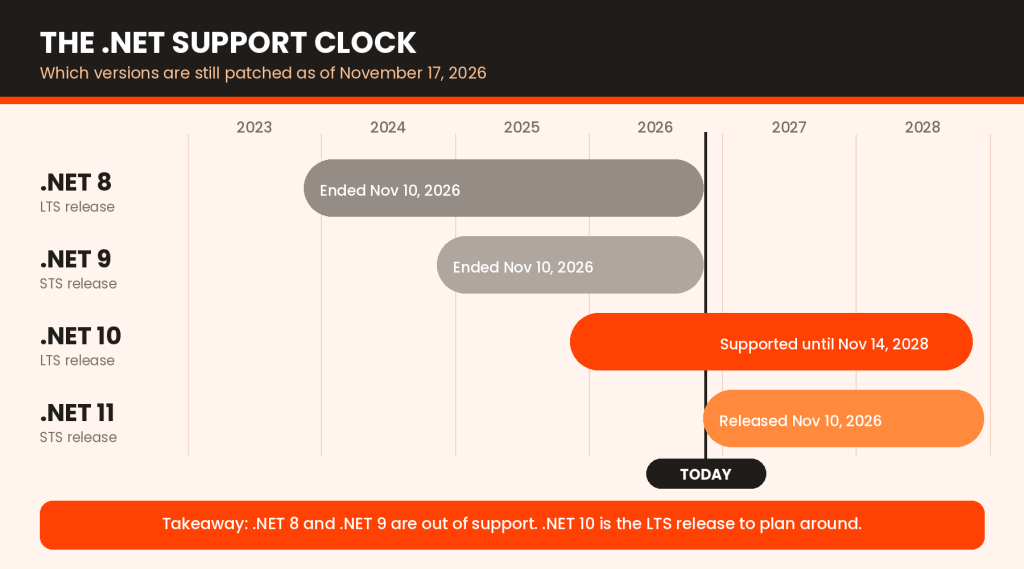
If you build software on Microsoft’s stack, November 2026 is a good moment to check where your applications sit. .NET 10 has been generally available for a year, and the past week changed the picture: .NET 11 shipped on November 10, and both .NET 8 and .NET 9 reached end of support the same day.
That makes .NET 10 the Long Term Support release most teams should plan around. It brings a faster runtime, C# 14, a more capable ASP.NET Core, EF Core 10 and tighter security defaults.
This guide covers what .NET 10 is, how it differs from .NET 9 and the old .NET Framework, which features matter, what you need to run it and how to install the .NET 10 SDK. It is written for developers, and for the CTOs and founders who sign off on upgrades. Every release-specific fact was checked against Microsoft’s own documentation in November 2026.
What Is .NET 10?
.NET 10 is Microsoft’s free, open-source, cross-platform development platform, released on November 11, 2025 as the successor to .NET 9. Officially it is version .NET 10.0, and project files refer to it as net10.0.
QUICK ANSWER
Microsoft .NET software is a platform with a runtime, class libraries, an SDK and tooling for building web, cloud, desktop, mobile and AI applications, mostly in C#. .NET 10 is an LTS release, supported until November 14, 2028.
Think of it as a stack. The runtime executes your code. The libraries handle collections, networking, JSON and cryptography. The SDK gives you the dotnet command line, compilers and templates. On top sit ASP.NET Core for web and APIs, Entity Framework Core for data access, .NET MAUI for mobile and desktop apps, and Blazor for web UI in C#.
Microsoft ships a new major version every November. Even-numbered releases get three years of support (LTS) and odd-numbered ones get two (STS). That is why .NET 10 is the safer long-term target, and why .NET 11, an STS release, is a different kind of decision.
.NET 10 vs .NET 9 vs .NET Framework: What’s the Difference?
The naming trips people up, so let’s be precise. .NET Framework is the older, Windows-only platform that ended at version 4.8.x. .NET Core was the cross-platform rewrite that began in 2016. From .NET 5 onward, Microsoft dropped the word “Core”, so every release since is simply modern .NET. There is no “.NET Framework 10”, and “.NET Core 10” is not an official name either. You will also see dotnet 10, dot net 10 and net 10 in searches and forums. They all mean this release.
| .NET 10 | .NET 9 | .NET Framework 4.8.x | |
| Generation | Modern .NET, successor to .NET Core | Modern .NET | Original Windows-only .NET |
| Platforms | Windows, Linux, macOS, plus mobile via MAUI | Same family as .NET 10 | Windows only |
| Support | LTS, until Nov 14, 2028 | STS, ended Nov 10, 2026 | Ships with Windows and follows that Windows version’s lifecycle |
| Best for | New builds, cloud, containers, APIs, AI | Nothing new; move to .NET 10 | Legacy Windows apps such as Web Forms and older desktop software |
| Migration | Usually an incremental upgrade from .NET 9 or earlier modern .NET | Retarget to net10.0 and test | Needs a planned, staged migration |
Some organizations still need .NET Framework for legacy Windows desktop apps, Web Forms sites or libraries with no modern equivalent. That is a fair reason to stay put today, but treat it as a plan to revisit, not a destination.
What’s New in .NET 10? Key Features and Improvements
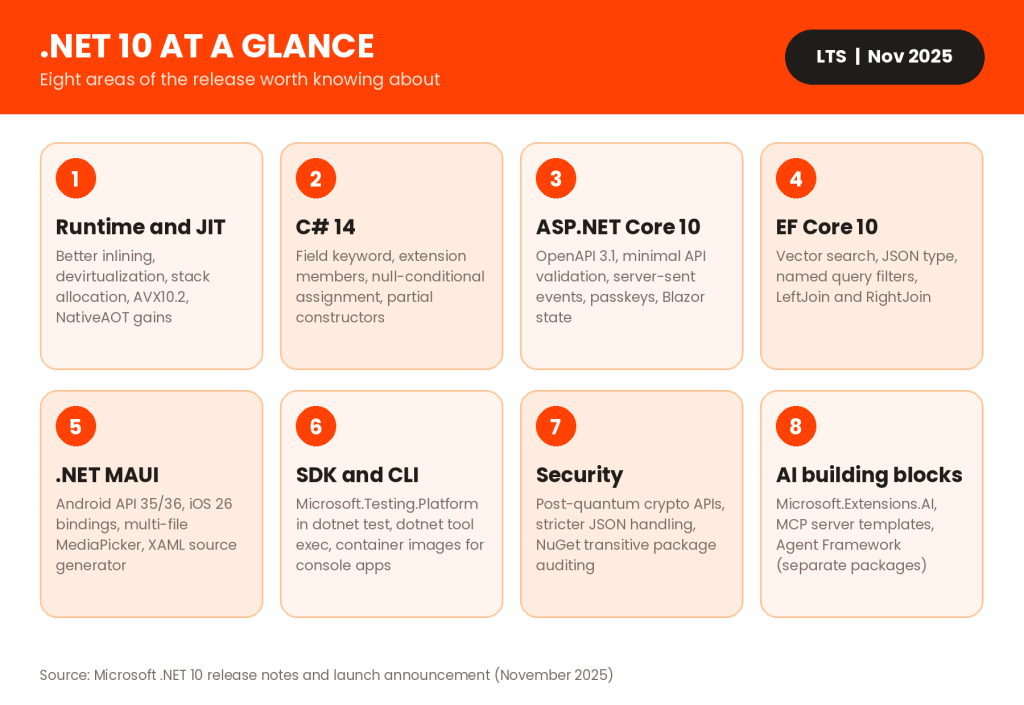
Everything below is part of the generally available release. Where something ships separately from the runtime, I say so. For the full list, see Microsoft’s .NET 10 overview.
-
Runtime and Performance Improvements
Microsoft calls .NET 10 its fastest release yet. The JIT compiler inlines more aggressively, devirtualizes more method calls and can place more objects on the stack instead of the heap, which eases garbage collection pressure. The release also adds AVX10.2 support, better code generation for struct arguments, enhanced loop inversion and NativeAOT improvements. Many of these optimizations apply automatically when you move to the new runtime, with no code changes. Microsoft’s launch post credits Arm64 write-barrier improvements with 8 to 20 percent shorter garbage collection pauses, which is useful context if you run on Arm servers. Gains vary by workload, so benchmark your own services before promising anyone a number.
-
C# 14 and Developer Experience
C# 14 ships with the SDK. The headline is the field keyword, which removes manual backing fields. Extension members let you add extension properties and static members to types you do not own. You also get null-conditional assignment (?.=), implicit Span<T> conversions, lambda parameter modifiers and partial constructors. Projects still targeting net9.0 default to an earlier language version, so retargeting is part of adopting these features. Here is the field keyword in action, with the compiler creating the backing field for you:

-
ASP.NET Core 10 Enhancements
Minimal APIs gain built-in validation through AddValidation(), returning a 400 response with details when input fails. Generated OpenAPI documents now use OpenAPI 3.1, with YAML output available. There is a first-class helper for server-sent events, ASP.NET Core Identity supports passkeys, and automatic memory pool eviction trims memory in long-running apps. Blazor adds declarative state persistence with [PersistentState], better validation for nested objects and WebAssembly asset preloading. For API teams, the practical win is fewer hand-written validation filters and cleaner documentation out of the box.
-
Entity Framework Core 10 Improvements
EF Core 10 makes the AI angle concrete. It supports the vector type and VECTOR_DISTANCE() on SQL Server 2025 and Azure SQL Database, plus the native json type. LINQ gains LeftJoin and RightJoin, and named query filters let you apply several filters per entity and disable them selectively. Cosmos DB vector search is production-ready too. Check your database version before relying on the SQL Server features.
-
.NET MAUI and Cross-Platform Development
.NET MAUI adds bindings for Android API 36 and iOS 26, multi-file selection and image compression in MediaPicker, request interception for web views and a XAML source generator aimed at faster builds. Marshal methods are on by default to improve Android startup. Windows Forms and WPF also get quality updates, including Fluent style changes in WPF.
-
Security and Reliability Improvements
Post-quantum cryptography support expands with ML-DSA and ML-KEM through Windows CNG. System.Text.Json can reject duplicate properties for safer deserialization. NuGet audits transitive dependencies by default in .NET 10 projects, and EF Core redacts inlined constants from logs. The three-year LTS window is a reliability feature too, because patches keep coming.
-
SDK, CLI and Tooling Enhancements
The .NET 10 SDK supports Microsoft.Testing.Platform in dotnet test, generates native tab-completion scripts and can build container images for console apps without a Dockerfile. dotnet tool exec runs a tool once without installing it, and file-based apps can now be published with native AOT. The new SLNX format makes solution files readable XML. None of this changes how your code runs, but together it trims friction from everyday build, test and release work.

Key Benefits of .NET 10 for Developers and Businesses
Features only matter when they change outcomes. Here is how the release translates, without the hype.
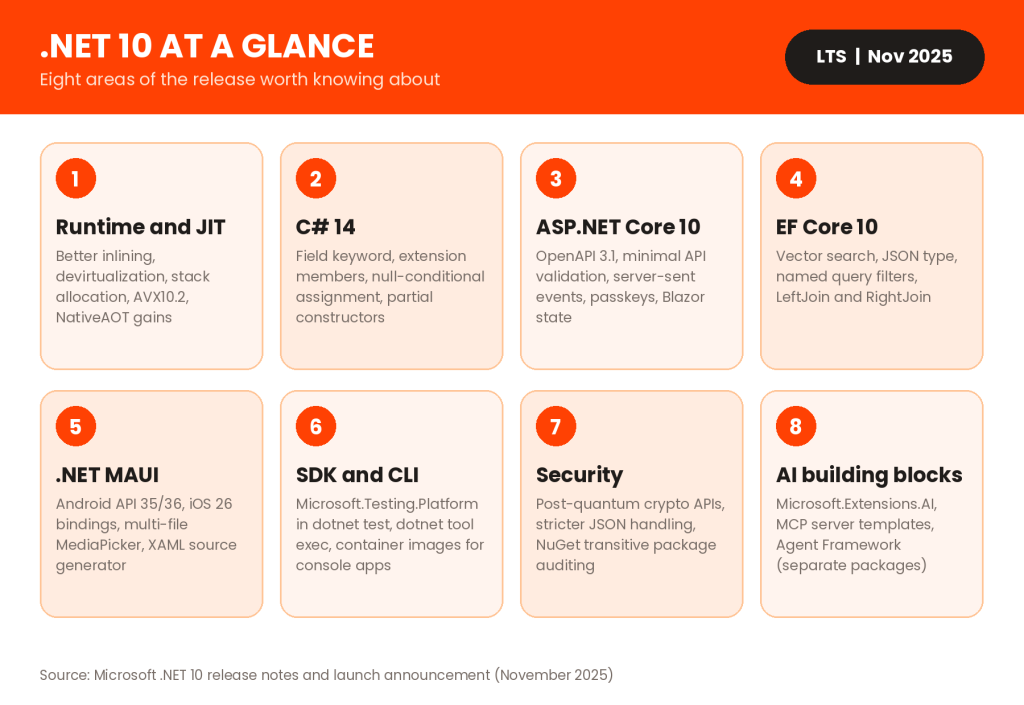
Read together, the business case is mostly about risk and cost. Staying on an unsupported version means no more security patches, which no audit will love. Moving to LTS .NET 10 buys a supported baseline, room to optimize cloud spend and a modern foundation for AI features, without betting the roadmap on a short-term release. Keep expectations honest, though: the gains are real but workload-specific.
.NET 10 System Requirements
Microsoft’s supported-OS list for .NET 10 covers operating systems, versions and CPU architectures. It does not publish a minimum RAM or disk figure, so size your machine for your IDE and workload. Apple silicon Macs, Windows 11 Arm64 devices and Arm64 Linux servers are all covered, and Microsoft supports the Rosetta 2 x64 emulator on macOS Arm64 plus the x64 and x86 emulators on Windows 11 Arm64.
| OS family | Supported versions (per Microsoft) | Architectures |
| Windows | Windows 11 24H2, 25H2 and 26H1, plus select Enterprise and IoT editions; limited Windows 10 Enterprise and IoT editions | x64, x86, Arm64 |
| Windows Server | 2025, 2022, 2019, 2016 and 23H2; 2012 and 2012 R2 only with Extended Security Updates | x64 |
| Linux | Ubuntu 22.04, 24.04, 25.10; Debian 12, 13; RHEL 8, 9, 10; Fedora 42 to 44; Alpine 3.21 to 3.23; SUSE Linux Enterprise 15.7, 16.0; Azure Linux 3.0 | x64, Arm64; Arm32 on select distros |
| macOS | 26, 15 and 14 | x64, Arm64 |
| Mobile (MAUI) | Android 14 to 16, iOS and iPadOS 18 and 26 | Arm64; Android also Arm32 and x64 |
Runtime and SDK are different needs. To run an app, install the .NET or ASP.NET Core runtime (or the Desktop Runtime for Windows desktop apps). To build apps, install the SDK, which already includes the runtime. One CI gotcha: Microsoft does not support running .NET apps under QEMU emulation, such as Arm64 containers on x64 runners.
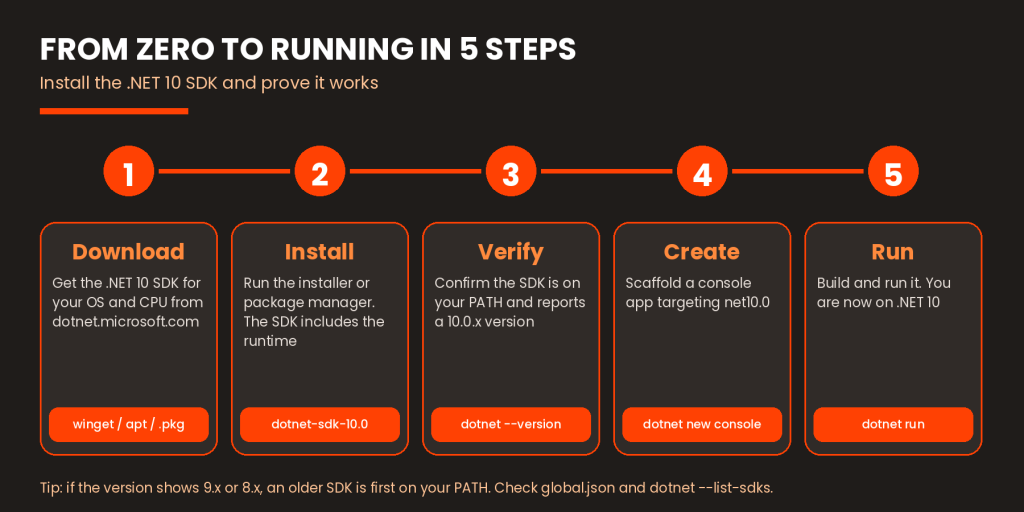
How to Install .NET 10 SDK
- Download. Open the official .NET 10 download page and pick your operating system and architecture.
- Install. Run the installer, or use a package manager. On Windows, winget install Microsoft.DotNet.SDK.10 works. On Ubuntu, run sudo apt-get install -y dotnet-sdk-10.0. On macOS, use the .pkg installer.
- Verify. Open a new terminal and check the version.
dotnet –version
- Create. Scaffold a console app.
dotnet new console -n DotNet10Demo
- Run. Build and run it.
cd DotNet10Demo
dotnet run
Pick x64 for most Windows PCs and Linux servers, and Arm64 for Apple silicon Macs and Arm devices. On a fresh machine, the console template creates a Program.cs that prints Hello, World! and a project file targeting net10.0. Open that project file and you will see the target framework line, the quickest proof that you are building for .NET 10.
If dotnet –version reports 9.x or 8.x, an older SDK is first on your path. Run dotnet –list-sdks and check for a global.json file pinning the version.
.NET 10 and Software Architecture Trends in 2026
Look at the latest features across .NET 9 and .NET 10 through the lens of software architecture trends in 2026 and a pattern appears. None of these trends are new to .NET 10, but the release supports them well.
- Cloud-native and containers: SDK container publishing now reaches console apps, and Aspire helps orchestrate services.
- Microservices and distributed systems: Aspire adds built-in telemetry and service discovery.
- API-first development: OpenAPI 3.1 and minimal API validation tighten the contract.
- Observability: ASP.NET Core 10 adds new built-in metrics and better Blazor tracing.
- AI integration: Microsoft.Extensions.AI, EF Core vector search and MCP server templates give you building blocks. Teams needing help can bring in AI application development experts.
- Modular monoliths: Not a .NET 10 feature, but a pattern the platform handles well, and often a saner start than premature microservices.
Pick the trends your product actually needs. A new feature set is not a reason to adopt a new architecture.
Should You Upgrade to .NET 10?
It depends on where you start. Here is a practical read by situation.
| Your situation | What to do |
| On .NET 9 or .NET 8 | Move first. Both are out of support. Retarget to net10.0, update packages and run your tests. |
| On .NET 7 or older | Upgrade in stages and read the breaking-change notes for each version you skip. |
| On .NET Framework | Assess before committing. Inventory dependencies, UI technology and Windows-only APIs, then migrate incrementally. |
| Complex enterprise app | Pilot a low-risk service, benchmark it, then roll out wave by wave. |
Whatever your starting point, check NuGet and third-party package compatibility, read the breaking changes list, run automated and manual tests, benchmark against your current baseline, plan the deployment and keep a rollback path, such as the previous container image. If your team lacks the capacity, HireDeveloper.dev (Talent Wing of Rightbyte Technologies Pvt Ltd) offers Microsoft development specialists who can help.
OUR RECOMMENDATION
if you run .NET 8 or .NET 9, upgrade now. If you run .NET Framework and the app works, assess first. Most production teams will prefer LTS .NET 10 over .NET 11 unless they want the newest features and can handle a faster upgrade cycle.
Conclusion
So what does .NET 10 bring? A faster runtime, C# 14, more capable ASP.NET Core and EF Core, stronger security defaults and three years of Long Term Support. With .NET 8 and .NET 9 now out of support and .NET 11 just released, evaluating the move to .NET 10 is a 2026 task, not a someday task. Check package compatibility and run your own benchmarks before you commit.
If you need experienced hands for a migration or a new build, HireDeveloper.dev (Talent Wing of Rightbyte Technologies Pvt Ltd) can help you hire experienced .NET developers or hire dedicated developers for remote engagements. Explore the options when you are ready.