






Introduction
If you have spent any time around .NET development, you have heard the term ASP.NET MVC thrown around constantly. But ask five developers what it actually means, and you will likely get five different half-answers.
That confusion is understandable. ASP.NET MVC sits at the intersection of three separate concepts: the ASP.NET platform, the broader .NET ecosystem, and the Model View Controller design pattern itself. Each piece matters, and none of them make full sense without the others.
This guide breaks all three down clearly, then shows you exactly how ASP.NET MVC works under the hood, with real code examples for the Model, the View, and the Controller. By the end, you will understand not just what ASP.NET MVC is, but why it has remained one of the most trusted architectural patterns in enterprise web development.
What Is ASP.NET?
ASP.NET is a free, open-source web framework created by Microsoft for building websites, web applications, and APIs. It is part of the larger .NET platform and primarily uses C# as its programming language.
Before MVC makes any sense, you need to understand the foundation it sits on. ASP.NET is Microsoft’s web development framework, first released in 2002. It gave developers a structured way to build dynamic websites using compiled code instead of loosely typed scripts.
ASP.NET handles everything that happens on the server: processing requests, talking to databases, managing user sessions, and sending responses back to the browser. It is the backend engine behind a huge share of enterprise web applications running today.
What Is ASP.NET Core?
ASP.NET Core is the modern, open-source, cross-platform version of ASP.NET, released by Microsoft in 2016. It runs on Windows, Linux, and macOS, and is the recommended framework for all new ASP.NET development in 2026.
ASP.NET Core is not just an update. It is a ground-up rebuild. The original ASP.NET only ran on Windows using IIS as the web server. ASP.NET Core broke that dependency entirely.
It introduced Kestrel, a lightweight, high-performance web server built into the framework itself, along with a modular middleware pipeline, native dependency injection, and full Docker and cloud support. If you are starting a new project today, you are working with ASP.NET Core, not the legacy version.
What Is MVC? Understanding Model View Controller
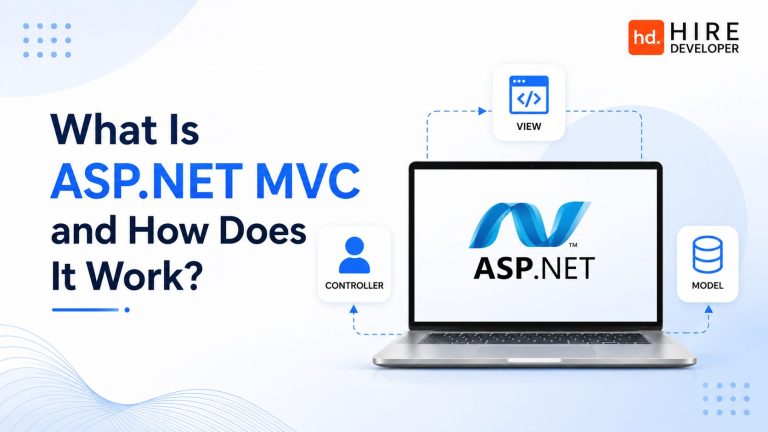
MVC stands for Model View Controller. It is a software design pattern that separates an application into three interconnected parts: the Model (data and business logic), the View (user interface), and the Controller (handles user input and coordinates between Model and View).
MVC is not specific to ASP.NET. It is a general software architecture pattern used across many languages and frameworks, including Ruby on Rails, Django, and Spring MVC in Java. The idea predates modern web development entirely, originating in the 1970s for desktop GUI applications.
The core principle behind model view architecture is separation of concerns. Instead of mixing data logic, business rules, and presentation code in one tangled file, MVC forces a clean split:
- Model: Represents the data and the business rules that govern it. It has no knowledge of how that data will be displayed.
- View: Represents what the user sees. It has no business logic of its own, it simply renders data it is given.
- Controller: Acts as the coordinator. It receives input from the user, decides what the Model should do, and chooses which View to render.
This separation is what makes the model view controller design pattern so durable. Teams can change the user interface without touching business logic, and change business logic without breaking the UI. For larger teams, this also means frontend-focused developers and backend-focused developers can work on the same application without constantly stepping on each other’s code.
What Is ASP.NET MVC?
ASP.NET MVC is Microsoft’s implementation of the Model View Controller pattern within the ASP.NET framework. It lets developers build web applications using C#, with application logic organized into Models, Views, and Controllers rather than the page-based structure of classic ASP.NET Web Forms.
Put simply, ASP.NET MVC is what happens when you apply the MVC pattern to ASP.NET. Microsoft released the first version in 2009 as an alternative to the page-centric Web Forms model that dominated ASP.NET development at the time.
Web Forms had become difficult to maintain at scale. It hid a lot of complexity behind drag-and-drop controls and view state management, which worked fine for small applications but became messy for large ones. ASP.NET MVC gave developers explicit control over HTML output, URL routing, and request handling, which mattered enormously for testability and long-term maintainability.
Today, when people say ASP.NET MVC, they are almost always referring to ASP.NET Core MVC, the modern implementation that runs inside the ASP.NET Core framework. It is fully open-source, cross-platform, and actively maintained by Microsoft.
Teams adopting ASP.NET MVC architecture for the first time often need experienced guidance to set up the project structure correctly. HireDeveloper.dev connects you with pre-vetted ASP.NET MVC developers who can architect this from day one.
Find pre-vetted ASP.NET MVC developers at HireDeveloper.dev.
How Does ASP.NET MVC Work? Request Lifecycle Explained
Understanding how does ASP.NET MVC work means following a single request from the moment it leaves the browser to the moment HTML comes back. Here is the exact sequence:
- The user sends a request. This could be typing a URL, clicking a link, or submitting a form.
- The routing engine intercepts the request. ASP.NET Core MVC inspects the URL pattern and decides which Controller and which Action method inside that Controller should handle it.
- The Controller’s Action method runs. This method contains the logic for handling this specific request. It might fetch data, validate input, or process a form submission.
- The Controller talks to the Model. If data is needed, the Controller calls into the Model layer, which might query a database through Entity Framework Core or another data access method.
- The Controller selects a View. Once the Controller has the data it needs, it chooses which View template should render the response, and passes the Model data to it.
- The View renders HTML. Using Razor syntax, the View combines the Model data with HTML markup to generate the final page.
- The response returns to the browser. The generated HTML, along with any CSS and JavaScript, is sent back and rendered for the user.
This cycle repeats for every single request. Once you can trace this flow in your head, the rest of ASP.NET MVC architecture becomes much easier to reason about.
The Model in ASP.NET MVC (With Code Example)
The Model represents your application’s data and the rules around it. In ASP.NET MVC, a Model is typically a plain C# class. Here is a simple example of a Model for a product catalog:
| public class Product
{ public int Id { get; set; } public string Name { get; set; } public decimal Price { get; set; } public string Category { get; set; }
public bool IsOnSale() { return Price < 50.00m; } } |
This Product class has no knowledge of HTML, routing, or how it will be displayed. It only knows about product data and a small piece of business logic (the IsOnSale method). That is exactly the point. The Model stays focused purely on data and rules.
The View in ASP.NET MVC
The View is responsible for displaying data to the user. ASP.NET MVC uses Razor syntax, which lets you mix C# directly into HTML using the @ symbol. Here is a simple View that displays a list of products using the Model above:
| @model List<Product>
<h2>Our Products</h2> <ul> @foreach (var item in Model) { <li> @item.Name – $@item.Price @if (item.IsOnSale()) { <span>ON SALE</span> } </li> } </ul> |
Notice that this View only displays data. It calls IsOnSale() to decide whether to show a sale badge, but it does not contain any logic for fetching products or calculating prices. All of that lives in the Model and the Controller.
The Controller in ASP.NET MVC
The Controller ties everything together. It receives the incoming request, retrieves or updates Model data, and chooses which View to return. Here is a basic Controller that serves the product list:
| public class ProductController : Controller
{ private readonly IProductService _productService;
public ProductController(IProductService productService) { _productService = productService; }
public IActionResult Index() { List<Product> products = _productService.GetAllProducts(); return View(products); } } |
When a user visits the URL for the product page, ASP.NET Core MVC routes the request to the Index action method inside ProductController. That method fetches the product list through a service (using dependency injection, a built-in feature of ASP.NET Core) and passes it to the View.
This is the full Model View Controller design pattern in action: the Controller coordinates, the Model holds data and logic, and the View renders the result. Each piece can be tested, modified, or replaced independently.
Implementing clean Controller, Model, and View separation at scale takes real architectural experience. HireDeveloper.dev helps companies hire ASP.NET developers and hire ASP.NET MVC developers who already know these patterns cold.
Find pre-vetted ASP.NET MVC developers at HireDeveloper.dev.
ASP.NET MVC vs ASP.NET Core MVC: What Changed?
| Feature | ASP.NET MVC (Legacy) | ASP.NET Core MVC |
| Platform | Windows only | Windows, Linux, macOS |
| Released | 2009 | 2016 |
| Web Server | IIS required | Kestrel (built-in) or IIS |
| Dependency Injection | Third-party libraries needed | Built-in, first-class support |
| Performance | Moderate | High (async-first design) |
| Open Source | Partially | Fully open-source on GitHub |
| Unified with Web API | Separate framework | Unified MVC and Web API |
| Recommended for new projects | No | Yes |
The biggest practical shift is that ASP.NET Core MVC unified what used to be two separate frameworks, MVC and Web API, into a single consistent programming model. This means a Controller can return HTML Views or JSON API responses using the same underlying architecture.
Key Features of ASP.NET MVC
Routing
ASP.NET MVC uses a routing engine that maps incoming URLs to specific Controllers and Action methods. Routes can be defined using attributes directly above action methods or through centralized route configuration.
Model Binding
When a form is submitted, ASP.NET MVC automatically maps form fields to Model properties. This eliminates a huge amount of manual parsing code that older frameworks required.
Razor View Engine
Razor is the templating syntax used in Views. It allows clean mixing of C# and HTML with minimal syntax overhead, which keeps Views readable even as they grow more complex.
Built-In Dependency Injection
ASP.NET Core MVC ships with a dependency injection container out of the box. Controllers can request services through their constructor, as shown in the ProductController example earlier, without needing a third-party DI framework.
Action Filters
Filters let you run code before or after an action method executes. Common use cases include authentication checks, logging, and exception handling, all without cluttering the action method itself.
Testability
Because Controllers, Models, and Views are separated, each can be unit tested independently. A Controller’s logic can be tested without spinning up a web server or rendering any HTML at all.
Advantages and Disadvantages of ASP.NET MVC
Advantages
- Clean separation of concerns makes large applications easier to maintain over time
- Full control over generated HTML, which matters for SEO and front-end performance tuning
- Strong testability since business logic in Controllers can be unit tested in isolation
- Mature ecosystem with extensive documentation, libraries, and community support
- ASP.NET Core MVC delivers high performance, consistently ranking well in independent web framework benchmarks
- Seamless integration with Entity Framework Core, ASP.NET Identity, and Azure cloud services
Considerations
- Steeper learning curve than simpler page-based frameworks for developers new to the pattern
- Requires more upfront architectural planning compared to quick-and-dirty scripting approaches
- Razor syntax, while clean, still requires learning a templating convention distinct from plain HTML
ASP.NET MVC vs Web Forms vs Razor Pages
| Model | Structure | Best For |
| Web Forms (Legacy) | Page-based, event-driven, view state heavy | Maintaining old enterprise systems |
| ASP.NET MVC | Model View Controller separation | Complex apps needing testability and structure |
| Razor Pages | Page-centric, simplified MVC variant | Simpler CRUD-style pages and forms |
| Minimal APIs | Lightweight endpoint definitions, no MVC overhead | Pure JSON APIs with minimal ceremony |
ASP.NET MVC remains the strongest choice when an application has complex page interactions, needs strict separation between logic and presentation, or is built by a larger team where multiple developers work across Models, Views, and Controllers simultaneously.
When to Use ASP.NET MVC in 2026
ASP.NET MVC is still a strong, production-proven choice in 2026. Here is when it makes the most sense:
- You are building a web application with complex page interactions, not just a thin JSON API
- Your team is larger than one or two developers and benefits from clear separation between data, logic, and presentation
- You need full control over the rendered HTML, which matters for SEO-sensitive public-facing websites
- Your application will grow significantly over time and needs an architecture that scales with team size
- You are working within the Microsoft ecosystem and want native integration with Entity Framework Core, ASP.NET Identity, and Azure
If you are building a pure API with no server-rendered pages, ASP.NET Core Minimal APIs or plain Web API controllers may be a lighter-weight choice. If your pages are simple CRUD forms with minimal complexity, Razor Pages can reduce ceremony. But for genuinely complex web applications, ASP.NET MVC remains a dependable, well-understood architecture.
Choosing the right ASP.NET architecture for your project is easier with experienced guidance. HireDeveloper.dev provides access to dedicated ASP.NET developers who can help you decide between MVC, Razor Pages, and Web API based on your actual requirements.
Find pre-vetted ASP.NET MVC developers at HireDeveloper.dev.
How to Hire ASP.NET MVC Developers
Whether you plan to hire ASP.NET developer talent for a new MVC project or hire ASP.NET MVC developers specifically for an existing codebase, here is what to evaluate:
- Solid understanding of the Model View Controller design pattern and why each layer stays separated
- Hands-on experience with Razor syntax, including layout pages, partial views, and view components
- Comfort with model binding, data annotations for validation, and form handling patterns
- Practical knowledge of dependency injection as used in ASP.NET Core MVC Controllers
- Experience with Entity Framework Core for data access within the Model layer
- Understanding of action filters, middleware, and how requests flow through the ASP.NET Core pipeline
- Unit testing experience, since testability is one of the core advantages of the MVC pattern
Many companies looking to hire ASP.NET developers from outside their home market choose to hire dedicated ASP.NET developers through specialized platforms rather than going through general job boards. This is particularly common for companies in the US, UK, Canada, and Australia sourcing ASP.NET core development company partners or individual ASP.NET MVC developers from India, where the .NET talent pool is large and well-established.
Conclusion: Understanding ASP.NET MVC for Modern Development
ASP.NET MVC brings together three ideas that, once understood individually, make the whole framework click into place. ASP.NET gives you the platform. The Model View Controller pattern gives you the structure. And ASP.NET Core MVC gives you the modern, cross-platform implementation that powers real production applications today.
The Model holds your data and business rules. The View renders what users see. The Controller sits in the middle, coordinating requests and responses. Once you can trace a request through that cycle, as shown step by step in this guide, the rest of ASP.NET MVC architecture becomes far less intimidating.
Whether you are evaluating ASP.NET MVC for a new project or trying to understand an existing codebase, this separation of concerns is what has kept the pattern relevant for well over a decade, and what will likely keep it relevant for years to come.
If your team needs hands-on ASP.NET MVC expertise, whether to build something new or extend an existing system, HireDeveloper.dev connects you with pre-vetted ASP.NET developers and ASP.NET MVC specialists ready to contribute immediately.
Find pre-vetted ASP.NET MVC developers at HireDeveloper.dev.